Menu Bar Description

This is the menu bar for the Core &Cavity Design workbench.

Start

ENOVIA V5 File Edit View Insert Tools

Tasks corresponding to general menu commands are described in the CATIA Version 5 Infrastructure User's Guide.


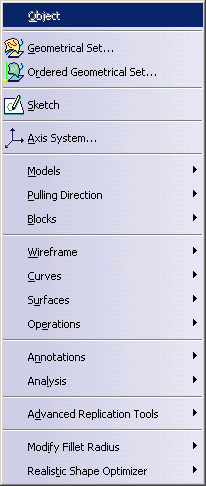
Insert

       
    Models   See Models
  Pulling Direction   See Pulling Direction
  Blocks   See Blocks
  Wireframe   See Wireframe
  Curves   See Curves
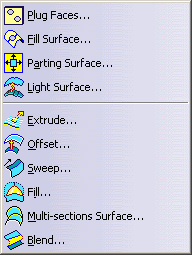
  Surfaces   See Surfaces
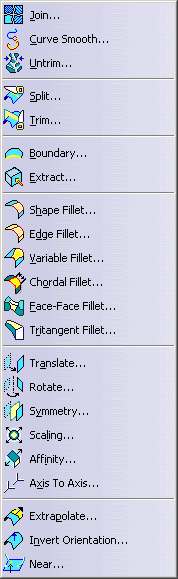
  Operations   See Operations
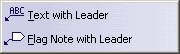
  Annotations   See Annotations
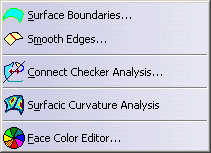
  Analysis   See Analysis
  Advanced Replication Tools   See Advanced Replication Tools
  Modify Fillet Radius   See Modify Fillet Radius

  Realistic Shape Optimizer   See Realistic Shape Optimizer


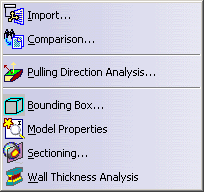
Models

For See
  Import... Importing a Model
Comparison... Comparing Two Molded Parts
  Pulling Direction Analysis...   Analyzing the Pulling Direction
Bounding Box... Creating a Bounding Box
  Model Properties   Retrieving the Model Properties
  Sectioning...   Sectioning
  Wall Thickness Analysis   Analyzing Wall Thicknesses


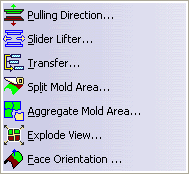
Pulling Direction

       
    Pulling Direction   Defining a Pulling Direction
Slider Lifter   Defining a Pulling Direction
Transfer   Transferring Elements
Split Mold Area   Splitting a Face
Aggregate MoldArea   Aggregating Surfaces
  Explode View   Exploding the View
  Face orientation   Orienting faces
 

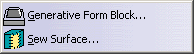
Blocks

    Generative Form Block   Creating a Generative Form Block
    Sew Surface   Creating a Sew Surface


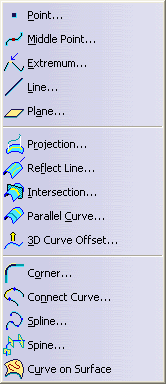
Wireframe

       
    Point ...   Creating Points
  Middle Point   Creating a Middle Point
  Extremum   Creating Extremum Elements
  Line ...   Creating Lines
  Plane ...   Creating Planes
  Projection...   Creating Projections
  ReflectLine ...   Creating Reflect Lines
  Intersection...   Creating Intersections
  Parallel Curve...   Creating Parallel Curves
  3D Curve Offset...   Creating a 3D Curve Offset
  Corner   Creating Corners
  Connect Curve...   Creating Connect Curves
  Spline Creating Splines
  Spine Creating a Spine
  Curve on Surface Creating Free Form Curves on Surfaces in the FreeStyle Shaper Optimizer & Profiler User's Guide


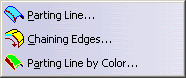
Curves

       
  Parting Line   Creating a Parting Line
  Chaining Edges   Chaining Edges
  Parting Line by Color   Creating a Parting Line by Color


Surfaces

       
    Plug Faces   Plugging Holes in Faces
Fill Surface   Filling Holes on Surfaces
Parting surface...   Creating a Parting Surface
Light Surface ...   Creating a Light Surface
Extrude ...   Creating Extruded Surfaces
Offset   Creating Offset Surfaces
Sweep ...   Creating Swept Surfaces
Fill ...   Creating Fill Surfaces
Multi-sections Surface ...   Creating Multi-sections Surfaces
Blend ...   Creating Blended Surfaces


Operations

       
    Join ...   Joining Surfaces or Curves
Curve Smooth... Smoothing curves
Untrim ...   Restoring a Surface
Split...   Splitting Geometry
Trim ...   Trimming Geometry
Boundary ...   Creating Boundary Curves
Extract ...   Extracting Geometry
Shape Fillet ...   Creating Shape Fillets
Edge Fillet   Creating Edge Fillets
Variable Fillet ...   Creating Variable Radius Fillet
Chordal Fillet   Chordal Fillet
Face-Face Fillet ...   Creating Face-Face Fillet.
Tritangent Fillet...   Creating Tritangent Fillets
Translate...   Translating Geometry
Rotate...   Rotating Geometry
Symmetry...   Performing a Symmetry on Geometry
Scaling...   Transforming Geometry by Scaling
Affinity...   Transforming Geometry by Affinity
Axis to Axis   Transforming Elements From an Axis to Another
Extrapolate ...   Extrapolating Surfaces or Extrapolating curves
Invert Orientation ...   Inverting the Orientation of Geometry
Near...   Creating the Nearest Entity of a Multiple Element


Annotations

       
    Text with Leader   Creating Texts
Flag Note with Leader   Creating Flag Notes


Analysis


  Surface Boundaries...   Surface Boundaries
  Smooth Edges...   Smooth Edges
  Connect Checker Analysis...   Checking Connections Between Curves
  Surfacic Curvature Analysis

Performing a Surfacic Curvature Analysis

  Face Color Editor   Editing Face Color


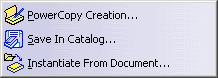
Advanced Replication Tools


  PowerCopy Creation...   Creating PowerCopy
Save in Catalog...   Saving PowerCopies into a Catalog
Instantiate From Document...   Instantiating PowerCopies


Modify Fillet Radius

       
    Search Fillets...   Searching Fillets
  Fillet Radius Reduction... Reducing the Fillet Radius


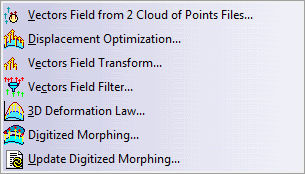
Realistic Shape Optimizer


Vectors Field from 2 Cloud of Points Files Creating a Vectors Field from 2 Clouds of Points Files
Displacement Optimization Optimizing the Displacement
Vectors Field Transform Applying a Transformation to a Vectors Field
Vectors Field Filter Filtering the Vectors Field
3D Deformation Law Creating a Deformation Law
Digitized Morphing Digitized Morphing
Update Digitized Morphing Update Digitized Morphing