
This task shows you how to create a vectors field from two cloud of points files, either in txt or STL ASCII formats.

-
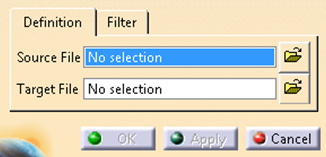
Click Vectors Field from 2 Cloud of Points Files
 in the Realistic Shape Optimizer toolbar.
-
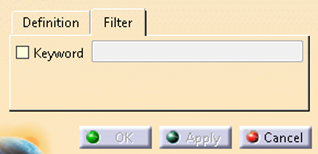
Go to the Filter tab.
-
Select the Keyword check box and enter a value.
The files with the Keyword are imported.
ASCI STL files having the standard keyword vertex are read by default, even if the check box is cleared.
-
Click Apply to preview the result could of vectors...
Both files must contain the
same number of points.
The points are specified by three coordinates,
either in .txt files. 442.440393 -50.000000 166.908245
442.439642 -45.000000 166.909224
438.476622 -50.000000 163.866269
...
or STL ASCII files
	solid unnamed
facet normal 0.0184052 0.283787
	0.958711
outer loop
point -83.3301 417.081 -6.39214
point
	-83.5946 425.385 -8.84517
point -89.3994 419.999 -7.13954
endloop

	endfacet

facet normal 0.018855 0.283798 0.958699
outer loop

	point -76.543 419.873 -7.35226
point -83.5946 425.385 -8.84517
point
	-83.3301 417.081 -6.39214
endloop
endfacet

facet normal
	0.0197302 0.28483 0.958375
outer loop
point -83.5946 425.385 -8.84517

point -76.543 419.873 -7.35226
point -76.4836 425.223 -8.94331

	endloop
endfacet
...
endsolid unnamed
A Vectors Field from 2 cloud of point files feature
is created.
It is not
editabe as a feature but can be modified as a cloud of points in Digitized
Shape Editor.
It can be used as input in other Realistic Shape Optimizer
commands such as Vectors Field Transform, Vectors Field
Filter, 3D Deformation Law or Digitized Morphing.
