Mechanical Surface Refinement Menu Bar

The various menus and menu commands that are specific to Mechanical Surface Refinement are described below.


Start

File

Edit View Insert Tools Windows Help

Tasks corresponding to general menu commands are described in the Infrastructure User's Guide.

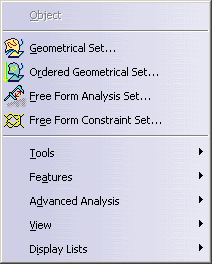
Insert

For... See...
Geometrical Set... Managing Geometrical Sets
Ordered Geometrical Set... Managing Ordered Geometrical Sets
Tools Insert -> Tools
Features Insert -> Features
Advanced Analysis Insert -> Advanced Analysis
View Insert -> View
Display Lists Insert  >  Display Lists

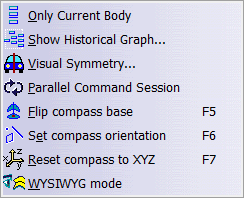
Tools

  For... See...
Only Current Body Selecting Bodies
Show Historical Graph Using the Historical Graph
Visual Symmetry Displaying a Part Symmetrically
Parallel Command Session Parallel Command Session
Flip Compass Base Flip Compass Base
Set compass orientation Set Compass Orientation
Reset compass to XYZ Reset Compass to XYZ
WYSIWYG mode Working With the WYSIWYG Mode

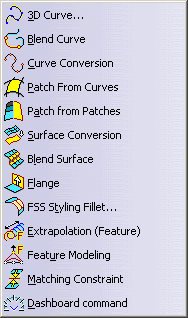
Features

  For... See...
3D Curve Creating Associative 3D Curves
Creating Associative 3D Curves on a Scan
Creating Associative 3D Curves on a Cloud of Points
Blend Curve Creating Blend Curves
Curve Conversion
Converting Curves
Patch From Curves Creating a Patch from Curves
Patch From Patches Creating a Patch from Patches
Surface Conversion
Converting Surfaces
Blend Surface Creating Blend Surfaces
Flange Creating a Flange
Styling Fillet Creating a Styling Fillet
Extrapolation (Feature) Extrapolating Curves and Surfaces
Feature Modeling Feature Modeling
Matching Constraint Creating a Matching Constraint
Dashboard Tools Dashboard

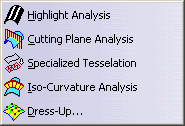
Advanced Analysis

  For... See...
Highlight Analysis Analyzing Using Highlights
Cutting Planes Using Dynamic Cutting Planes
Specialized Tesselation Specialized Tesselation
Iso Curvature Analysis Performing an Iso-Curvature Analysis
New Dress-Up Displaying and Modifying Dress-Up Features

View

  For... See...
View Selector The standard views may be selected graphically.

Display Lists

  For... See...
Display Lists Display Lists