This section presents the tools and commands which are
available in the Imagine and Shape workbench.
Many other operations are documented in the Infrastructure User's
Guide.
| Start | File | Edit | View | Insert | Tools | Window | Help |
The File menu lets you perform file creation, opening saving, printing operations
The Edit menu lets you manipulate selected objects. Refer to the Infrastructure User's Guide and Part Design User's Guide.
The View menu lets you view document contents. Refer to the Infrastructure User's Guide.
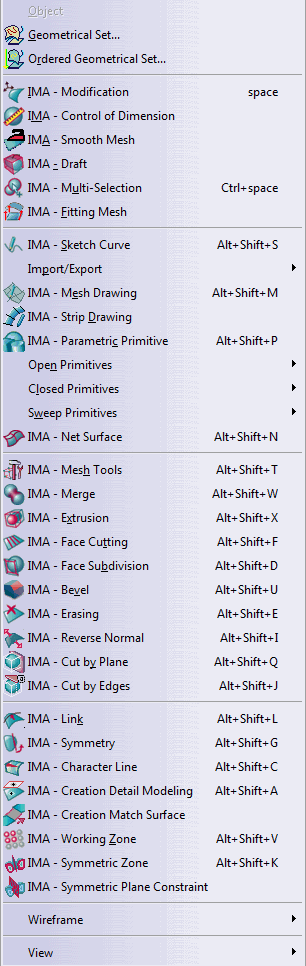
The Insert menu lets you insert Image and Shape's elements.
| For... | See... | |
|
|
||
| Geometrical Set... | Managing Geometrical Sets | |
| Ordered Geometrical Set... | Managing Ordered Geometrical Sets | |
| Help Text | Displaying Textual Help | |
| Show Coord | Displaying Compass Coordinate | |
| IMA - Modification | Manipulating and Deforming Surfaces | |
| IMA - Control of Dimension | Dimensioning Subdivisions | |
| IMA - Multi Selection | Selecting Multiple Surfaces | |
| IMA - Sketch Curve | Creating a Curve | |
| Open Primitives | Insert > Open Primitives | |
| Closed Primitives | Insert > Closed Primitives | |
| IMA - Number of Sections | Adding Sections to A Closed Primitive or Adding Sections to An Open Primitive | |
| Sweep Primitives | Insert > Sweep Primitives | |
| IMA - Merge | Merging Subdivision Surfaces | |
| IMA - Extrusion | Extruding Faces and Edges | |
| IMA - Face Cutting | Cutting Faces | |
| IMA - Face Subdivision | Subdividing Faces | |
| IMA - Face Erasing | Erasing Faces | |
| IMA - Link | Associating a Curve to a Surface | |
| IMA - Symmetry | Performing A Symmetry | |
| IMA - Working Zone | Defining The Working Zone | |
| IMA - View and Selection mode | Selecting Visible Elements | |
| For... | See... | |
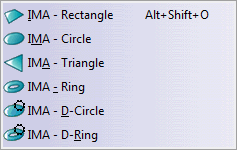 |
IMA - Rectangle | Creating a Rectangular Surface |
| IMA - Circle | Creating a Circle | |
| IMA - Triangle | Creating a Triangle | |
| IMA - Ring | Creating a Ring | |
| IMA - D-Circle | Creating a D-Circle | |
| IMA - D-Ring | Creating a D-Ring |
| For... | See... | |
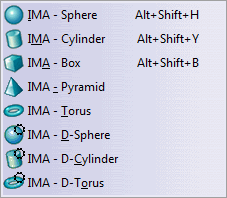 |
IMA - Sphere | Creating a Sphere |
| IMA - Cylinder | Creating a Cylinder | |
| IMA - Box | Creating a Box | |
| IMA - Pyramid | Creating a Pyramid | |
| IMA - Torus | Creating a Torus | |
| IMA - D-Sphere | Creating a D-Sphere | |
| IMA - D-Cylinder | Creating a D-Cylinder | |
| IMA - D-Torus | Creating a D-Torus |
| For... | See... | |
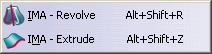 |
IMA - Revolve | Creating a Surface Using Revolve |
| IMA - Extrude | Creating a Surface Using Extrude |
The Window menu lets you arrange document windows in relation one to the other. Refer to the Infrastructure User's Guide.
The Help menu lets you get help on the currently active command, and the product in general. Refer to the Infrastructure User's Guide.