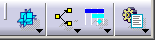
The hyperlinks below link to the procedures that describe how to use the commands in the Data Views toolbar and its associated sub-toolbars as well as the Select toolbars. The Data Views toolbar contains the following sub-toolbars:
 |
See 3D Viewer Sub-toolbar |
 |
See PERT Chart Sub-toolbar |
 |
See Gantt Chart Sub-toolbar |
 |
See List Views Sub-toolbar |

|
|
3D Standard Viewer See Showing the PPR Tree and the 3D View |
 |
3D Assigned Viewer See Showing the PPR Tree and the 3D View |

|
|
Open PERT chart See Opening the PERT Chart |
 |
Precedent Viewer See Using the Precedent Viewer |

|
|
Open Gantt chart See Opening the Gantt Chart |
 |
Open resource Gantt chart See Opening the Resource Gantt Chart |
|
|
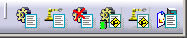
List Products See Listing Products, Resources, or Hyperlinks |
 |
List Resources See Listing Products, Resources, or Hyperlinks |
 |
List Unassigned Products See Listing Products, Resources, and Hyperlinks |
 |
List Associated Activities of a Product See Listing Products, Resources, and Hyperlinks |
 |
List Associated Activities of a Resource See Listing Products, Resources, and Hyperlinks |
 |
List Hyperlinks See Listing Products, Resources, and Hyperlinks . |


 |
Select See Using the Selection Traps in V5 Infrastructure User's Guide. |
 |
Selection Trap above Geometry See Using the Selection Traps in V5 Infrastructure User's Guide. |
 |
Selection Trap See Using the Selection Traps in V5 Infrastructure User's Guide. |
 |
Intersecting Trap See Using the Selection Traps in V5 Infrastructure User's Guide. |
 |
Polygonal Trap See Using the Selection Traps in V5 Infrastructure User's Guide. |
 |
Paint Stroke Trap See Using the Selection Traps in V5 Infrastructure User's Guide. |
 |
Outside Trap
Selection See Using the Selection Traps in V5 Infrastructure User's Guide. |
 |
Intersecting Outside Trap Selection See Using the Selection Traps in V5 Infrastructure User's Guide. |