Click Roughing
 then the geometric
components
then the geometric
components  to be machined.
A number of strategy parameters are available:
- in the Machining
tab:
- the Machining mode,
- the Tool path style,
- Distinct style in pocket,
- the Machining tolerance,
- the Cutting mode,
- the Helical movement,
- the Always stay on bottom and Part contouring options,
- the Fully engaged tool management,
- 3/5-Axis Converter.
- in the Radial tab:
- the Stepover with the Max. distance between pass and the Tool diameter ratio.
- in the Axial tab:
- the Maximum cut depth.
- in the Zone tab:
- the Small pass filter,
- the Pocket filter,
- the Bottom tab:
- the Automatic horizontal areas detection with the offset on areas and the Maximum angle.
- the Same offset on bottom as on part,
- in the HSM tab:
- the High speed milling option and its Corner radius,
- the Corner radius on part contouring option.
- in the Output tab:
Specify the
tool to be used (only end mill tools
 are available for this
operation)
are available for this
operation)
and speeds and rates
 .
.
You can also define transition paths in your machining operations by
means
of NC macros
 as needed.
These transition paths are useful to:
- optimize retract distances,
- set the Approach and Retract parameters,
- allow engagement from external zones.
Only the geometry is obligatory, all of the other requirements have a default value.
Roughing: Machining Strategy tab
The roughing strategy parameters are distributed into 6
tabs.
By default, all 6 tabs are displayed with all their parameters.
However, most operations only require a reduced list of those parameters.
Click <<Less to display only those parameters.
The Zone and the Bottom tab are hidden, as well as the
Variable cut depths button in the Axial tab.
Click More>> to re-display all parameters.
You can also use the modal option
User
Interface Simplified mode
in the Tools > Options > Machining > Operation tab.
By default, all tabs and all parameters are displayed:
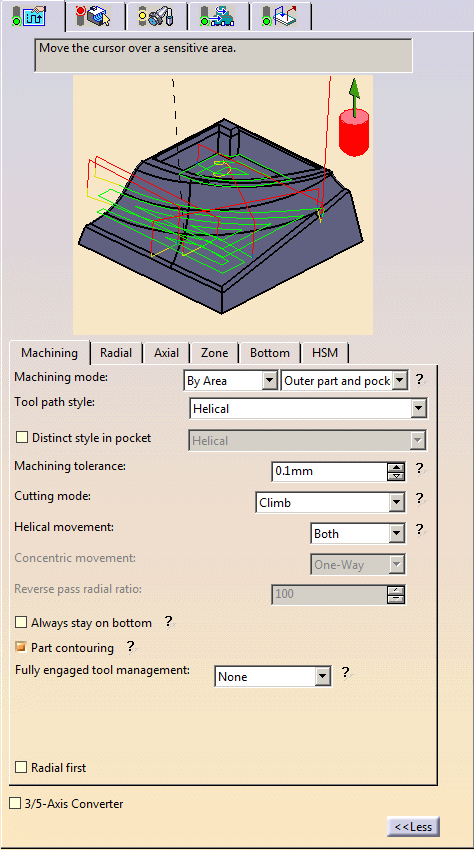
Click <<Less to display a reduced list of tabs
and parameters:
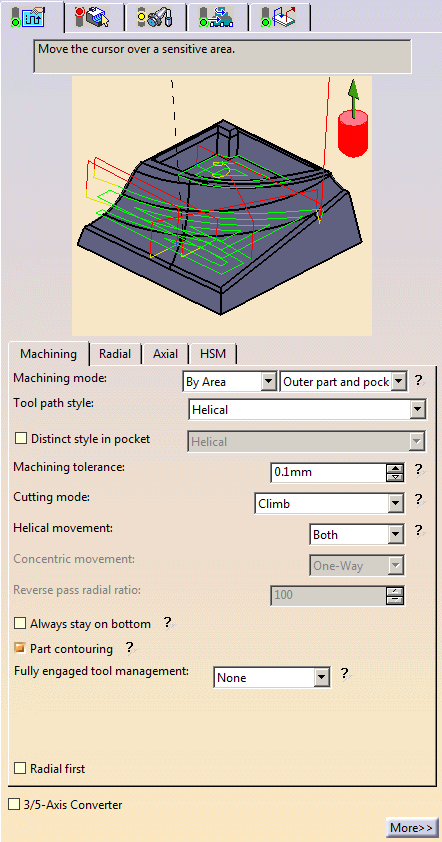
Roughing: Machining tab
All parameters remain displayed in the <<Less mode.
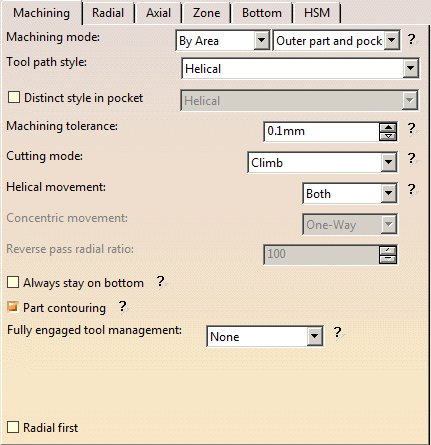
Machining mode:
Defines the type of area to be machined:
then
- Pockets only: only pockets on the part are machined,
- Outer part: only the outside of the part is machined,
- Outer part and pockets: the whole part is machined outer
area by outer area
and then pocket by pocket.
Please note that horizontal areas are always defined as pockets (no
distinction outer part/pocket).
To mill them as Pockets only or
Outer part areas, please use a limiting contour.
See also
Definition of Pockets and Outer part.
Tool path style
:
Indicates the cutting mode of the operation:
- One-way next:
the tool path always has the same direction during successive passes and
goes diagonally from the end of one tool path to the beginning of the next. - One-way same: the tool path always has the same direction
during successive passes
and returns to the first point in each pass before moving on to the first point in the next pass. - Zig-zag: the tool path alternates directions during successive passes.
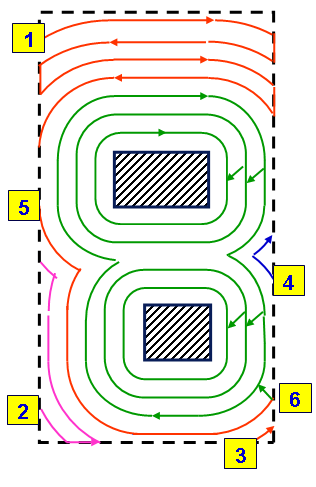
- Spiral: the tool moves in successive concentric passes from
the boundary
of the area to machine towards the interior.
The tool moves from one pass to the next by stepping over. - Contour only: only machines around the external contour of the part.

- Concentric: Builds
a safe-cutting trajectory by controlling the engagement of the tool.
The trajectory created by the Concentric strategy adapts itself dynamically to ensure a safe cutting at nominal speed.
The engagement of the tool is controlled to never exceed a maximum value, even in corner areas.
This strategy is particularly recommended for hard-material milling.
In this type of material(e.g. titanium, stainless steel, ceramic, ...) the tool needs to be protected.
This has also been enhanced to reduce the computation time to make it acceptable for these cases.
Other tool path styles -based on a constant distance between passes- are not appropriate because the tool load increases significantly when milling the inside of a radius.
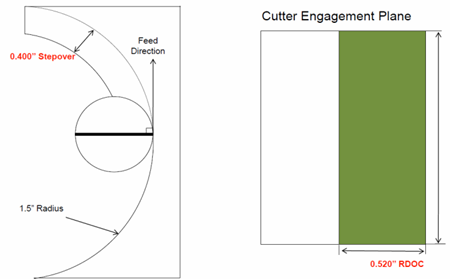
whereas the engagement is equal to the step over when milling in a straight line.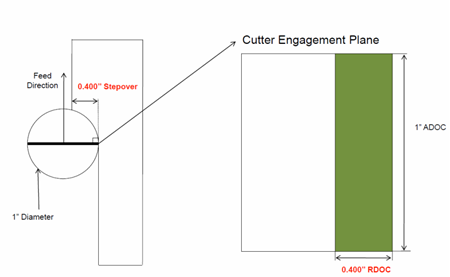
The Concentric strategy controls the tool load by modifying the distance between passes for each motion.
As a result, the tool lifetime is increased and the machining time is optimized.- Helical:
The tool moves in successive concentric passes from the boundary of the area to machine
towards the interior. The tool moves from one pass to the next by stepping over.
The difference between Spiral and Helical style is most obvious when using high speed milling options.
Helical has a rounded tool path in the corners of pockets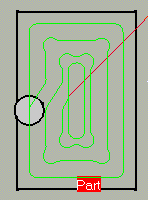
whereas a Spiral tool path will form loops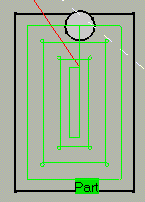
- Machining mode: Inward Helical, Cutting mode: Climb
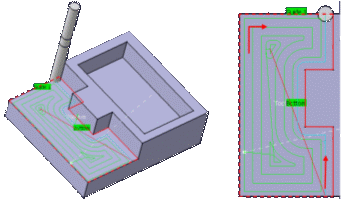
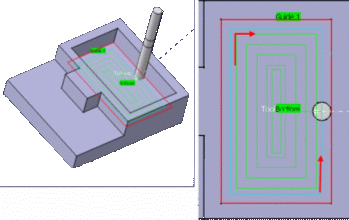
The Helical tool path style will replace the Spiral tool path style in upcoming releases. As a consequence, we recommend that you use the Helical tool path, and that you switch to Helical tool path style whenever you encounter a problem with the Spiral tool path style. - By Offset on part with One-Way
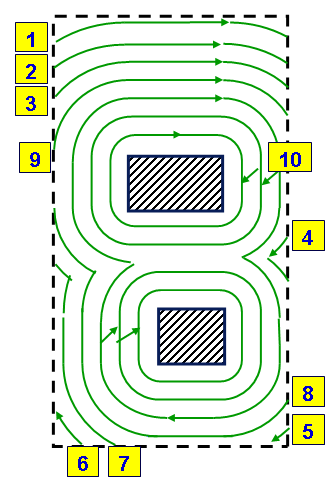
- By Offset on part with Zig-zag
- With these two tool path styles, the part is machined by
contouring passes,
offset from the part, with high speed milling capability.
This is useful for:- progressive milling from stock to part,
- island machining in high speed milling,
- optimized contouring tool path.
-
These styles are available for outer part areas only.
Therefore, when the Machining mode is set to Outer part and pockets,
the Distinct style in pocket option is automatically selected. - The user Start point is not used as an imposed start
point but is taken
into account to define the path start point. - Finish passes are done after rough passes, and finish passes on
islands are
done before those on sides. - The Cutting mode is respected for:
- each pass in By Offset on part with One-Way mode,
- the last pass (side finish pass if it exists) in By Offset on part with Zig-zag mode.
The cutting mode (Climb/Conventional) is respected on the contouring tool passes generated by
the Helical tool path style.- The option Always stay on bottom is not available for these styles.
Distinct style in pocket:
Available only for the Machining mode Outer part and pockets.
When this option is selected, you can apply a different tool path style to pockets.
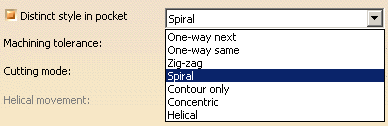
The icon is updated accordingly, for example:
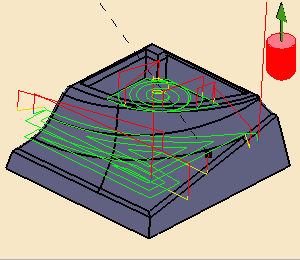
Machining tolerance:
Maximum allowed distance between the theoretical and computed tool path.
Consider the value to be the acceptable chord error.Cutting mode:
specifies the position of the tool regarding the surface to be machined. It can be:Helical movement:
specifies the way the tool moves in a pocket or an external zone. It can be:- Inward: the tool starts from a point inside the zone and
follows inward paths parallel to the boundary.
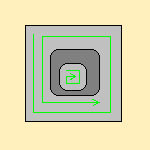
- Outward: the tool starts from a point inside the zone and
follows outward paths parallel to the boundary.
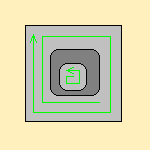
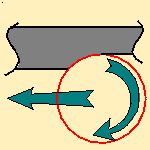
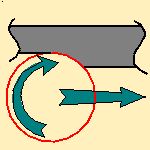
- Both:
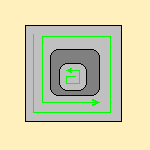
For pockets, the tool starts from a point inside the pocket and follows outward paths parallel to the boundary.
For external zones, the tool starts from a point on the rough stock boundary and follows inward
paths parallel to the boundary.In Helical mode, the control of the Non Cutting Diameter (Dnc) has been enhanced,
in particular in the computation of the ramping approaches.
This improvement may cause a computation failure, resulting in this specific message:
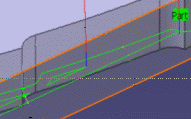
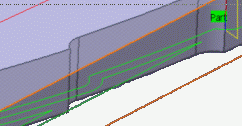
The tool core diameter is not compatible with some ramping motions.Always stay on bottom:
becomes available when at least one tool path style is set to Helical.
When machining a multi-domain pocket using a helical tool path style,
this parameter forces the tool to remain in contact with the pocket bottom when moving from one
domain to another.
This avoids unnecessary linking transitions.- Always stay on bottom is not selected:
- Always stay on bottom is selected:
- Most Return on Same Level macros are replaced by
optimized linking motions.
These motions should automatically avoid any collision with the part and the remaining stock. - Use the Clearance parameter if you do not want these motions to remain in contact with the bottom.
- Use the Feedrate parameter to define a feedrate on
the linking part of these motions.
Note that the approach and retract parts use the global approach and retract feedrates.
Part contouring:
Only used with the zig-zag and helical tool path styles.
With Part contouring selected, the tool goes round the outside contour of the part before continuing
to zig-zag.
Clearing this check box allows you to gain machining time.
The tool that you are using and the part you are working on must be such that contouring the
rough stock is superfluous.- With Part contouring selected.
Note how the tool went round the area to machine first:
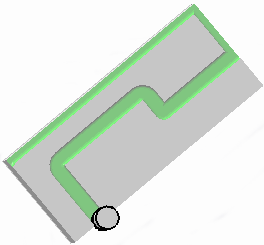
- With Part contouring cleared and exactly the same
parameters.
Note that the tool goes straight into zig-zag mode: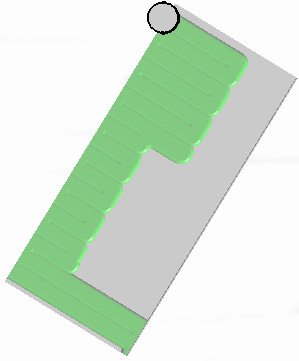
- each area is machined,
- then there is a contouring pass around each areas,
- followed by a contouring pass around the whole part when the remaining material is less than the tool radius,
- approach and retract motions are computed for all those tool paths.
Starting with R17, when Part Contouring is selected, all the tool paths around the part are chained, thus reducing the number of air cuts as there are fewer approach and retract motions.Fully engaged tool management
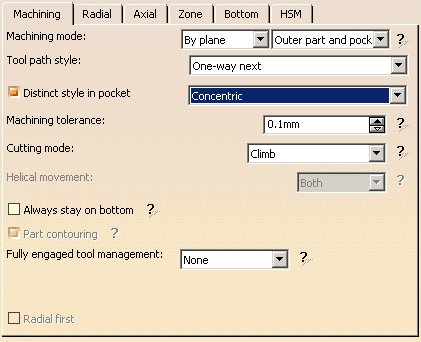
This parameter is available when:
- the
Machining mode is set to:
- Pockets only
- Outer part and pockets
- the
Tool path style is set to:
- Helical
- Concentric
- By Offset on part with Zig-Zag
- By Offset on part with One-Way
It is used to manage full material cut in hard material roughing, where the stepover is not always respected and where the tool can be damaged. This can be avoided by switching to a trochoid motion that reduces the stepover, or by adding machining planes to reduce the load on the tool.
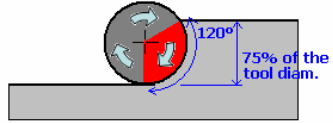
Full engagement is detected when:
- more that 75% of the tool diameter is engaged in the material,
- or more than 120 degrees of the tool is in contact with the material
- or if the actual radial stepover is more than 75% of the
theoretical volume of material.
It can be set to:
- None: no management of the tool engagement.
- Trochoid: adds a trochoid motion in areas where the
stepover is not respected. The trochoid motion is managed by:
- the Minimum trochoid radius:
- the arrows show where full material milling is detected
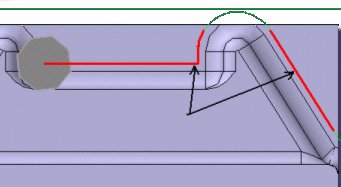
- the
arrows show where full material milling is replaced by trochoidal motions
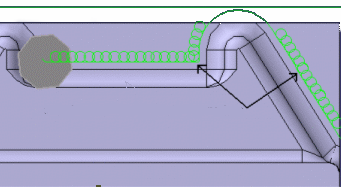
- the arrows show where full material milling is detected
- the Max engagement. By
default, its value is 0.5 mm.
The maximum diameter of the trochoid motion is equal to the radial stepover.
If the minimum diameter of the trochoid motion is higher than the nominal radial stepover, or if the actual radial stepover is smaller than the nominal radial stepover, the trochoid motion will cover the bordering passes. In this case, it is possible that the bordering passes do not remove any material.Trochoid motion is not generated when the stepover is respected.
The trochoidal movement is generated with a constant engagement. In some cases, this engagement can be smaller than parameter Max engagement, e.g. with curves, or at the end of guide.
- the Minimum trochoid radius:
-
MultiPass adds machining planes in areas where the
stepover is not respected. The distance between those additional planes is
managed by the parameter Maximum full material cut depth.
In previews and replays, a warning is displayed if Maximum full material cut depth is greater than the Maximum cut depth.
The MultiPass mode may be de-activated on a given portion of the tool path when the curvilinear length of this portion is smaller than the radial stepover value. This de-activation avoids unnecessary approaches and retracts, when the radial plunge of the tool into the full material is not significant. -
Radial first lets you reduce air cut by using a radial strategy first.
Movement
- When Movement is set to One-Way, the tool path uses the selected cutting direction.
- When Movement is set to Zig-Zag, the tool
path is optimized using both cutting directions (Climb
and Conventional).
The selected cutting mode is the main direction. Modifying it could change the trajectory.
Reverse pass (radial %)
Lets your define the reverse radial engagement when milling in the reverse direction, that is in the direction that is not selected as the Direction of cut.
The value is a percentage of the main radial engagement.
A value equal to 100% keeps the same engagement for the main and the reverse direction.Click here for information about the 3/5-Axis Converter option.
Roughing: Radial tab
All parameters remain displayed in the <<Less mode.
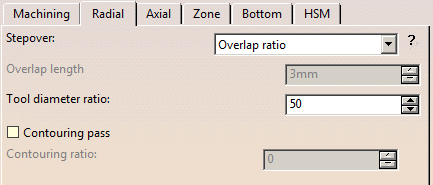
Stepover:
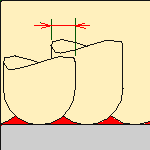
It can be defined by:- the Overlap ratio, i.e. the overlap between two passes,
given as a percentage of the tool diameter
(Tool diameter ratio),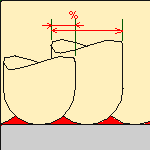
- the Overlap length
between two passes given by the Max. distance between pass,
- the Stepover ratio, i.e. the stepover between two passes,
given as a percentage of the tool diameter
(Tool diameter ratio)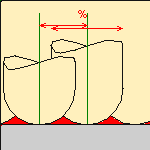 ,
, - the Stepover length between two passes given by the
Max. distance between pass,
In a rework context, if the area is small enough i.e. covered by the tool diameter,
it is deleted and replaced by an single ZLevel pass (Reduce the air cut)
and the radial stepover is not respected.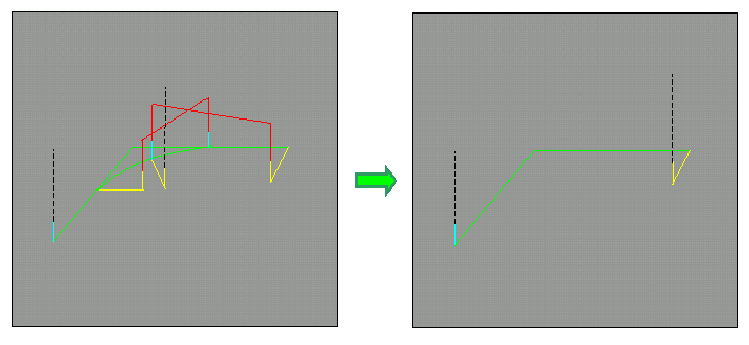
See also Minimum thickness to machineContouring pass
- Is available when Tool path style is set to Back and forth or to Concentric in Zig-Zag mode.
- When selected, Contouring pass adds
an end contouring pass to the tool path.
This ensures no material is left at the direction changes between two passes.
Contouring ratio
- Is available when Contouring pass is selected.
- Adjusts the position of the contouring pass to optimize scallop removal (given as a percentage of the tool diameter).
Overhang
Is available in all tool path styles.
As this option is activated by default in all new processes, it is not visible in the dialog box.
However, if you are editing an older process, you can see the option in the dialog box and decide to activate it or nor.
By shifting the tool position with respect to the soft boundary of the machining domain, Overhang defines the correct radial engagement of the tool. The possible options are:- None: The tool position is not shifted: The
tool is positioned on the middle of the boundary.
This is the position by default.
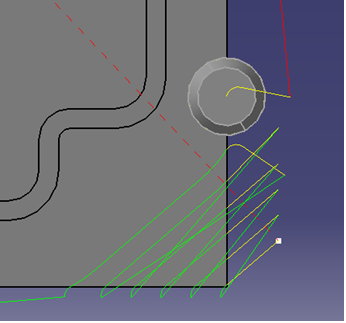
- Same as stepover: The tool position
is shifted by the stepover value, up to 50% of the tool diameter
(greater values are not supported).
Roughing: Axial tab
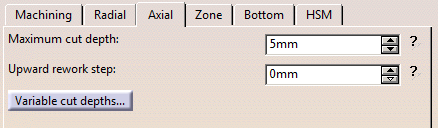
By default, or when the More>> button is pressed:
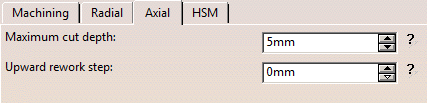
When the <<Less button is pressed:
Maximum cut depth:
Depth of the cut effected by the tool at each pass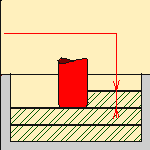
Variable cut depths:
Hidden when the <<Less button is pressed.
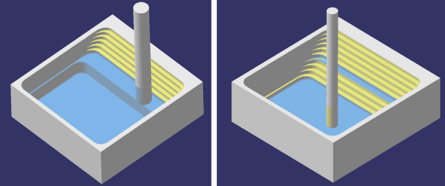
When the dialog box opens the distance between passes from the top to
the bottom of the part is constant and is the same as Maximum cut depth.
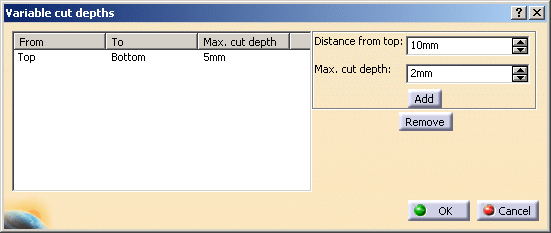
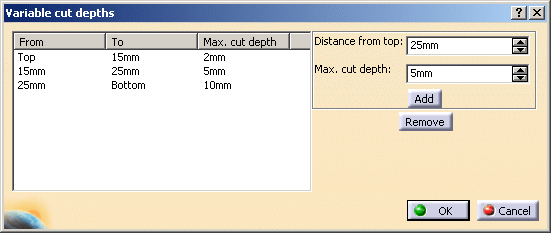
Change the Distance from top value and the Max. cut depth value and
then press Add to give a different depth value over a given distance.In the example below the cut depth:
- from the top of the part to 15mm from the top is of 2 mm,
- from 15mm from the top to 25mm from the top is 5mm,
-
and from 25 mm from the top to the bottom of the part is
10 mm.
Upward rework step
This parameter is dedicated to the concentric tool path style in hard material, but can be used for soft materials as well.
To take advantage of the whole cutting height, the downward roughing planes are computed with a large step equal to the Maximum cut depth.
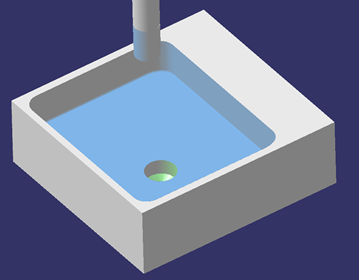
The upper levels are then reworked upward with a small step equal to the Upward rework step.
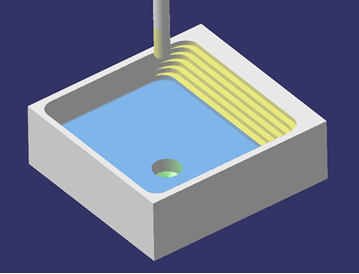
The same method is applied to the next levels.
In the current release, when Upward rework step is defined, Variable cut depth is not managed.Roughing: Zone parameters
This tab is hidden when the <<Less button is pressed.
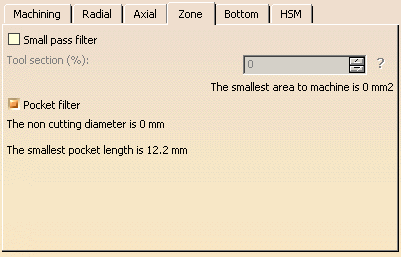
Small pass filter:
select this check box to activate the filter for small passes.
Then type the Tool section (%) value, which will be used to define the smallest area
to machine according to the tool used.
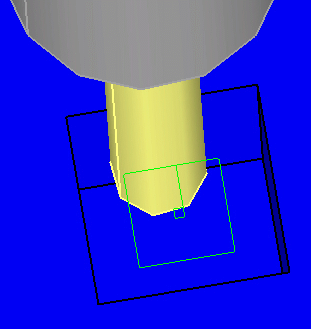
This information is given below the data field.Note that this filter applies to the sweeping surface, not that of the pocket.
In the example below, the dimension of the pocket is 9mmx9mm, and that of the sweeping is 5mmx5mm (in green).
If the filter value is less than 25mm2, the pocket will be machined.
Pocket filter:
Not all pockets will be machined if there is not enough depth for the tool to plunge.
select this check box to activate the filter for small passes.
The non-cutting diameter of the tool can be entered in the Tool tab,
(click More). It is given as an information only in the Zone tab.
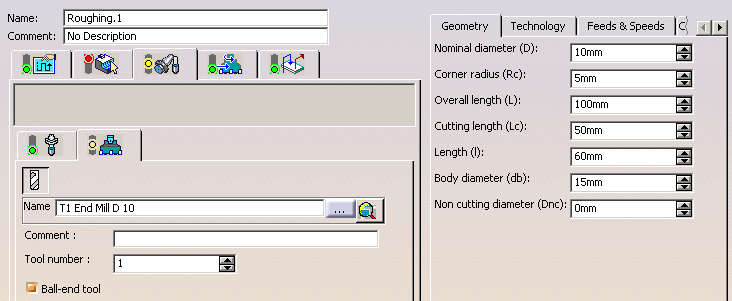
A null value means that tool is allowed to plunge in pockets.
The size of the smallest pocket is given below the data field.However, the smallest area to machine is taken into account only if the area detected
has no impact on larger areas beneath.The Tool core diameter is taken into account:
- in pockets (default operating mode),
- also for outer parts when limiting contours are used.
When areas are filtered (i.e. not machined) with the Tool core diameter,
the areas beneath those areas are not machined.Roughing: Bottom tab
This tab is hidden when the <<Less button is pressed.
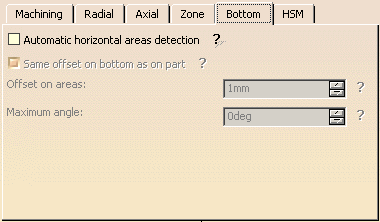
Automatic horizontal areas detection:
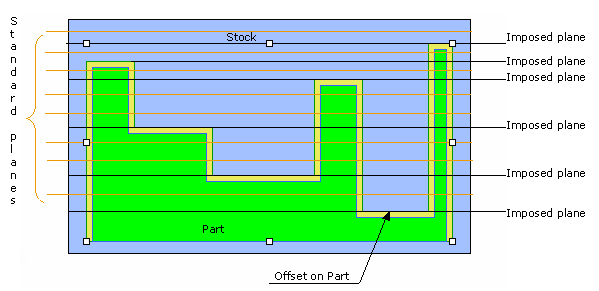
- When this check box is not selected, the only way to ensure that a
cutting plane corresponds with
an horizontal area is to define an imposed plane crossing the area.
This means that you have to consider the offset on part.
This plane applies to the whole part (which is not necessary).
If there are several horizontal areas to consider at different levels you have to define all of
the corresponding imposed planes.
-
Select this check box to:
- detect automatically horizontal areas on the part,
- limit the cutting plane effect to these areas,
-
apply a dedicated offset on the part for these areas.
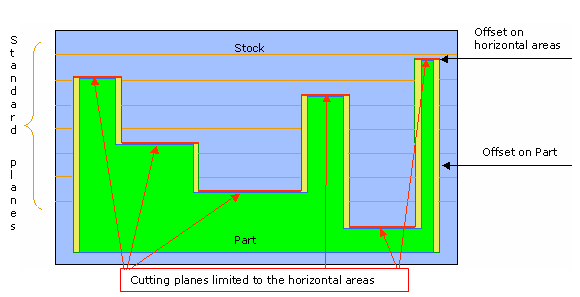
Contouring paths, hard soft attributes along pocket boundaries, tool holder collision checking, and circular interpolation are managed in horizontal areas like in standard sections.
Then type the value of the offset to apply on the areas (Offset on areas).
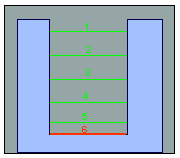
The Maximum angle that can be considered as horizontal is displayed for information only.- If the machining mode is By area, the tool path will look
like this:
- If the machining mode is By plane, the tool path will look
like this:
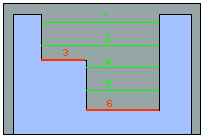
The cutting planes in green are the Standard roughing tool paths,
the red ones are those computed for the horizontal areas detected.The computation of horizontal areas is not possible if the part is made of a cloud of points (STL).
When only Outer part areas are to be machined, no specific tool path style is given for the pockets. As a consequence, if the tool path style used for the Outer part areas is not compatible with pockets (e.g. By Offset on part with One-Way), horizontal areas are machined with a default tool path style (Concentric).
Same offset on bottom as on part:
lets you specify the offset on bottom is the same that the offset on part.Roughing:High Speed Milling tab
All parameters remain displayed in the <<Less mode.
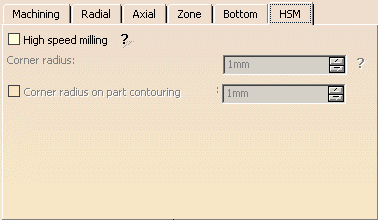
High speed milling:
select this check box to activate and define the parameters for High speed milling.Corner radius:
applies to Concentric, Helical, By Offset on part with One-Way and By Offset on part with Zig-Zag tool path styles.Defines the radius of the rounded ends of passes when cutting with a Concentric tool path style
and the radius of the rounded end of retracts with Helical and Concentric tool path styles.
The ends are rounded to give a smoother path that is machined much faster.- This is what a tool path will look like if you do not use high speed
milling parameters:
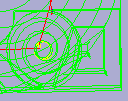
-
Here is the same tool path with the High speed milling check box selected. Note how the round tool path ends.
In both cases a Concentric tool path style is used.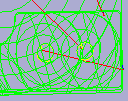
- Similarly, here is what retracts look like without the high speed
milling option:
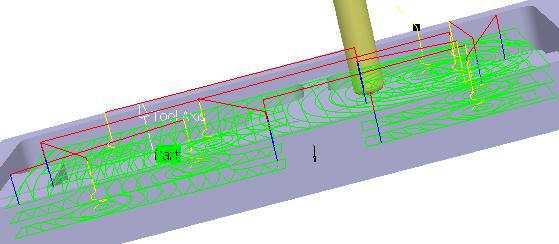
- And here is the same tool path with high speed milling switched on:
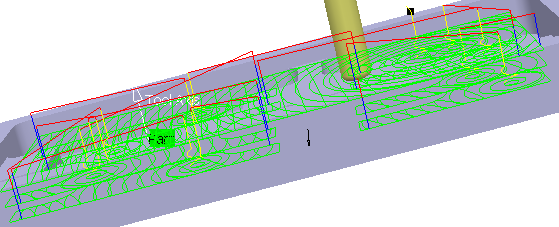

- With HSM and helical mode, the corner radius must be less than
half the stepover distance.
It will be forced to this value. - The corner radius is no longer applied to the finish path.
- With the Spiral mode, the tool path is cornered only when the
value of the parameter
Max. distance between pass is higher than the radius of the flat tool tip + 10%.
The HSM loops are generated only when the flat tool tip does not cover the previous
tool path in the corners.
- With HSM and helical mode, the corner radius must be less than
half the stepover distance.
Corner radius on part contouring:
When available and active, defines the corner radius of all the tool paths in contact with the part.Roughing: Output tab
The Output tab appears once you have selected a physical machine, and selected the 2D circular interpol. check box in the machine editor.

By default, the Circular Interpolation check box is not selected.
When selected, it lets you generate an arc in the roughing tool path when the tool is in contact with a revolution surface, with its axis parallel to the tool axis.Revolution surfaces can be found in cylinders, spheres, cones, torus, and complex surfaces such as chamfers, circular sweeps, etc. if those surfaces are revolution surfaces. However, note that revolution surfaces are not found in NURBS surfaces, even if those surfaces represent revolution surfaces.
Helical Interpolation: To set the helical syntax as the output instead of GOTO points, enable the following options:
- Helical Interpolation in the NC Control tab of the NC Machine Definition dialog box,
- Helix option from the Mode menu in the Macro Parameters tab of the Roughing dialog box.
Roughing: Geometry
You can also specify the following geometry:
- Part with possible offset.
- Rough stock. If you do not have a rough stock you can
create one
automatically.
You must define a rough stock if you have not already defined one in the Part Operation.
See the Machining Infrastructure user's guide for further information. - Check element with possible offset.
The check element is often a clamp that holds the part and therefore is not an area to be machined.
Area to avoid (small
light brown corner near the part selection area). - select the whole part as the Part,
- then define the Area to avoid by selecting the faces of the pocket.
This is in fact a list of faces removed from from the list of faces built from the Part.
Those removed faces are not taken into account to compute the tool path.
Use Area to avoid for a quick definition of a sub-element of the Part you want to machine.
For example, you want to machine the Part below, but not its pocket.
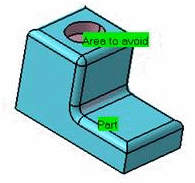
To do so:A longer alternative would be to define the Part face by face.
-
Safety plane. The safety plane is the plane that the tool will rise to at the end of the tool path in
order to avoid collisions with the part.
You can also define a new safety plane with the Offset option in the safety plane contextual menu.
The new plane will be offset from the original by the distance that you enter in the dialog box
along the normal to the safety plane.
If the safety plane normal and the tool axis have opposed directions, the direction of the safety plane normal
is inverted to ensure that the safety plane is not inside the part to machine.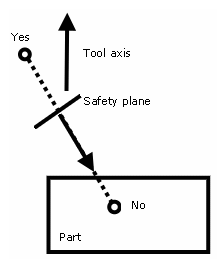
- Top plane which defines the highest plane that will be machined on the part,
- Bottom plane which defines the lowest plane that will be machined on the part,
- Imposed plane that the tool must obligatorily pass through.
Use this option if the part that you are going to machine has a particular shape
(a groove or a step) that you want to be sure will be cut.If you wish to use all of the planar surfaces in a part as imposed surfaces,
select Search/View ... in the contextual menu to select them.When searching for planar surfaces, you can choose to find either:
- all of the planar surfaces in the part,
- or only the planes that can be reached by the tool you are using.
Here is an example with the gets2.CATPart.
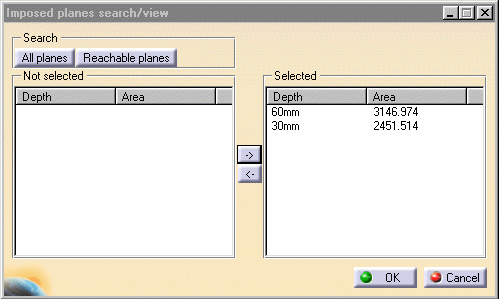
To use planar surfaces of a part as imposed planes: - Select the planar surfaces,
- Select Offset in the contextual menu and enter a
value equal to the
machining tolerance + the offset value on part (if any):- If the machining tolerance is 0.1 mm, and there is no
offset on part,
you will enter 0.1 mm as offset for the imposed plane. - If the machining tolerance is 0.1 mm, and the offset on
part is 1 mm,
you will enter 1.1 mm as offset for the imposed plane.
- If the machining tolerance is 0.1 mm, and there is no
offset on part,
This ensures that the imposed planar surface is respected to within the offset and tolerance values.
- When a face is selected as a Bottom plane or an
Imposed plane, the contextual menu item
Force to machine
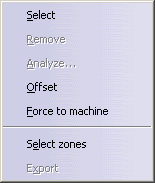
imposes the computation of the tool path on this face.
- Start point where the tool will start cutting.
Whatever the tool path style is, when drilling holes exist, define start points and set the Mode in the Definition tab of macros to Radial only to avoid any plunge or ramping macros. If a radial engagement is not possible (collision with part or with the residual material), the roughing tool path is stopped:
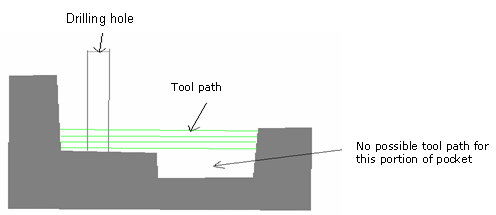
If you leave the Mode in the Definition tab of macros to Plunge, no control will be carried out when the tool will plunge at the start point.
If the start point is not correct or if no start point has been defined for a given area, no start point will be computed automatically and the tool will plunge in material.Start points behave differently according to the Tool path style: When Tool path style is set to One-way next, One-way same, Spiral, Contour only:
- They must be outside the machining limit.
Examples of machining limits are the rough stock contour;
a limit line, an offset on the rough stock, an offset on the limit line, etc.. - They must not be positioned so as to cause collisions with
either the part or the check element.
If a start point for a given zone causes a collision, the tool will automatically adopt ramping approach mode. - The distance between the start point and the machining limit
must be greater than the tool radius plus
the machining tolerance. If the distance between the start point and the machining limit is greater
than the tool radius plus the safety distance, the start point will only serve to define the engagement direction. - If there are several start points for a given area, the one that
is used is the first valid one
(in the order in which they were selected) for that area.
If there are several possible valid points, the nearest one is taken into account. - One start point may be valid for more than one area.
- If a limit line is used, the tool will approach outer areas of
the part and pockets in ramping mode,
towards the outside of the contour.
The tool moves from the outside towards the inside of this type of area.
In this case, you must define the start point.
- Spiral Tool path style:
Whenever possible, the end of the engagement associated to the start point corresponds to
the beginning of the sweeping path.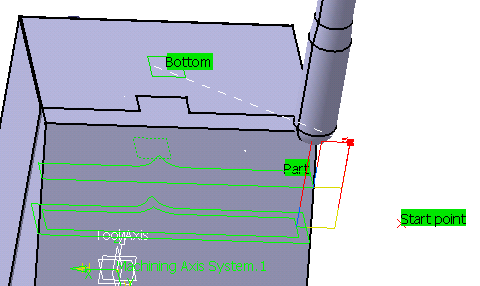
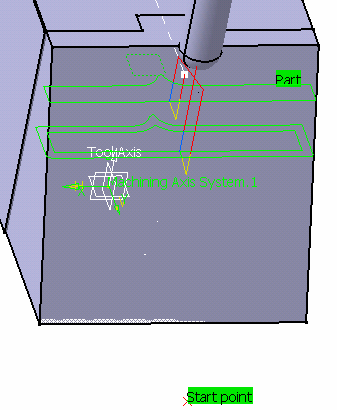
If this is no possible, the path will be cut to respect the constraint imposed by the start point. 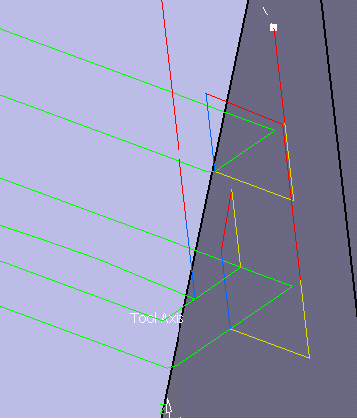
When Tool path style is set to Zig-zag, Concentric, Helical, By Offset on part with One-Way and By Offset on part with Zig-Zag. - Start points:
- manage contouring passes.
- manage outer part and pockets. Therefore, you do not need to deactivate previous drilling operations.
- taken into account if they lay inside the drilling hole even if they are not completely outside the part, check surfaces or rough stock.
- For each start point, the point to join after the start point
must lay in a circle defined by a maximum radius. This maximum
radius can be activated and edited in the contextual menu of Start point(s):
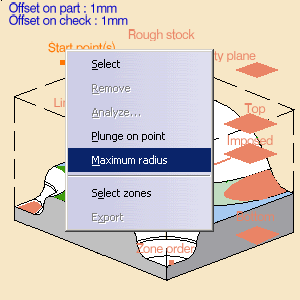
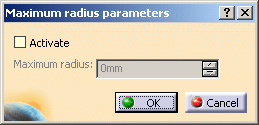
By default, the check box Activate is not selected, no maximum radius is applied to the start points, all start points are taken into account whether they lie within the circle or not. Select the check box to take the maximum radius into account. - Select the contextual menu item Plunge on point
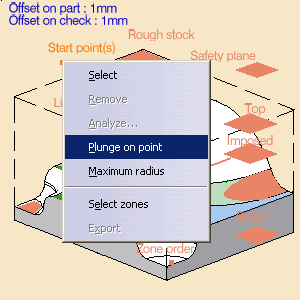
to make the plunge of the tool at the start point compulsory.
When this item is not selected, the tool will not plunge at the start point.
The start point will only impose the direction of the radial engagement.
We recommend that you use the Engage from outside option when you have selected Plunge on point.
- Concentric tool path style:
Start points are automatically defined. In this case, the start point is the center of the largest
circle that can be described in the area to machine. Lateral approach modes cannot be used. - Helical Tool path styles:
Whenever possible, the end of the engagement associated to the start point corresponds to
the beginning of the sweeping path.
- They must be outside the machining limit.
- Inner points (only active if the Drilling mode has been
selected in the Macro data tab).
There are specific conditions for inner points:- They are usable for pockets only,
- They must not be positioned so as to cause collisions with
either the part or the check element.
If an inner point for a given pocket causes a collision, the tool will adopt a new inner point generated
automatically. - The inner point must lay inside the pocket and inside the portion of the pocket that is machined.
- When you look at the part from the tool axis direction, the
inner point must lay inside each pocket
tool end contour for every cutting plane. - If there are several inner points for a given pocket, the one
that is used is the first valid one
(in the order in which they were selected) for that pocket. - A point can not be valid for several pockets.
- Limiting contour which defines the machining limit on the part, with the Side to machine parameter.
There is also the possibility of setting the order in which the zones on the part are machined. Please refer to the Selecting Geometric Components to learn how to select the geometry.

Appears when invalid faces have been detected.
This message disappears when you close the dialog box or when the next computation is successful.
Appears when invalid faces have been detected and when you have decided to ignore them.
This message remains displayed as a warning.Pick the text to switch from one status to the other.
Roughing: Tool/Rough Stock parameters
Position
Defines where the tool center stops:- Outside stops the tool outside the rough stock.
The tool path is computed as if the rough stock is increased by a value equal to 50% of the tool diameter in each cutting plane, - Inside stops the tool inside the rough stock.
The tool path is computed as if the rough stock is reduced by a value equal to 50% of the tool diameter in each cutting plane, - On stops the tool on the rough stock.
This is the default (recommended) option.
Offset
Defines the distance that the tool can overshoot the Position.
It is expressed as a percentage of the tool diameter.
This parameter is useful in cases where there is an island near the edge of the part and the tool diameter
is too wide to allow the area behind the island to be machined.
This parameter can only be used if the Position is inside or outside.Minimum thickness to machine
Specifies the minimum material thickness that will be removed when using overshoot or in a rework operation.- The red arrow points to the Minimum thickness to machine,
the green arrows point to the material that is not removed,
the black arrow points to the material removed,
the grey arrow points to the part to machine.
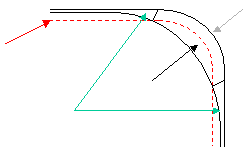
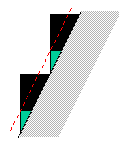
- In red, the Minimum thickness to machine,
in green, the material that is not removed,
in black, the material removed,
in grey, the part to machine.
Limit Definition- In a given level, the thickness of material left can amount up to
the value of the
Minimum thickness to machine + twice the value of the tolerance.
Therefore, on a level below you may have to mill a thickness amounting to the value of the
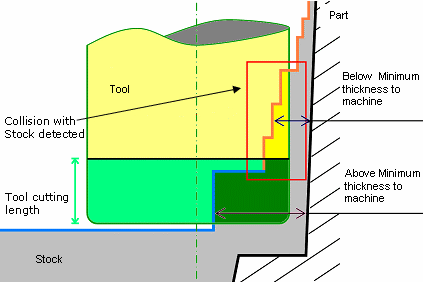
Minimum thickness to machine + twice the value of the tolerance of one or several levels above. - Minimum thickness to machine leads to select areas to
be machined depending on a specific thickness value. However, in a
roughing operation collisions with stock must be controlled and passes
are added to avoid any over height situation. Over height situations
are detected with a straight tool, as shown in the picture below:
Defines what area of the part will be machined with respect to the limiting contour(s).
It can either be inside or outside. In the pictures below, there are three limiting contours on the rough stock.
The yellow areas will be machined.Side to machine: Inside
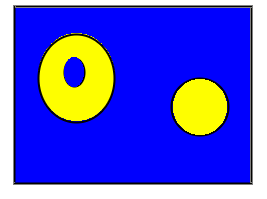
Side to machine: Outside
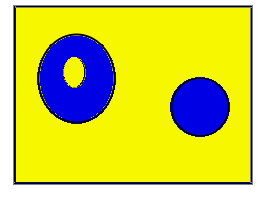

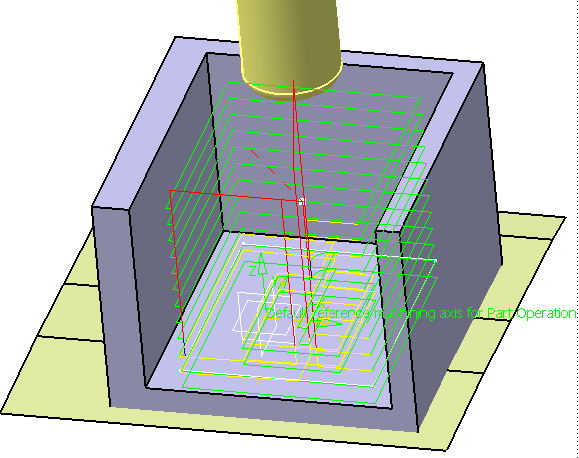
The limiting contour is used to limit the cutting motions.
It does not avoid that approach or retract motions stay outside the limiting contour.
To keep approach and retract motions inside the limiting contour, we recommend that you define a check surface with holes or a mask.Starting with R20 release, the tool motion is added along the limit line on both sides, to remove residual material around the limit line and secures the machining on lower levels. Now, there is no collision between the residual material and tool holder and height of removed material is also not greater than the distance between levels. The machining trajectory is more secure because of these paths and removes residual material on both sides before machining the bottom.
Stop position is documented here.
Offset is documented here.
Ignore holes on stock:
Select this check box to ignore holes which are on the rough stock, with Tool path style set to Helical or Zig-zag.
Once this check box is selected, define the diameter under which holes are to be ignored.Compute with tool holder:
Select this check box to compute the tool path as to avoid collisions with the tool holder.
When this check box is selected, you can define an offset on the tool holder assembly.
When this check box is cleared, the tool path is computed only with the tool.Force replay:
only used for reworking operations.
Its purpose is to compute the residual rough stock remaining from operations preceding the current one,
providing a rough stock has not been defined for this operation.
Use it before clicking Tool Path Replay .
.Roughing: Feeds and Speeds
In the Feeds and Speeds tab page, you can specify feedrates for approach,
retract, machining and finishing as well as a machining spindle speed.Feedrates and spindle speed can be defined in linear or angular units.
A Spindle output checkbox is available for managing output of the SPINDL instruction in the generated NC data file.
If the checkbox is selected, the instruction is generated. Otherwise, it is not generated.Feeds and speeds of the operation can be updated automatically according to tooling data and the Rough or
Finish quality of the operation. This is described in Update of Feeds and Speeds on Machining Operation.Feedrate reduction is not available for all tool path styles. Feedrate management is possible for Helical, By Offset on part with One-Way and By Offset on part with Zig-Zag
tool path styles only.Feedrate Reduction in Corners You can reduce feedrates in corners encountered along the tool path depending on values given in
the Feeds and Speeds tab page: reduction rate, maximum radius, minimum angle,
and distances before and after the corner.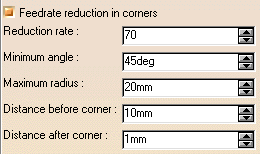
Feed reduction is applied to corners along the tool path whose radius is less than the
Maximum radius value and whose arc angle is greater than the Minimum angle value.When machining pockets, feedrate reduction applies to inside and outside corners for
machining or finishing passes. It does not apply for macros or default linking and return motions.Corners can be angled or rounded, and may include extra segments for HSM operations.
1=Machining feedrate or Finishing feedrate
2=Reduced feedrate
A=Distance after corner
B=Distance before corner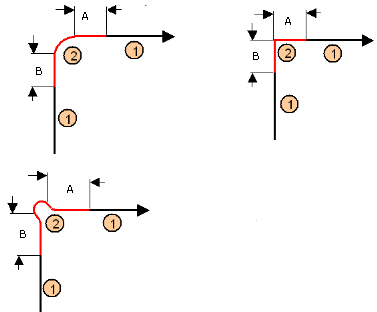
Slowdown Rate:
use Slowdown rate in the Feeds and Speeds tab page to reduce the current feedrate
by a given percentage.
In Helical tool paths, the reduction is applied to the first channel cut.Combining Slowdown Rate and Feedrate Reduction in Corners
If a corner is included in a Slowdown path, the general rule is that the lowest percentage value
is taken into account.For example, if the Slowdown rate is set to 70 % and Feedrate reduction rate in corners is set to 50%,
the feedrate sequence is:
100%,
70% (entry in slowdown),
50% (entry in corner),
70% (end of corner, still in slowdown),
100% (end of slowdown).If Feedrate reduction rate in corners is then set to 75%, the feedrate sequence is:
100%,
70% (entry in slowdown),
70% (entry in corner: 75% ignored),
70% (end of corner, still in slowdown),
100% (end of slowdown).Roughing: Macros
General information about macros can be found in NC Macros.
In addition to the automatic macros listed below,
Information about the operating mode can be found in Defining Macros.
Information about Surface Machining macro parameters can be found in Macro Parameters.
you can insert pre-and post-macros using the Build by user graphic mode.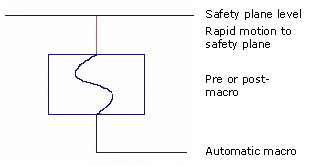
If the last motion of the pre- or post-macro is above the safety plane level,
there will be no rapid motion to the safety plane.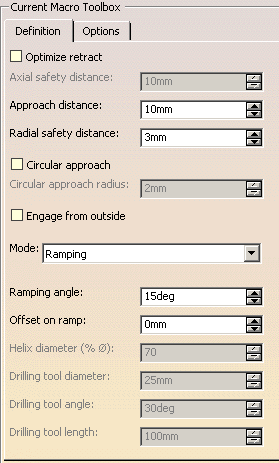
Optimize retract:
optimizes tool retract movements.
This means that when the tool moves over a surface where there are no obstructions,
it will not rise as high as the safety plane because there is no danger of tool-part collisions.
The result is a gain in time.- The parameter Optimize retract takes the rough stock left by the previous operation into account.
- If you have defined a safety plane, you should deactivate the
Optimize retract option.
If you do not, the safety plane will be ignored.
Axial safety distance:
Maximum distance that the tool will rise to when moving from the end of one pass to the beginning of the next.Approach distance:
engagement distance for the plunge mode.Radial safety distance:
length of the tool horizontal move before it begins the approach.Circular approach:
select this check box to create circular engagements from external zones:- a cornerization arc is inserted in the approach movements.
- all the movements will be tangent except when a collision could occur between the arc and the part.
Once selected, define the radius of this circular approach.
Engage from outside:
In case of open pockets, select this check box to create engagements from external zones.Limitations on Circular approach and Engage from outside: - By default, the point used for external engagement is the point
on the rough stock closest to the pattern start point.
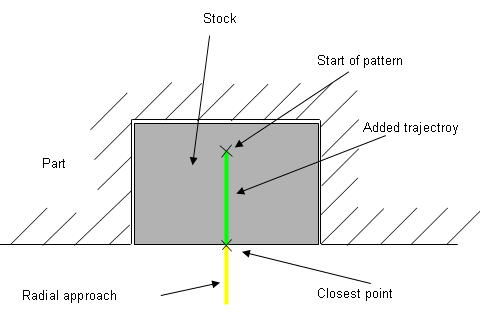
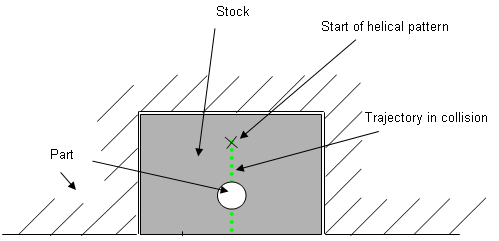
- In case of collision, V5 tries to compute a pattern avoiding
collision.
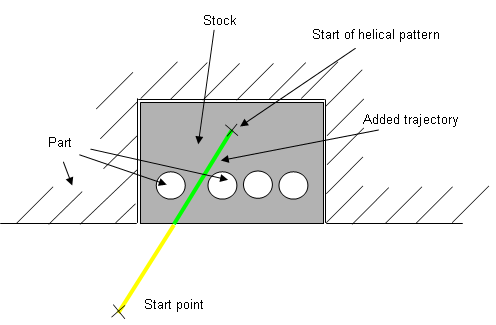
- If some collisions remain in planes you have defined, you can
define a start point to help find out a pattern which avoids the
collision.
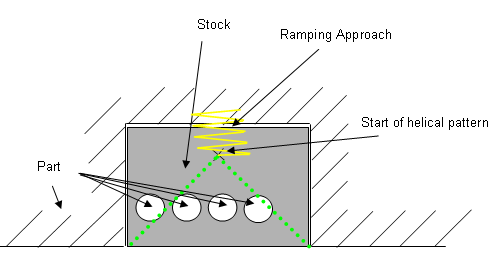
- If some collisions remain in some planes even with the defined
start point, a ramping approach will be created.
Mode:
Specifies the engagement of the tool in the material:- Plunge: the tool plunges vertically,
- Drilling: the tool plunges into previously drilled holes.
You can change the Drilling tool diameter,
Drilling tool angle and Drilling tool length,Helix retracts are inserted into the tool path when using Helical mode (only when retracts begin on the part).
But when a Drilling macro is selected, not all Helix retracts are inserted.. - Ramping: the tool moves progressively down at the Ramping angle,
- Helix: the tool moves progressively down at the ramping
angle with its center along a (vertical)
circular helix of Helix diameter. - Radial only:
When drilling holes exist, define start points and use Radial only to avoid any plunge or ramping macros.
If a radial engagement is not possible (collision with part or with the residual material), the roughing tool path is stopped.
Those approach modes apply to pockets.
- If the tool Path is Concentric, the approach is always Helix, either on outer areas or pockets.
- Ramping approach mode applies to pockets but also outer areas in given
conditions:
- If a limit line is used, the tool will approach outer areas of the part and pockets in ramping mode.
- If a lateral approach is not possible (due to the check element), the approach is made in ramping mode.
- Helical: