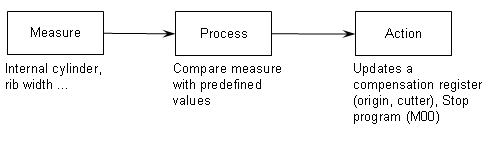
resulting in the following steps:
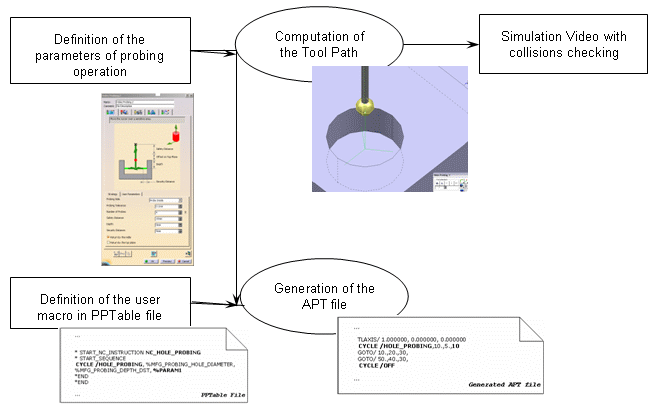
The tool path can be simulated with the video tool to check the collisions
between the tool and the part.
No material is removed and the collision checking is not activated in
probing feedrate.
It is impossible to define exactly all the probing cycles as each
controller has its specific macro for the same cycle.
Therefore, the probing operations can be customized to your needs:
- for the strategy parameters : you can add parameters to the probing operation, in addition to the standard ones.
- for the format of the output APT file generated : the generated syntax is configurable in the your PPTable.
Below, you will find the following information:
In the examples below:
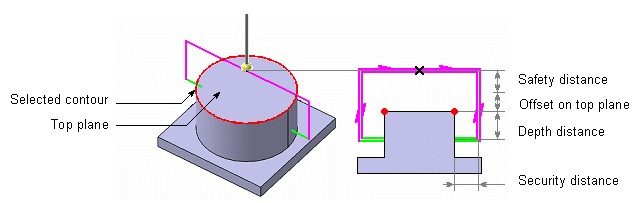
- feedrate for approach is displayed in pink,
- feedrate for probing is displayed in green,
- feedrate for retract is displayed in blue.
Probing Operations: Geometry and Standard Strategy Parameters
The following probing operations are available:
-
 Holes or Pins Probing: measures the diameter and the center of several holes or pins
 -
 Slots or Ribs Probing: measures the width and the middle of a slot or a rib
 -
 Corner Probing: measures the internal or external corner
 -
 Multi-Points Probing: you define the points to probe and their direction
They share some standard parameters:
|
|
|
|
|
|
| Probing Side | Yes | Yes | Yes | |
| Probing Tolerance | Yes | Yes | Yes | Yes |
| Number of Probes | Yes | |||
| Safety Distance | Yes | Yes | Yes | |
| Distance to probe | Yes | |||
| Depth | Yes | Yes | Yes | |
| Security Distance | Yes | Yes | Yes | Yes |
| Compensation | Yes | Yes | Yes | Yes |
| Return by the middle | Yes | |||
| Return by the top plane | Yes | Yes |
You can also add your own parameters.
Holes or Pins Probing
Output:
The first points of each probing cycle (marked x in the pictures below)
Geometry to select:
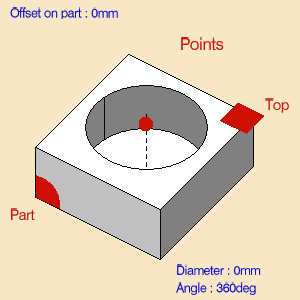
- Probing Side (MFG_PROBING_SIDE):
- Probe Inside to probe a hole,

- or Probe Outside to probe a pin.
- Probe Inside to probe a hole,
- List of geometries composed of points (center of holes or pins to
probe) or guides (contour of holes or pins).
You can select points, circles and cylinders. - Theoretical Diameter (MFG_PROBING_HOLE_DIAMETER, default value: 0.mm).
If the contour of the hole (or pin) is selected, the diameter is automatically computed and is associated with the geometry.
Its value is displayed in the sensitive icon. You can:- remove your selection
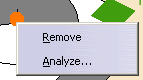
and select a new contour, - Double-click Diameter or Angle and edit it in the dialog box that appears,
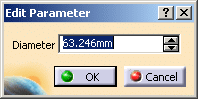
- Modify the geometry, hence the diameter or the angle, and retrieve the associativity via the contextual menu:
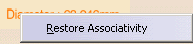
- remove your selection
- Top plane and Offset (MFG_OFFSET_ON_TOP_PLANE, default value: 0.)
Standard strategy parameters:
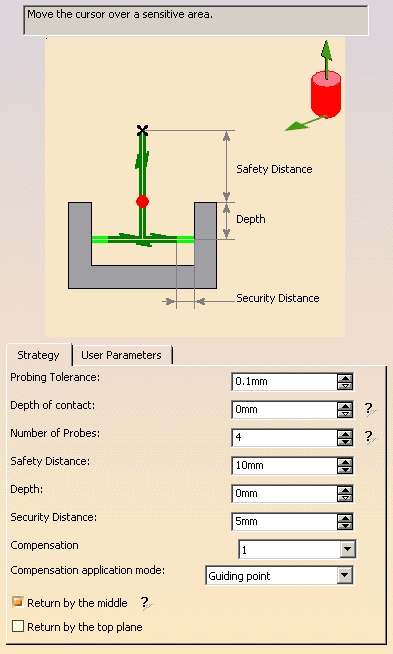
- Tool axis.
The default value is 0., 0., 1. - Probing direction (MFG_PROBING_DIRECTION_X, MFG_PROBING_DIRECTION_Y,
MFG_PROBING_DIRECTION_Z)
i.e. direction of the first probing.
The default value is 1., 0., 0. - Probing Tolerance (MFG_PROBING_TOLERANCE): probing tolerance used in the computation of the tool path,
- Depth of contact (MFG_PROBING_CONTACT_DEPTH): depth of penetration of the stylus into the material.
- Number of Probes (MFG_PROBING_NB_PROB): Number of probing
points.
The default value is 4, it must be greater than 0. - Safety Distance (MFG_PROBING_SAFETY_DST).
The default value is 10.mm. - Depth (MFG_PROBING_DEPTH_DST): Depth Distance.
The default value is 0.mm if you select points. - Security Distance (MFG_PROBING_SECURITY_DST):
Distance before contact with part to change the feedrate in probing
federate.
The default value is 5.mm. - Compensation: Specifies the tool corrector identifier to be used in the operation.
- Compensation application mode: specifies how the
Compensation, in other words the corrector type specified on
the tool (P1, P2, P3, for example) is used to define the position of the
tool:
- Output point: the tool compensation point is generated in the output file. The tool path computation is done according to the tool tip.
- Guiding point: the tool motion is computed according to the tool compensation point and the tool compensation point is generated in the output file.
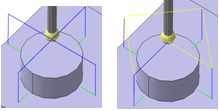
- Return by the middle (MFG_PROBING_RETURN_BY_MIDLE): If this
option is activated, after each probe, the retract goes through the middle
of the hole (or the pin).
Example when the option is activated then deactivated:
- Return by the top plane (MFG_PROBING_RETURN_BY_TOP_PLANE):
available only to probe holes.
If this option is activated, after each probe, the retract goes through the top plane.
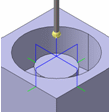
Examples of:
- PPTable:
*START_NC_INSTRUCTION NC_PROBING_HOLE
*START_SEQUENCE
CYCLE/HOLE_PROBING, %MFG_PROBING_NB_PROB, %MFG_PROBING_HOLE_DIAMETER,
%MFG_PROBING_SAFETY_DST, %MFG_PROBING_DEPTH_DST, %MFG_OFFSET_ON_TOP_PLANE,
%MFG_PROBING_DIRECTION_X, %MFG_PROBING_DIRECTION_Y, %MFG_PROBING_DIRECTION_Z
*END
*END - Generated APT File: The selected point coordinates are (0.0, 10.0,
0.0).
$$ OPERATION NAME : Hole Probing.1
$$ Start generation of : Hole Probing.1
LOADTL/1,1
TLAXIS/ 0.00, 0.00, 1.00
SPINDL/ 0.00,RPM,CLW
RAPID
GOTO / 0.00, 10.00, 10.00
CYCLE/HOLE_PROBING, 4, 10.00, 10.00, 5.00, 0.00, 1.00, 0.00, 0.00
GOTO / 0.00, 10.00, 20.00
CYCLE/OFF
$$ End of generation of : Hole Probing.1
Slots or Ribs Probing
Output:
The first points of each probing cycle (marked x in the pictures below).
Geometry to select:
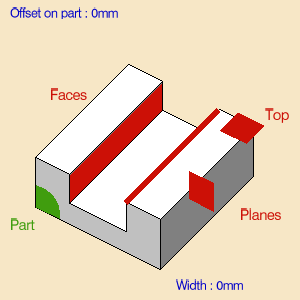
- Probing Side (MFG_PROBING_SIDE).
- Probe Inside to probe a slot,
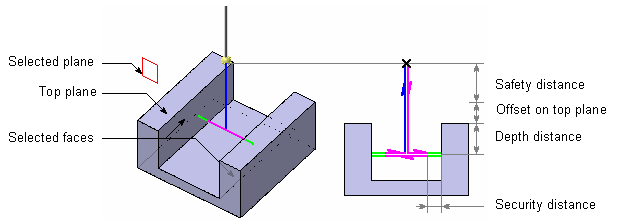
- or Probe Outside to probe a rib.
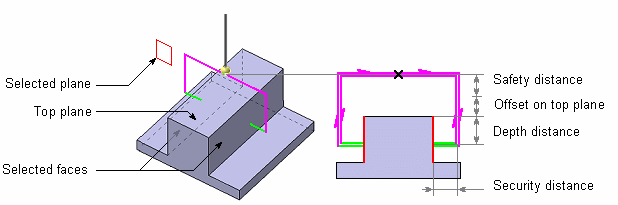
- Probe Inside to probe a slot,
- Several planes to localize the probe.
- Top plane and Offset (MFG_OFFSET_ON_TOP_PLANE, default value: 0.)
- Two faces or planes which compose the Slot or the Rib.
If the faces of the hole (or pin) is selected the width is automatically computed and is associated of the geometry. - Theoretical width (MFG_PROBING_SLOT_WIDTH):
If the faces of the rib (or slot) are selected, the width is automatically computed and is associated with the geometry.
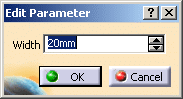
Its value is displayed in the sensitive icon. You can:- remove your selection
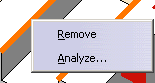
and select new facesr, - Double-click Width and edit it in the dialog box that appears,
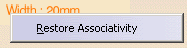
- Modify the geometry, hence the rib or the slot, and retrieve the
associativity via the contextual menu:
- remove your selection
Standard strategy parameters:
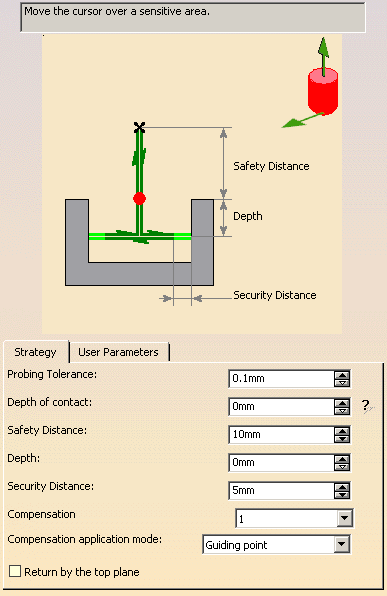
- Tool axis
The default value is: 0., 0., 1. - Probing direction (MFG_PROBING_DIRECTION_X, MFG_PROBING_DIRECTION_Y,
MFG_PROBING_DIRECTION_Z)
i.e. direction of the first probing.
The default value is 1., 0., 0. - Probing Tolerance (MFG_PROBING_TOLERANCE): probing tolerance used in the computation of the tool path,
- Depth of Contact (MFG_PROBING_CONTACT_DEPTH): depth of penetration of the stylus into the material.
- Safety Distance (MFG_PROBING_SAFETY_DST).
The default value is 10.mm. - Depth Distance (MFG_PROBING_DEPTH_DST)
The default value is 0.mm. - Security Distance (MFG_PROBING_SECURITY_DST): Distance before
contact with part to change the feedrate in probing federate.
The default value is 5.mm. - Compensation: Specifies the tool corrector identifier to be used in the operation.
- Compensation application mode: specifies how the
Compensation, in other words the corrector type specified on
the tool (P1, P2, P3, for example) is used to define the position of the
tool:
- Output point: the tool compensation point is generated in the output file. The tool path computation is done according to the tool tip.
- Guiding point: the tool motion is computed according to the tool compensation point and the tool compensation point is generated in the output file.
- Return by the top plane (MFG_PROBING_RETURN_BY_TOP_PLANE):
available only to probe holes.
If this option is activated, after each probe, the retract goes through the top plane.
Examples of:
- PPTable:
*START_NC_INSTRUCTION NC_PROBING_SLOT
*START_SEQUENCE
CYCLE/SLOT_PROBING, %MFG_PROBING_SLOT_WIDTH, %MFG_PROBING_SAFETY_DST,
%MFG_PROBING_DEPTH_DST, %MFG_OFFSET_ON_TOP_PLANE,
%MFG_PROBING_DIRECTION_X, %MFG_PROBING_DIRECTION_Y, %MFG_PROBING_DIRECTION_Z
*END
*END - Generated APT File:
$$ OPERATION NAME : Slot Probing.1
$$ Start generation of : Slot Probing.1
LOADTL/1,1
TLAXIS/ 0.00, 0.00, 1.00
SPINDL/ 0.00,RPM,CLW
RAPID
GOTO / 0.00, 10.00, 10.00
CYCLE/SLOT_PROBING, 10.00, 10.00, 5.00, 0.00, 1.00, 0.00, 0.00
GOTO / 0.00, 10.00, 20.00
CYCLE/OFF
$$ End of generation of : Slot Probing.1
Corner Probing
Output:
The first points of each probing cycle (marked x in the pictures below).
Geometry to select:
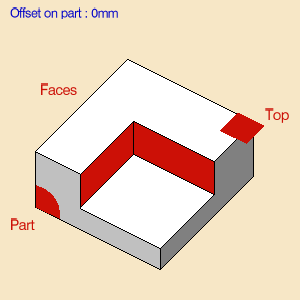
- Probing Side (MFG_PROBING_SIDE).
- Probe Inside to probe a internal corner,
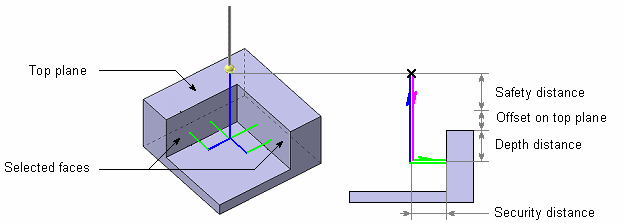
- or Probe Outside to probe an external corner.
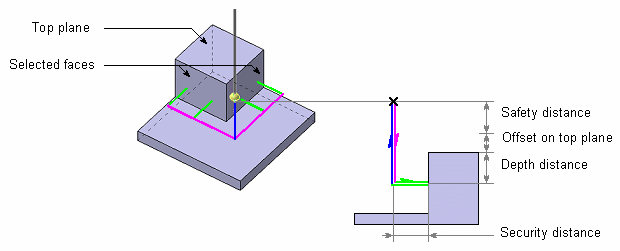
- Probe Inside to probe a internal corner,
- Top plane and Offset (MFG_OFFSET_ON_TOP_PLANE, default value: 0.),
- Two faces which compose the corner.
Standard strategy parameters:

- Tool axis
The default value is: 0., 0., 1. - Probing Tolerance (MFG_PROBING_TOLERANCE): probing tolerance used in the computation of the tool path,
- Depth of contact (MFG_PROBING_CONTACT_DEPTH): depth of penetration of the stylus into the material.
- Distance of first point (MFG_PROBING_FIRST_PROBE):
defines the distance between the corner and the first probing point for
the external corner.

For the internal corner, the distance between the corner and the first probing point is defined by this distance plus the security distance. - Distance of second point (MFG_PROBING_DIST_PROBE): defines the distance between the first and the second probing points.
- Safety Distance (MFG_PROBING_SAFETY_DST).
The default value is 10.mm. - Depth Distance (MFG_PROBING_DEPTH_DST)
The default value is 0.mm. - Security Distance (MFG_PROBING_SECURITY_DST):
Distance before contact with part to change the feedrate in probing
federate.
The default value is 5.mm. - Compensation: Specifies the tool corrector identifier to be used in the operation.
- Compensation application mode: specifies how the
Compensation, in other words the corrector type specified on
the tool (P1, P2, P3, for example) is used to define the position of the
tool:
- Output point: the tool compensation point is generated in the output file. The tool path computation is done according to the tool tip.
- Guiding point: the tool motion is computed according to the tool compensation point and the tool compensation point is generated in the output file.
Examples of:
- PPTable:
*START_NC_INSTRUCTION NC_PROBING_CORNER
*START_SEQUENCE
CYCLE/INT_CORNER_PROBING, %MFG_PROBING_SAFETY_DST, %MFG_PROBING_DEPTH_DST,
%MFG_OFFSET_ON_TOP_PLANE
*END
*END - Generated APT File: All macro motions are deactivated.
$$ OPERATION NAME : Int. Corner Probing.1
$$ Start generation of : Int. Corner Probing.1
LOADTL/1,1
TLAXIS/ 0.000000, 0.000000, 1.000000
SPINDL/ 0.0000,RPM,CLW
RAPID
GOTO / 0.00000, 10.00000, 10.00000
CYCLE/INT_CORNER_PROBING, 10.00000, 5.00000, 0.00000
GOTO / 0.00000, 10.00000, 20.00000
CYCLE/OFF
$$ End of generation of : Int. Corner Probing.1
Multi-Points Probing
Output:
The selected point and its direction, followed by the first point of the
probing cycle (marked x in the pictures below.
Geometry to select:
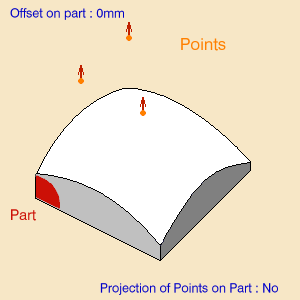
Points to probe and their direction.
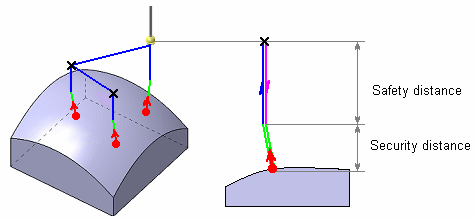
You can:
- select points, in this case their direction is the tool axis.
- pick points on a surface. At each pick, a point is created on the
surface with the coordinates of pointer.
This point is not associated of the face: if the face is modified, the point will not be modified.
The direction of the point is the normal to the surface.
The toggle Projection of Points on Part: No/Yes defines if
the points are projected onto the part or not.
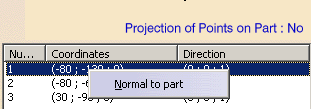
The contextual menu of the points listed in the dialog box lets you
decide of the projection direction (Normal to part or not).
It support the multi-selection of the points.
Standard strategy parameters:
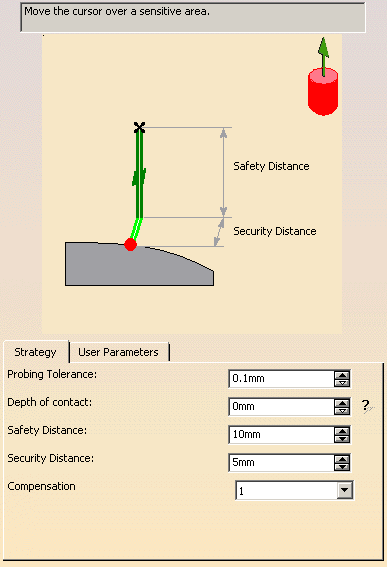
- Tool axis
The default value is: 0., 0., 1. - Probing Tolerance (MFG_PROBING_TOLERANCE): probing tolerance used in the computation of the tool path,
- Depth of contact (MFG_PROBING_CONTACT_DEPTH): depth of penetration of the stylus into the material.
- Safety Distance (MFG_PROBING_SAFETY_DST).
The default value is 10.mm. - Security Distance (MFG_PROBING_SECURITY_DST):
distance before contact with part to change the feedrate in probing
federate.
The default value is 5.mm. - Compensation: Specifies the tool corrector identifier to be used in the operation.
Examples of
- PPTable:
*START_NC_INSTRUCTION NC_PROBING_MULTIPOINTS
*START_SEQUENCE
VERIFY/ MULTI_PROBING, %MFG_PROBING_SAFETY_DST
*END
*END - Generated APT File: All macro motions are deactivated.
$$ OPERATION NAME : Multi Probing.1
$$ Start generation of : Multi Probing.1
LOADTL/1,1
TLAXIS/ 0.000000, 0.000000, 1.000000
SPINDL/ 0.0000,RPM,CLW
RAPID
GOTO / 0.00000, 10.00000, 10.00000
CYCLE/MULTI_PROBING, 10.00000, 5.00000, 0.00000
GOTO / 17.64900, 70.69300, 30.58600, -0.40615, 0.26639, 0.87411
GOTO / 59.80300, 68.11100, 39.42300, 0.07485, 0.26853, 0.96035
GOTO / 20.88300, 27.77500, 31.39400, -0.31938, -0.28117, 0.90496
CYCLE/OFF
$$ End of generation of : Multi Probing.1
Case of the Multi-Points Probing
The points selected are displayed under the geometry sensitive icon.
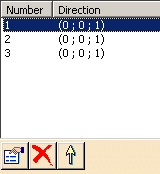
You can:
-
 edit them,
 -
 remove them,
 -
 reorder them.
Probing Operations: Tools
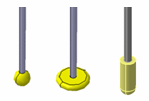
The tools used with the probing operations are ball stylus (or disc stylus:
portion of a sphere) and cylinder stylus:
Probing Operations: Macros
General information about macros can be found in
NC Macros in NC Manufacturing products.
Information about the operating mode can be found in
Defining Macros.
Information about Surface Machining macro parameters can be found in
Macro Parameters.
Please note that:
- Approach macro is used to approach the operation start point (deactivated by default).
- Retract macro is used to retract from the operation end point (deactivated by default).
- The linking macros can be used to link two probing cycles (deactivated by default).
- Clearance macro can be used to avoid a fixture or similar (deactivated
by default).
The Clearance macro is only used if the Linking Macros are used.
The macros generated in APT file are managed as the drilling operations.
Examples: Hole probing of 2 holes with the Linking macros deactivated:
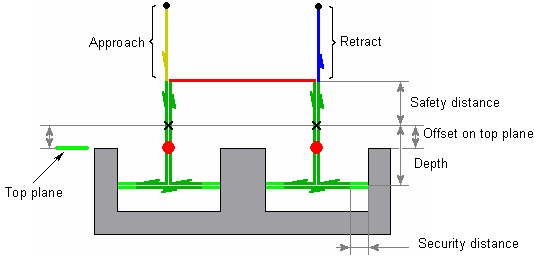
Strategy Parameters:
Diameter = 40mm
Safety Distance = 10mm
Offset on Top Plane = 2mm
Depth = 20mm
Security Distance = 5mm
Macro Parameters:
Approach : Along Tool Axis – 20mm
Linking : Deactived
Retract : Along Tool Axis – 20mm
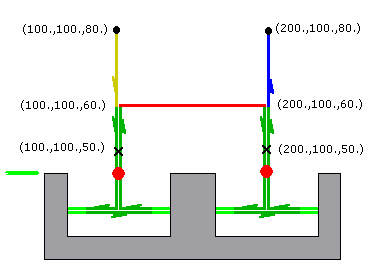
APT Generated:
$$ Start generation of : Holes Probing.1
RAPID
GOTO / 100.0, 100.0, 80.0, 0.0, 0.0, 1.0
FEDRAT/ 300.0000,MMPM
GOTO / 100.0, 100.0, 60.0, 0.0, 0.0, 1.0
CYCLE/PROBING_HOLE, 40.000000, 10.000000, 2.000000, 20.000000, 5.000000
GOTO / 100.0, 100.0, 50.0, 0.0, 0.0, 1.0
GOTO / 200.0, 100.0, 50.0, 0.0, 0.0, 1.0
CYCLE/OFF
FEDRAT/ 1000.0000,MMPM
GOTO / 200.0, 100.0, 80.0, 0.0, 0.0, 1.0
$$ End of generation of : Holes Probing.1
Probing Operations: Edit Cycle Macro
Edit Cycle
 is
available for all probing commands, with the following dialog box:
is
available for all probing commands, with the following dialog box:
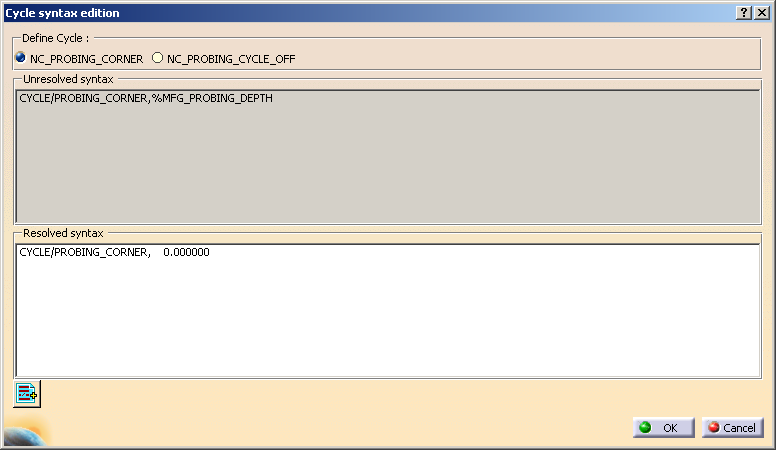
Note that the left option takes the name of the current Probing
operation type and lets you edit its instructions
while the right option lets you edit the NC_PROBING_CYCLE_OFF instruction.
Add PP word list
 lets you add PP Words.
General information about PP Words can be found in
PP Tables and
PP Word Syntaxes in NC Machining Infrastructure.
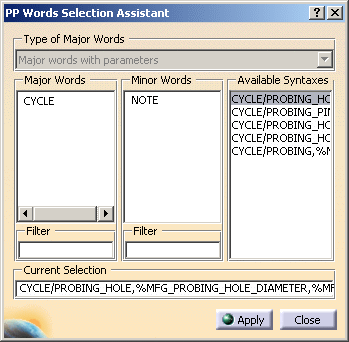
Click here for more
information.
The syntaxes available are:
| Probing operation |
Available syntaxes (where n is a number: 1,2,….) |
|
Holes or Pins Probing |
NC_PROBING_HOLE |
|
Slots or Ribs Probing |
NC_PROBING_SLOT |
|
Corner Probing |
NC_PROBING_CORNER |
|
Multi-Points Probing |
NC_PROBING_MULTI_POINTS |
| All Probing Operations | NC_PROBING_CYCLE_OFF |