
This task shows you how to use One Click Reconciliation command to set mapping and reconciliation rules automatically to reconcile the object with just one click.

- Maps the object to be reconciled after query in cases where there are no ambiguities.
- Applies Rule application to the objects to be reconciled in cases
where there are no ambiguities.
You can complete the Reconciliation process by clicking Apply. The functionality of One Click Reconciliation applies existing Global Set Automatic Preselection.
The Ambiguities tab lists down the ambiguities during all
Reconciliation Queries (One Click Reconciliation, Easy Query, Automatic
Preselection and Global query)
You can use the information in the Ambiguities tab to
manually resolve the ambiguities for completing the reconciliation
process. Ambiguities tab will be available to all reconciliation queries
and Global Sets.
The Ambiguities tab has:
- Short Name of Document, Rule
- Type of ambiguity
- Mapping Ambiguity: A document is set as mapping ambiguous, if more than one query results are found in database for that document
- Rule Ambiguity: A document is set as rule ambiguous, if more than one rule are applicable on that document and the document is not synchronized (Timestamps are not identical) with the document in Database
- Comment which will help you to resolve ambiguity
Whenever you resolves an ambiguity, the respective entry gets removed from the list. This gives you a clear status of the remaining ambiguities.
To know more about the Mapping and reconciliation rule logic used for One Click Reconciliation and Automatic Pre-selection, see More about the Automatic Pre-selection.

-
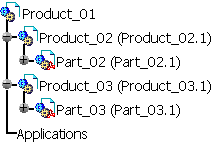
Create a structure in CATIA. For example, Product_01.
-
Save the structure in SmarTeam and Check In the Product_01.
-
Open the structure from SmarTeam and select File > Send To. Send the product to a local directory.
-
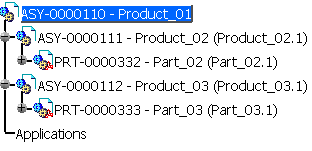
Open Product_01 from local directory.
-
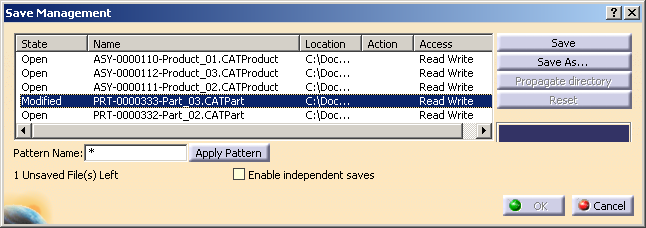
Modify Part_03 and save it to the local directory.
-
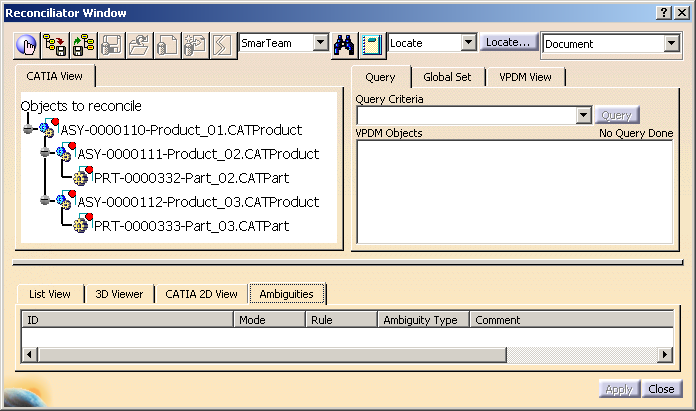
From the SmarTeam menu, select Collaboration > Launch Reconciliation.
-
In the Reconciliator Window, click One Click Reconciliation
 icon.
icon.
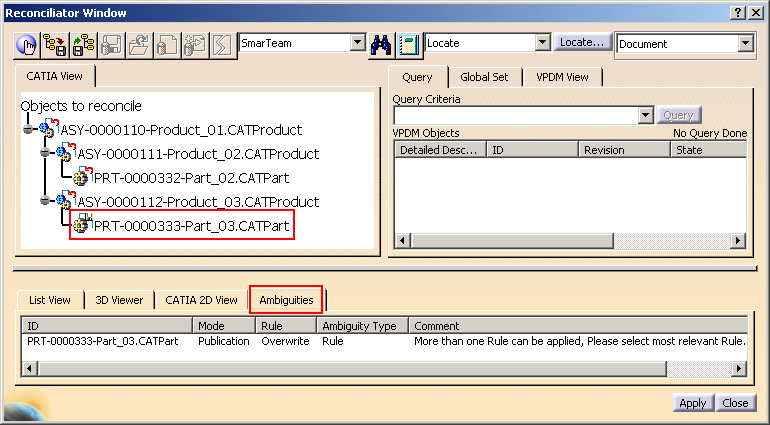
The mapping is done automatically and an ambiguity appears for Part_03 for the Overwrite rule.
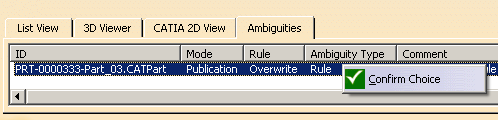
You can right-click and select Confirm Choice.
-
Click Apply.
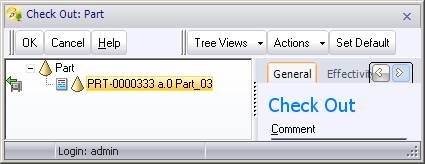
The Check Out option for Part_03 appears.
-
Click OK.
-
Validate Checkout on the Fly messages on Product_03 and Product_01.
-
Reconciliation is proceeded and a message Reconciliation successfully executed is displayed.
Close the Reconciliator Window, and perform SmarTeam Check In on Product_01.

- Locate functionality is not applicable for Ambiguities tab list.
- Ambiguities are not stored in Stop or Restart functionality. The dump of the reconciliation session will not include this additional information, and a session restored from an xml dump file will lead to empty Ambiguities tab.
- It is recommended to select the No automatic backup check
box, under General tab in CATIA Tools > Options >
General settings.
If you select Automatic backup option then after specified time, automatic save happens which lead to change in Timestamp.
