
This task shows you how to ensure that each time you launch the Reconcile Window, queries, identification of targeted SmarTeam Documents and selection of reconciliation rules are done automatically.
The Automatic Pre-selection command is a way of drastically saving time.

-
In the CATIA View tab, select the root document -Skateboard (skateboard)- from the Objects to reconcile tree.
-
Click the Global Set tab.
-
Select Automatic pre-selection from the list of options.
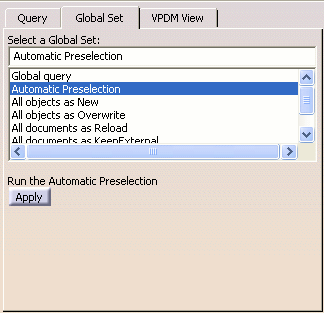
In only one operation, Automatic preselection:
-
runs Latest Available Revision on all the objects
-
sets reconciliation rule (explained above) on all possible objects using some predefined laws (explained later)
-
-
Click Apply to confirm the operation.
The Global Set dialog box is displayed.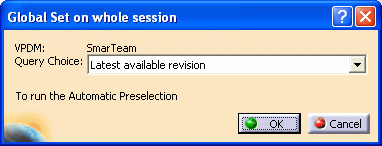
-
Click OK to confirm your query choice.
The documents making up the assembly in your CATIA session have been mapped and reconciliation rules are set.
Note that if need be, at that stage, you still can change the mapping and reconciliation rules manually.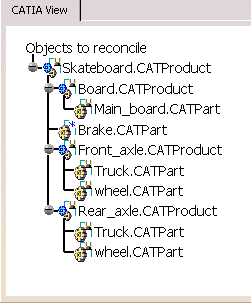
-
Click Apply to confirm the reconciliation operation.
More About the Automatic Pre-selection
Before using automatic pre-selection, you should be familiar with the following information:
Query
Queries are always performed using the criteria defined thru the SmarTeam Integration Tool Setup utility. This utility enables administrators to map properties from CATIA directly to an object's profile card.
Reconciliation Rules
When using automatic pre-selection, reconciliations rules are set as follows:
- If the mapping process, that is the identification of targeted
SmarTeam documents, results with no documents found in the SmarTeam
database, the rule applied to documents is New
 or Keep As External
 in case there are broken links
.
in case there are broken links
. - If the mapping process is successful and that targeted SmarTeam
documents:
- were not modified, the rule applied to documents is Reload
 .
. - were modified, the rule applied to documents is Overwrite
 .
.
- were not modified, the rule applied to documents is Reload
Note
The Overwrite
rule is always applied to documents proceeding from ENOVIA as well as to
documents handled in a SmarTeam to SmarTeam exchange environment, that
is to documents used by OEMs and their suppliers, all of them working
with SmarTeam databases. In such environments, documents are seen as
modified due to attribute mappings and especially to the revision
mappings.
Using Databases Anterior to V5R18
If you are using a SmarTeam database anterior to V5R18, administrators need to create a new attribute as explained in Customizing Pre-V5R18 Databases to use Automatic Pre-selection.
