 |
Creating an Expert Rule: Select the Expert rule icon to create an expert rule, write its body, test its syntax and add it to your rule base. |
|
|
Creating an Expert Rule: Select the Expert rule icon to create an expert rule, write its body, test its syntax and add it to your rule base. |
|
|
An expert rule is made up of two parts:
|
|
If you use more than one type in the for all field, you need at least
one object of each type to execute the rule.
In the example above, you need at least one object of Shell type
AND one object of Hole type.
To apply an expert rule to a document, solve the entire rule base.
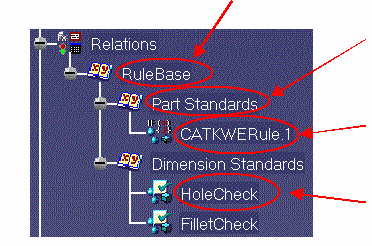
Here is the Knowledge Expert feature hierarchy. In the graphic below, click the links to display the related summary of tasks.
 Rule Base
 |
|
 |
Rule Set tasks |
|
Expert Rule tasks |
|
 Expert Check tasks
 |
Creating an Expert Rule
Using the Rule Editor
Editing an Expert Rule
 field in
which you define the types list the rule applies to:
field in
which you define the types list the rule applies to: