Creating Surfaces of Revolution

This task shows how to create a surface by revolving a planar profile about an axis.

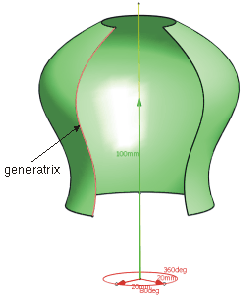
The rotation of a planar or 3D curve ('generator curve') about an axis traces the shape of a surface of revolution.

In ICEM Shape Design the creation of surfaces of revolution covers the creation of the shape of spherically symmetric surfaces for which the generator curve will be provided (surface of revolution types Cylinder, Cone, Sphere, Torus and Barrel), as well as the generation of surfaces by rotation of previously defined curves (Freeform).


After being created, the surface of revolution can be modified with the manipulators.

Open the SurfaceOfRevolution.CATPart document.

  1. Click Surface of Revolution .
    The Surface of Revolution dialog box appears.
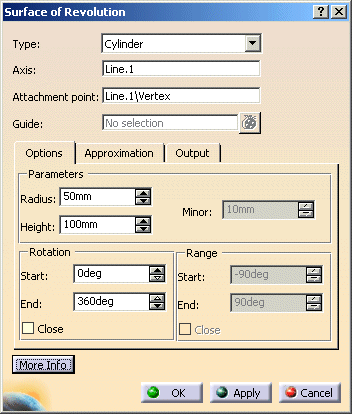


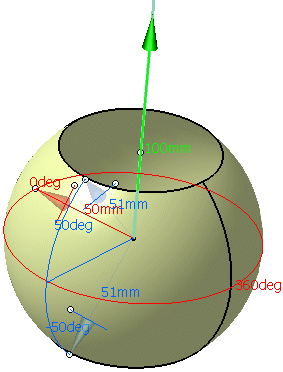
  1. Select the type of surface of revolution Barrel and Line.1 as axis of rotation.

  2. For Range, specify start and end values of -50 and 50.

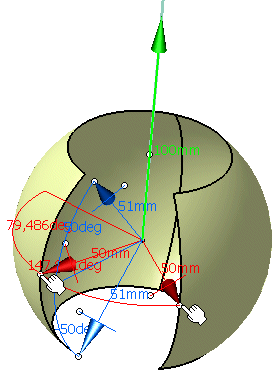
  3. Click Apply to create a barrel surface.

 
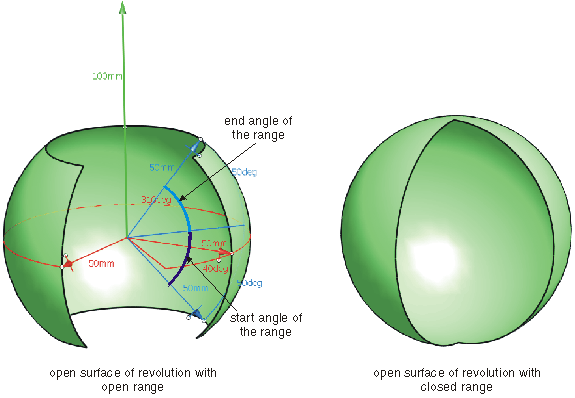
  1. Start and end angle can be modified by manipulating the handles at the tips of the red manipulators.
 
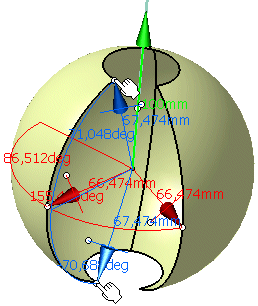
  1. Start and end ranges can be modified by manipulating the handles at the tips of the blue manipulators.
 
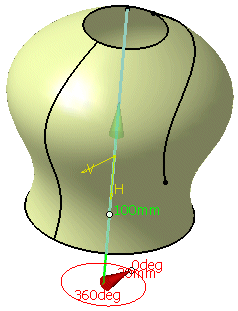
  1. Activate the display of the element Sketch.1 via 'Hide/Show' in the contextual menu.

  2. Set the type of surface of revolution Freeform in the Surface of Revolution dialog box and select Sketch.1 as Guide.

  3. Click OK  to create a surface of revolution from the freeform curve.

 
You can define the following options:
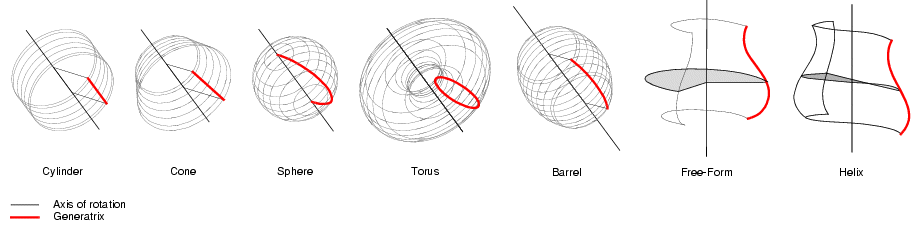
  • Type: Defines the type of surface of revolution:
 
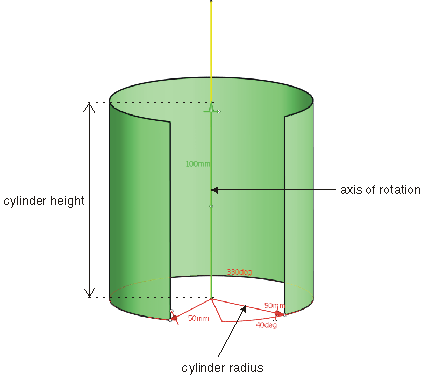
  • Cylinder
     
    Generatrix Parameters
    Straight line parallel to the axis of rotation Cylinder radius (Radius)
    Cylinder height (Height)

 
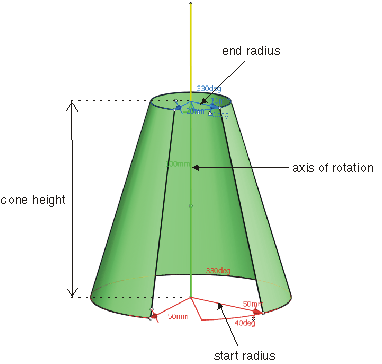
  • Cone
     
    Generatrix Parameters
    Straight line Radius at bottom (Radius)
    Radius at top (Minor)
    Height of cone (Height)

 
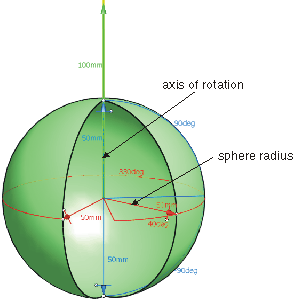
  • Sphere
     
    Generatrix Parameters
    Semicircle with centre on the axis of rotation Radius of sphere (Radius)

 
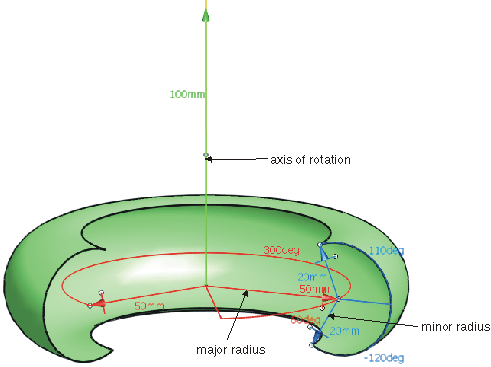
  • Torus
     
    Generatrix Parameters
    Circle Major radius (Radius)
    Minor radius (Minor)

 
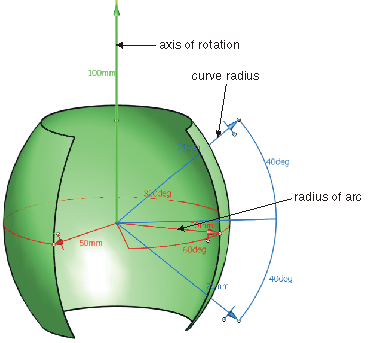
  • Barrel:
     
    Generatrix Parameters
    Circular arc Radius of arc (Radius)
    Curve radius (Minor)

 
  • Freeform:
     
    Generatrix Parameters
    Planar or 3D Bezier curve None

 
  • Axis: Defines the axis of rotation.
  • Attachment point: Defines the starting position of the rotation (= origin of the local coordinate system).
  • Guide: Selects a guide for the type of surface of revolution Freeform.
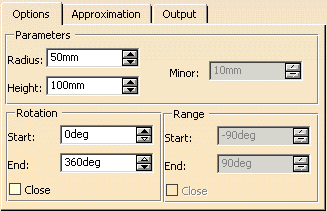
  Options tab
 
  • Parameters:
    • Radius: Depending on the selected type of surface of revolution, the following values are defined:
       
      Type of surface of revolution Parameters
      Cylinder Cylinder radius (see Cylinder)
      Cone Start radius (see Cone)
      Sphere Sphere radius (see Sphere)
      Torus Major radius (see Torus)
      Barrel Rotation radius (see Barrel)


    • Height: This parameter can only be defined for Cylinder  and Cone.
      Depending on the selected type of surface of revolution, the following values are defined:


      Type of surface of revolution Parameters
      Cylinder Cylinder height (see Cylinder)
      Cone Height of the frustum of a cone (see Cone)


    • Minor: This parameter can only be defined for Cone, Torus, and Barrel.

      Depending on the selected type of surface of revolution, the following values are defined:
       

      Type of surface of revolution Parameters
      Cone End radius (see Cone)
      Torus Minor radius (see Torus)
      Barrel Curve radius (= radius of the generating arc) (see Barrel)
 
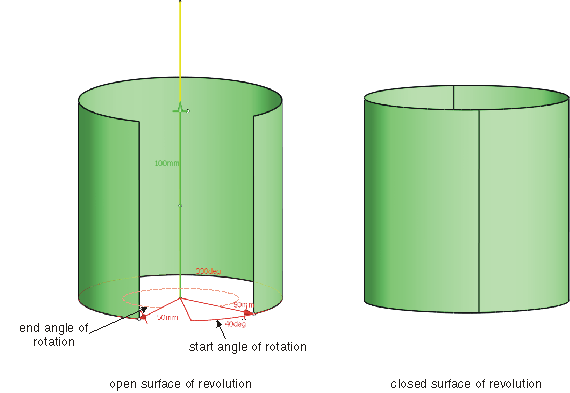
  • Rotation: The surface of revolution is defined by start and end angles by which the generator curve is rotated about the Z axis of the local coordinate system of rotation. Values between 0° and 360° can be specified for the angles. The surface of revolution is always created in positive rotational direction, i. e. from the start to the end angle.
    • Start/End: Defines the start and end angle of the surface of revolution.
    • Close: Creates a closed surface of revolution.
 
  • Range: This option is only available for Sphere, Torus, and Barrel.
    The values specified here determine the part of the generator curve that is to be used if only a segment of a cylindrical surface is going to be created. For the range angles can be specified values between -90° and +90°.
    • Start/End: Defines start and end angle of the range.
    • Close: Creates a surface of revolution with closed range.
  See Approximation tab
  See Output tab
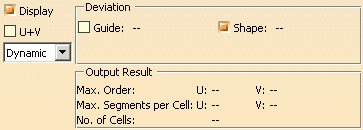
  Click 'More Info' to display deviations and output results.
 
  • Display: Depending on the options selected, values are displayed in the graphics area.
  • U+V: Display of the UV vectors of curves and surfaces.
  • Dynamic, Static, None: See Apply Modes
  • Deviation: Maximum deviation between the edges of the created surface and the original curves.
    • Guide: Displays the deviation of the approximated guide.
    • Shape: Displays the deviation from the surface of revolution.
  • Output Result: See Output Result