|
This task explains how to create a lofted surface through multiple profiles and guide curves.
The selected profiles define the U direction, the guide curves the V direction of the lofted surface. The profiles determine the
surface shape. In many cases, the creation of a lofted surface requires that the profiles are driven along a spine curve. Depending
on setting the check button Spine in the dialog box, an internally computed (implicit) or a user-defined
spine will be used. |
 |
Implicit spine
|
| |
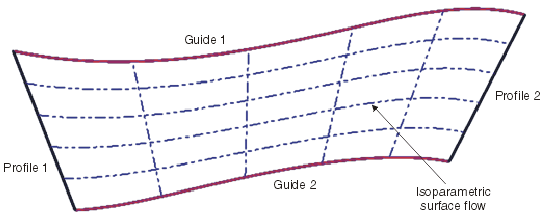
The implicit spine (check button Spine OFF) is computed through first and last guide curve.
Coupling points are calculated from the intersection with the profiles.
An implicit plane is created along the spine curve and normal to it determining the orientation of the internal profiles. The
isoparametric flow of the lofted surface is then evenly distributed between the profiles and guides.
If a user-defined spine curve is used, the loft is calculated using the implicit spine curve to control the parametrization.
|
| |
User-defined spine
Construction of the spine curve
The user-defined spine (check button Spine ON) must respect several criteria.
- Only connected curves are supported.
- Crossed curves (loops) are not supported.
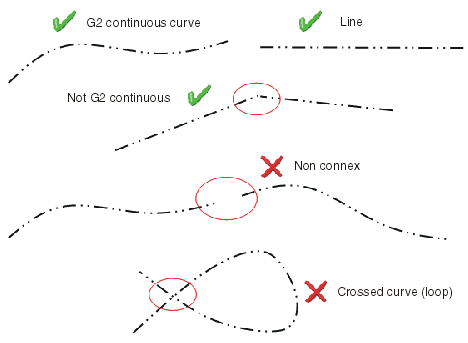
|
| |
Length and position of the spine curve
- The spine curve must have at minimum the same length as the maximum distance between first and last selected profile.
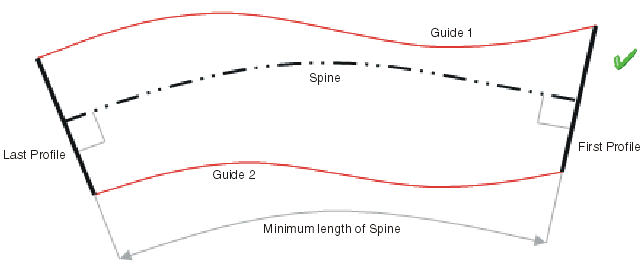
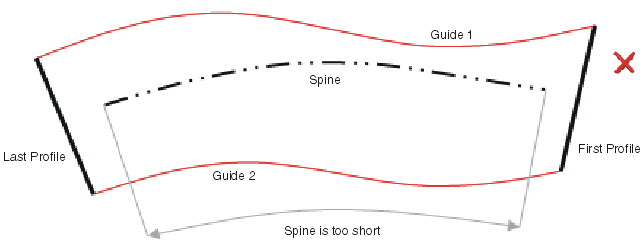
- The implicit plane created normal to the spine curve ensures that the profiles are driven perpendicularly along the spine
curve. This plane MUST intersect all selected guide curves at all points. Therefore the spine curve positioning with respect
to the guides and profiles is equally important.
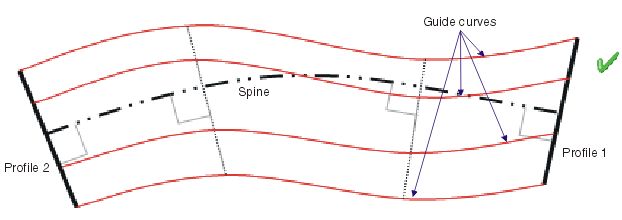
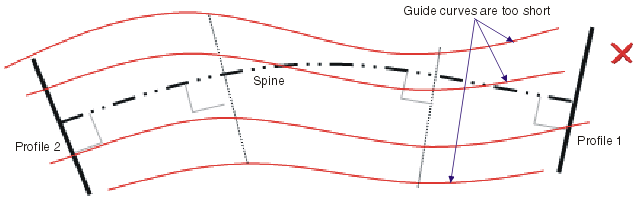
|
| |
Orientation of the spine curve
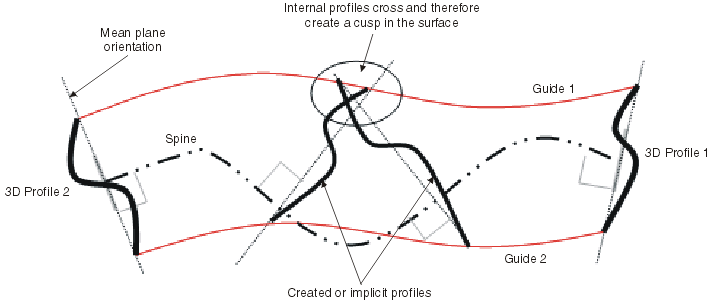
The selected profiles determine the shape of the lofted surface. It is required that the orientation of the spine curve in relation
to the selected profiles is perpendicular.
- 2D Profiles (planar)
In many cases, the profiles will be created already in a 2D plane and in 3D space. Thus the spine orientation is automatically
defined perpendicular to the plane lying on the section profile.
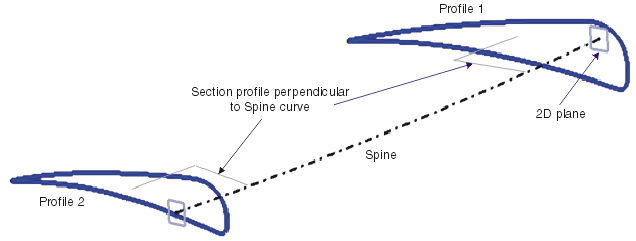
When only 2D profiles and no internal profiles are selected for the start and end of the lofted surface, the internal profiles
are implicitly calculated and are perpendicularly swept along the spine curve.

If the spine curve is then adjusted or a new spine is selected, it will influence the shape of the loft as the internal profiles
are consequently adjusted.
Start and end of the spine curve must remain perpendicular to the selected 2D profile curves.
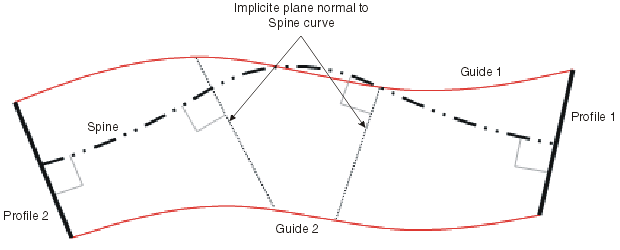
- 3D Profiles
If it is not possible to use 2D profiles for start and end profiles, the input profiles are considered to be 3D. When a 3D
curve is used as profile, the orientation of the spine curve is equally important.
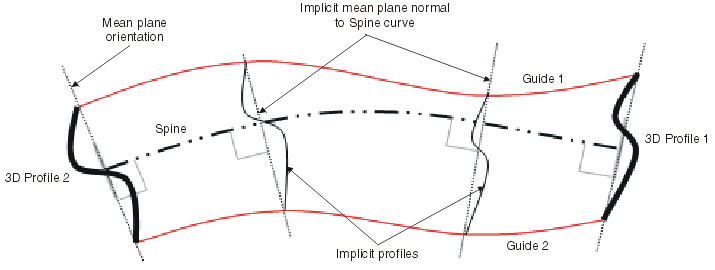
- Internal Profiles
The spine curve must smoothly flow through each profile, such that an internal cusp in the loft result is not created.
|
| |
|
 |
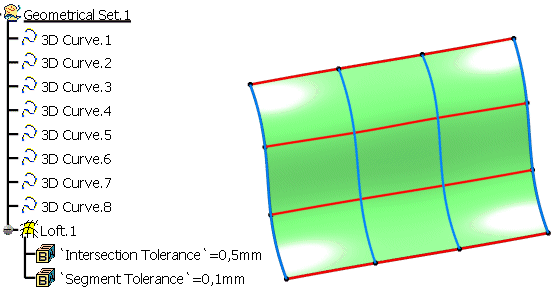
Open the Loft.CATPart document. |
 |
-
Click the Loft icon  . .
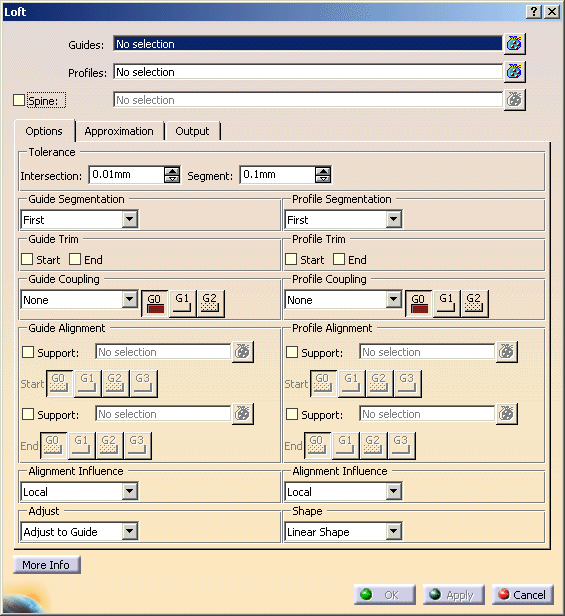
The Loft dialog opens.
|
 |
| |
-
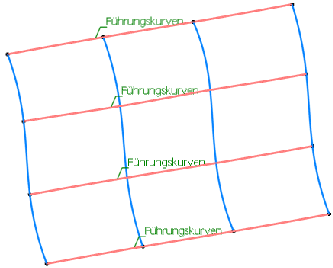
Select the elements 3D Curve.1 to 3D Curve.4 as Guides.
|
 |
| |
-
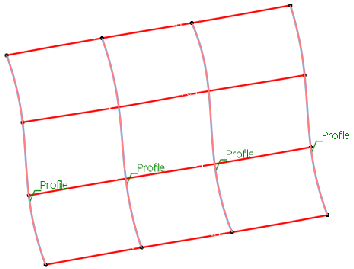
Select the elements 3D Curve.5 to 3D Curve.8 as Profiles.
|
 |
| |
-
Enter in the text field Tolerance Intersection the value 0,5 mm.
-
Click OK to create the Loft surface Loft.1.
|
 |
 |
You can define the following options:
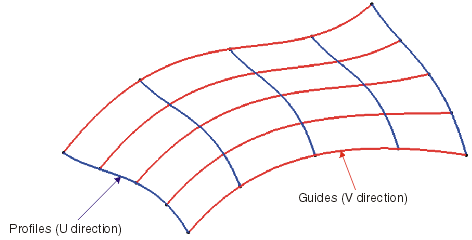
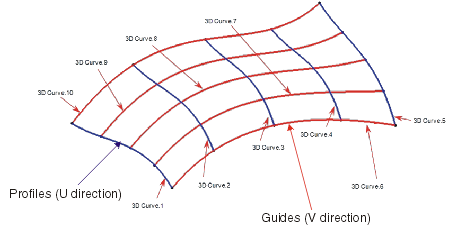
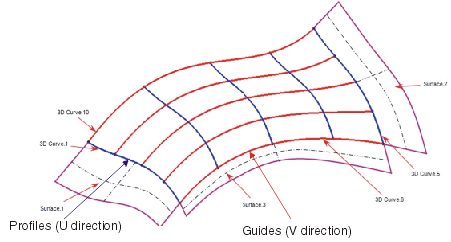
- Guides: Selection of one or several curve elements as guides (V direction of the loft).
- Profiles: Selection of one or several curve elements as profile (U direction of the loft).
 |
Note: The curve elements selected as guides and profiles must all lie in the corresponding
direction.
Otherwise the selection will not be considered as valid input.
 |
- Spine: Selection of one or several curve elements as spine curves.
The profiles/sections are driven along a spine curve, whereby they lie upon a 2D plane which is perpendicular to the spine
curve.
A separate spine curve can be selected for each edge of the lofted surface.
- OFF: Usage of an implicit spine curve which is calculated from the selected profiles and guides.
For more information please refer to Implicit spine.
- ON: Selection of a user-defined spine curve.
For more information please refer to User-defined spine.
|
| |
Options tab |
 |
| |
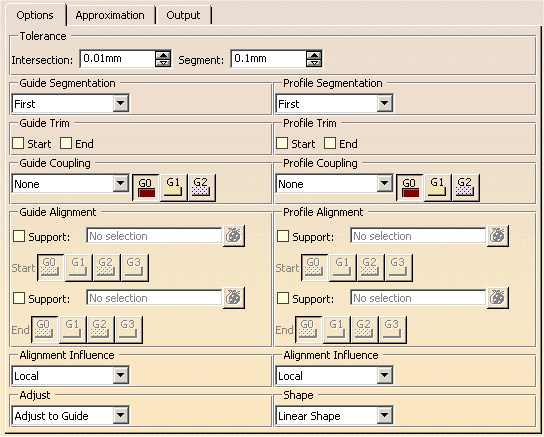
- Tolerance:
- Intersection: The intersection points of the selected guides and profiles must
be lying within the specified tolerance.
Moreover, the Intersection tolerance defines the maximum distance to the support surfaces which influence the continuity
condition of the result.
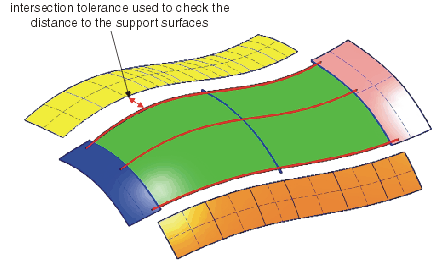
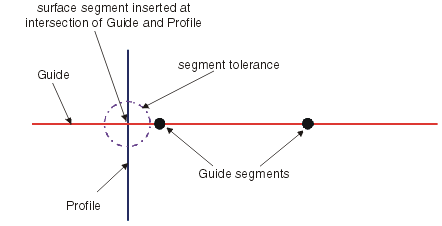
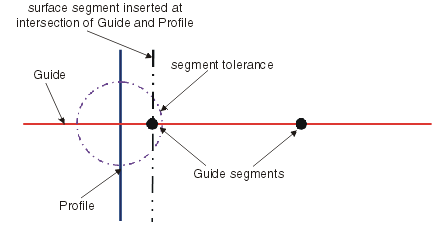
- Segment: The Segment tolerance determines the segment boundaries of the resulting surface at the intersection
point between guide and profile according to the following criteria:
- If the value is exceeded at the point of intersection, the segment position in the result uses the guide and profile
curve intersection for the segment position irrespective of the internal segmentation of the curves used.
- If the tolerance value is met at the point of intersection, the segment position in the result uses a segment point
in the curves used.
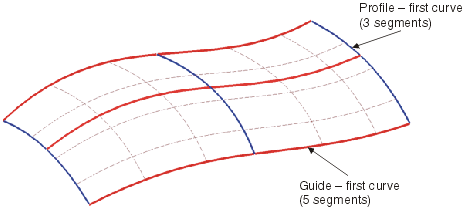
- Guide/Profile Segmentation: The segmentation of the loft surface can be influenced according to the segmentation
points on the guide and profile curves. The following options are available:
- First: The segmentation will be taken from the curve defined as first guide or profile from the selection
process. All other curves are ignored.
- Max.: The segmentation will be taken from the guide or profile with the maximum number of segments.
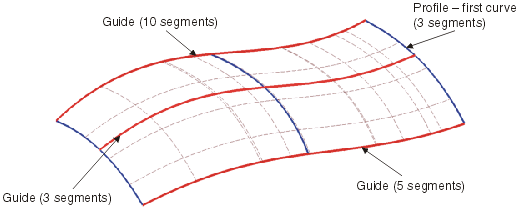
- All: The segmentation of the result will be calculated from the segment boundaries of all guides and profiles.
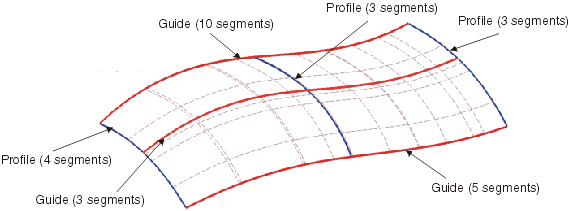
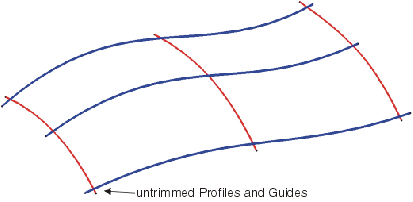
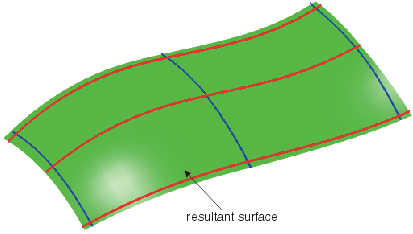
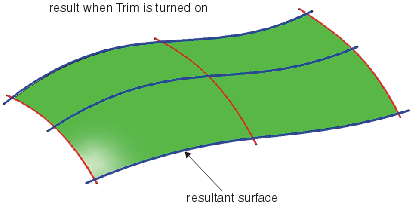
- Guide/Profile Trim: Input curves that do not have coincident ends can be trimmed temporarily at their Start
and/or End.
The resultant surface is then created between temporary trimmed guides and profiles.
- Guide/Profile Coupling: The parametrization of the resultant surface can be influenced by coupling the parametrization
of the individual sets of curves (guides and profiles).
- None: The coupling is defined automatically.

- Segments: The calculation of the coupling is defined by the number of segments contained within the set of
curves defining the profiles and guides allowing the user to re-parameterize according to the internal continuities.
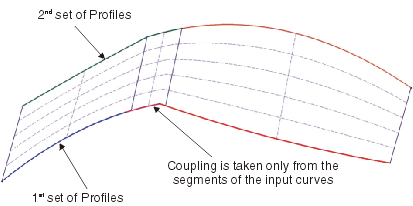
- Cells: The calculation of the coupling is defined by the number of cells (individual curves) defining the
profiles and guides allowing the user to re-parameterize according to the internal continuities.
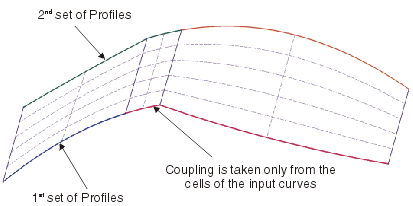
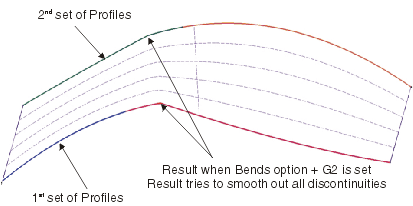
- Bends: The calculation of the coupling is defined by the number of bends (cells and segments) defining the
profiles and guides allowing the user to re-parameterize according to the internal continuities.
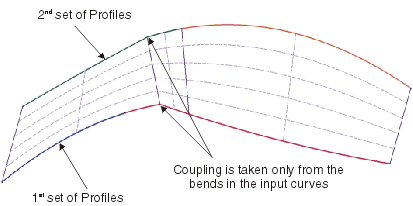
- G0, G1, G2 : A level of continuity is imposed on the selected curves, thus reducing the number of cells within
the result depending upon the inputs.
- Guide/Profile Alignment: These options allow to influence the continuity condition of the selected Start
and End curves for either guide or profile to an adjacent set of support surfaces.
- Support: For each side of the lofted surface you can define more than one support.
Their order is managed by the command, so that you are not required to organize the data before commencing the construction
of the lofted surface.
- Start/End: G0, G1, G2, G3: Setting the continuity condition for start and end curves.
After creating the lofted surface manipulators for graphically editing the continuity are displayed at the support surfaces.
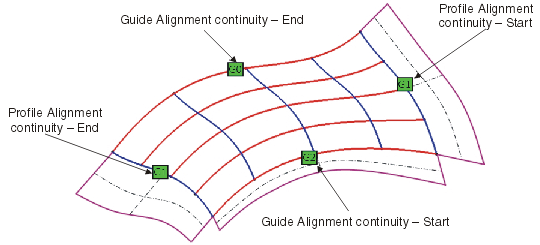
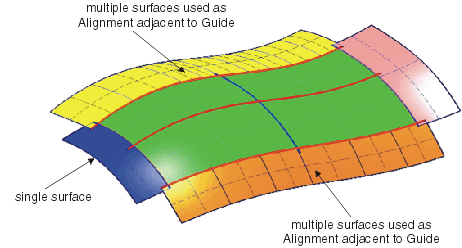
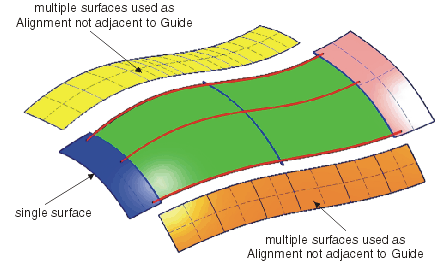
The images below demonstrate the acceptable configurations for the use of support surfaces for aligning guides and profiles.
- Alignment Influence:
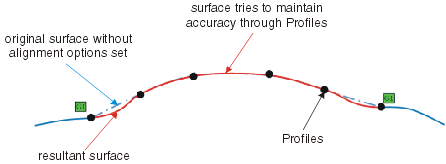
- Local: The continuities assigned to a specific edge only influence the surface shape locally between the
1st and 2nd curve according to the continuity specified.
As a result of local continuity matching, the result in addition attempts to pass through the guide and profile curves.
Therefore depending upon the continuity settings, the positions of the curves and the approximation settings, result attempts
to create a non oscillating result.
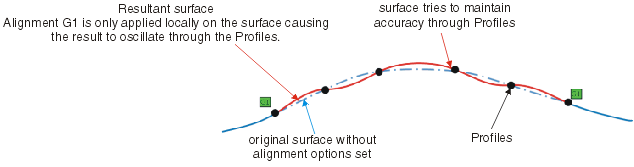
- Spread: The continuities assigned to a specific edge influence the surface shape through all the selected
internal guide and profiles according to the continuity specified.
Therefore depending upon the continuity settings, the positions of the curves and the approximation settings, an oscillating
result may be produced.
- Global: The continuities assigned to a specific edge, influence entire surface shape. Depending upon the
approximation settings the result accuracy to the guide and profile curve inputs can be lost.
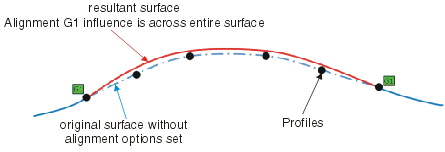
|
Note: The images are for demonstration only and show exaggerated conditions.
|
Adjust: With these options you can determine which input elements shall have priority for the surface calculation.
- Adjust to Guide: The guides have most influence on the result.
The profiles are then used as a guide to assist in achieving the smoothest transition of the result between the guides.

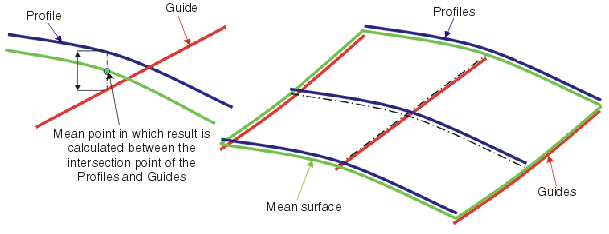
- Mean: The result is calculated through the “mean” point between the intersection of all profiles and guides
with the influence on achieving the smoothest interpolation in both U and V direction.
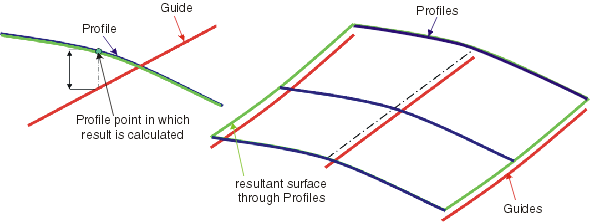
- Adjust to Profile: The profiles have most influence on the result.
The guides are then used as a guide to assist in achieving the smoothest transition of the result between the profiles.
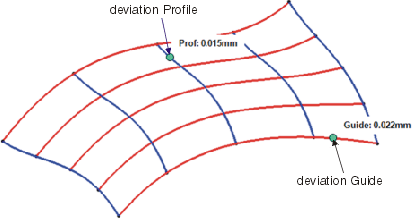
The approximation settings used will effect the accuracy of the result. Any deviation of the final result from the true mathematical
result is displayed in the dialog box (button More Info...) and in the graphics.
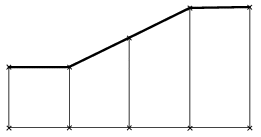
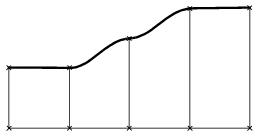
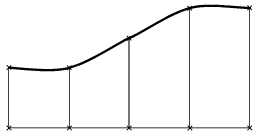
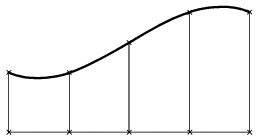
Shape: Specifies the shape of the surface, i. e. the transition type between the individual selected profiles.
|
Linear Shape
|
Local Shape
|
|
Smooth Shape
|
Global Shape
|
|
| |
See Approximation tab |
| |
See Output tab |
| |
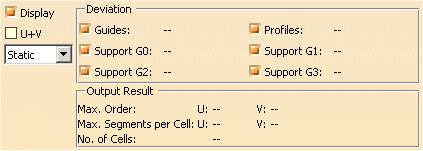
Click 'More Info' to display deviations and output results. |
 |
| |
- Display: Depending on the options selected, values are displayed in the graphics area.
- U+V: Display of the UV vectors of curves and surfaces.
- Static, None: See Apply Modes
- Deviation:
- Guides: Displays the maximum deviation of the Guide curves from its true mathematical position.
- Profiles: Displays the maximum deviation of the Profile curves from its true mathematical position.
- Support G0...G3: Displays the maximum deviation of the result from the support surfaces at the surface limits
defined by the first and last Guide and Profile curves.
- Output Result: See Output Result
|
|

|