
Topics discussed are:
Hiding or Showing the Geometry of a Solid Functional SetIf the solid functional set is in no show mode, protected features (in red) as well as wireframe geometry remain visible, unless they are contained in a nested solid functional set. To hide or conversely, show the geometry of a solid functional set:
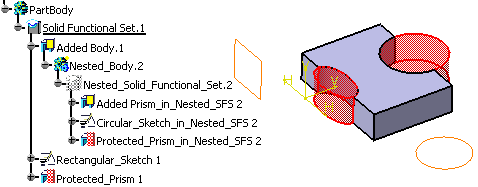
In the above figure, the nested solid functional set Nested_Solid_Functional_Set.2 is in no show mode. You can observe that the Circular_Sketch_in_Nested_SFS 2 feature and the shape of Protected_Prism_in_Nested_SFS 2 under Nested_Solid_Functional_Set 2 are visible. This is because the nested body nested_Body.2 is in show mode. Similarly, the sketch feature Rectangular_Skecth 1 and the protected prism feature Protected_Prism 1 are visible because Solid_Functional_Set.1 is in show mode.
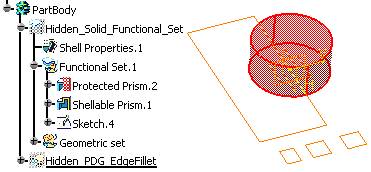
In the above figure, the solid functional set Hiddend_Solid_Functional_Set is in no show mode. As a result, its actual solid geometry is not visible. In this case, you can observe that the fillet Hidden_PDG_EdgeFillet is not seen, but the shape of Protected Prism.2, the shape of Shell Properties.1 and all wireframe/sketch are seen. |
Features Contained in a Functional SetFunctional features contained in a functional set are no
longer visible as soon as you have selected Only Current
Body
Solid Functional Set.1 is set as current.
Only Current Body
|
Hiding or Showing Protected FeaturesBy default, pure protected
features, like
protected,
holes and
fitting features remain visible once created (shown in red). |
 in the Tools toolbar. However, the features
contained in the current solid functional set are shown.
in the Tools toolbar. However, the features
contained in the current solid functional set are shown.