
- those files are .xls or .xlsx files,
- the core sampling file is generated from the points created at the zones level,
- the stack-up file is then generated from the core sampling information.

Either work on the part where you have created the plies from slicing, or open StackupFromCSSA1.CATPart

-
Click Stack-up File from Core Samples
 in the Preliminary Design toolbar.
The Stacking from core sampling information dialog box is displayed:
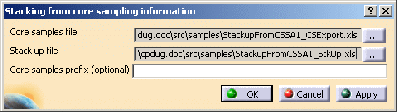
A name and a storage path are proposed by default for each file to create.
The default storage path is that of the directory containing the part you are working on.
The default names are based on the name of the part you are working on,
completed by the suffix _CSExport for the core samples file, and by the suffix _StkUp for the stack-up file.
Click ... to edit the names and paths. -
Select the stacking for which you want to create the files.
-
Optional: you can key in a prefix to be used for the core sampling, e.g. CS
-
Click OK to validate and exit the dialog box.
The core samples are created in the specification tree and in the 3D viewer.
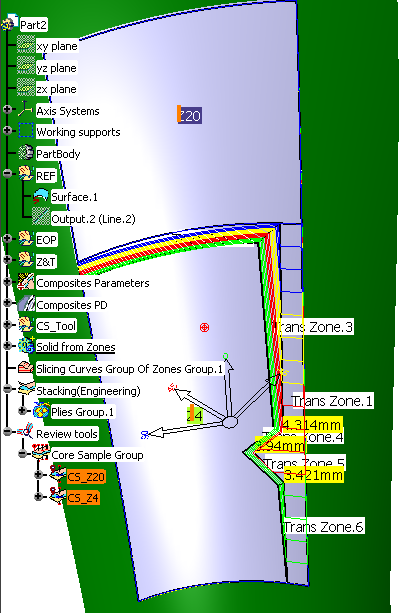
The files StackupFromCSSA1_CSExport.xls and StackupFromCSSA1_StkUp.xls are created in their directory.
They look like this:- Core samples file: StackupFromCSSA1_CSExport.xls:

- Stack-up file: StackupFromCSSA1_StkUp.xls:
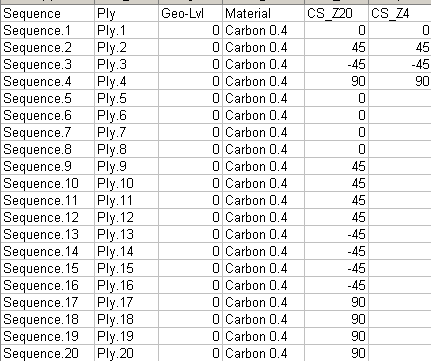
- Core samples file: StackupFromCSSA1_CSExport.xls:
