

-
Click Preview Distortion to view distortion distribution.

The Flattened Plate Distortion viewer shows minimum and maximum distortion values. For more information about the Flattened Plate Distortion, see below.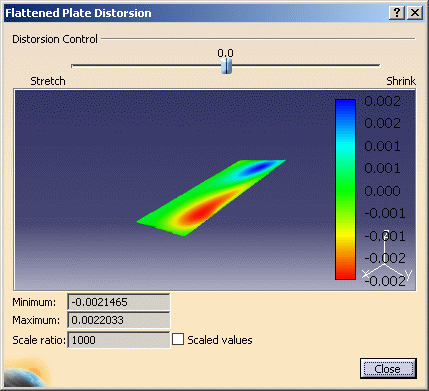
-
Use the slider in the Flattened Plate Distortion dialog box to adjust the stretch and shrink and see the results in tThe slider is graduation from -1 to +1; a value of -0.6 means 60% stretch and 40% shrinkage.
-
If needed, select Scaled values to have the system define a scale ratio to optimize the display.
-
Click Close in the Flattened Plate Distortion viewer when done.
Distortion is an attribute stored on the operation and can be viewed in the Properties dialog box.
You are now ready to generate a set of plate forming templates.

About the Flattened Plate Distortion Dialog Box
The slide, seen in the dialog box, helps to control the distortion. The range of the scale is [-1,1], where:
- -1 corresponds to only stretching (i.e. the distortion at 100% of the computation points is positive, which means that the distortion is positive at all the points). This means the flattened body is larger than the input body.
- 1 corresponds to only shrinking (i.e. the distortion at 0% of the computation points is positive, which means the distortion is negative at all the points). This means the flattened body is smaller than the input body.
- 0 corresponds to even distortion (i.e. there are as many
(50%) points with stretching distortion as there are with
shrinking distortion)
An intermediate value, say -0.6, means 80% of the points have stretching distortion, which implies 20% points have shrinking distortion.
Minimum and Maximum values of distortion are displayed in the dialog box. These values are not the percentages, but the percentages converted into decimals. A minimum value of -0.0021465 (seen in the panel) corresponds to - 0.21465%. A scale ratio of 1000 is provided to scale the distortion value before display.
Default flattening values are 50% stretch and 50% shrink. Once the Flattened Plate Distortion dialog opens, it shows the flattening result (flat surface) based on 0.5 shrink/stretch. If the flattening result is not satisfactory you can control the distortion (through slider) and update the flattened surface after clicking on the OK or Preview button of the Forming dialog box.