 |
This procedure describes how to create
move
activities using geometry that already has a track created.
Depending on the CAD program used to create the original product geometry, a product may have been created with a track. A track is the path that a move takes. If so, that track can be imported and used to create a move activity. If, in addition to using DELMIA DPM Assembly Simulation, you have the
CATIA DMU Fitting product, you may have used the DMU Fitting commands to
define a path for a product. The product may also contain other
activities in a sequence, such as visibility activities. Using
Imports the Track |
|||
 |
Importing a track created with a product requires that
the product data containing the track already
be loaded into this process.
If the product data does not have track already defined, use the regular
Create Move
Activity  . . |
|||
 |
|
|||
 |
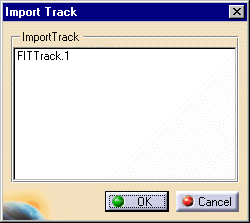
You can select multiple tracks for
importation by holding down the Ctrl key when you use the
mouse to select the tracks. Clicking OK imports the
tracks, as move activities, into the process in the same order in which
they appear in the Import Track dialog box. The track is imported relative to its part's current position; the track does not necessarily retain the placement it had when it was created. |

 does not import any other activities in a sequence; it imports the
specified track or tracks and creates move activities from the tracks.
does not import any other activities in a sequence; it imports the
specified track or tracks and creates move activities from the tracks.