


For this scenario, we will be utilizing the Equipment & Systems > Electrical Harness Discipline > Electrical 3D Design Part workbench to create the constraints.

-
Click Define Bundle Connection Point
 ,
and select a part or product; from the specification tree, select the
connector C_END_BLOCK_3.
,
and select a part or product; from the specification tree, select the
connector C_END_BLOCK_3.The Bundle Connection Point Definition dialog box appears.
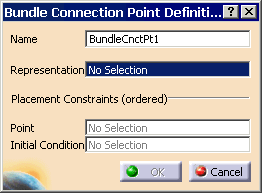
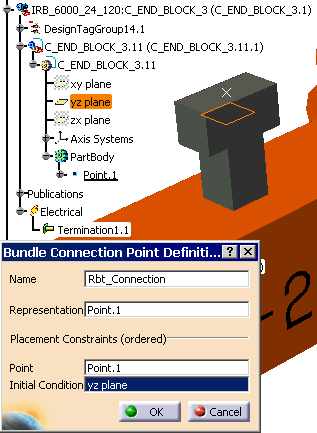
Change the Name to Rbt_Connection
For Representation, select the point. A representation can be a point or a surface.
-
For Point, re-select the point. This point is used as a bundle segment extremity.
For Initial Condition, select the yz plane. This plane or axis determines the direction in which the cable comes out of the connection point. (Right-click the yz plane, and click Hide/Show, if the plane is not visible.)
-
Click OK.
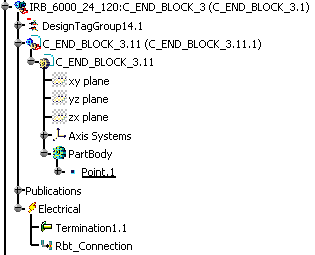
The Rbt_Connection appears in the specification tree.
-
Click Define Bundle Connection Point
,
and select a part or product. From the specification tree, select the
connector C_END_BOX_1. The Bundle Connection Point Definition dialog box appears.
Change the Name to Box_Connection.
For Representation, select the point.
-
For Point, re-select the point.
For Initial Condition, select the xy plane. This plane or axis determines the direction in which the cable comes out of the connection point.
-
Click OK.
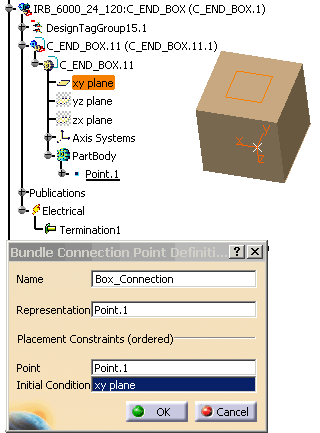
The Box_Connection appears in the specification tree.
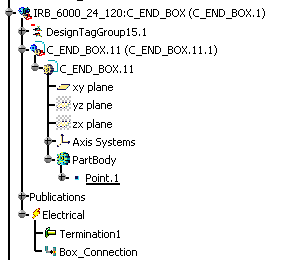
-
Save your scenario.
-
Next, you will define the geometrical harness for the connection points that were created.
