 |
-
Select the parent process of the circle measurement.
-
On the toolbar, select the black arrow at the bottom
of the Measure Generic . .
-
Click Measure Circle in the Measure Feature Activities
sub-toolbar:
in the Measure Feature Activities
sub-toolbar:
-
Select the circle feature.
| The Measure Circle dialog box appears. |
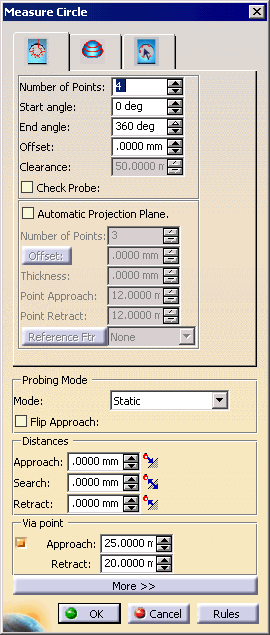 |
| The default values are computed from the Knowledgeware rules
provided with the product. |
-
Use the spinner to raise the number of points in the
feature path to 6.
-
Click OK.
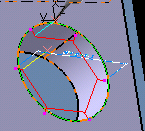
| The activity is added to the process list on the PPR tree. |
| The measured circle appears on the part geometry: |
 |
-
Repeat Steps 3-4 in the
Define Circle procedure with a second circle.
-
In the Define Circle dialog box,
select the Create FPath check box, then click
OK.
| In this case, two activities have been created in
the PPR tree: Define Circle and Measure Circle. |
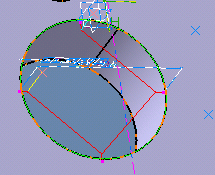
| The path for the second measured circle appears on
the geometry. Note the difference in measurement path made
by the default number of measurement points (4) created using the
Create FPath option in the Define
Circle dialog box versus selecting more points using
the Measure Circle box. |
 |
|


 icon instead of Measure Generic