 |
Structure Preliminary Layout documents can
be stored in SmarTeam. Documents are managed in projects in SmarTeam.
You must therefore create a SmarTeam project. |
 |
To ensure seamless integration, you must have both a CATIA and
SmarTeam session running. |
 |
-
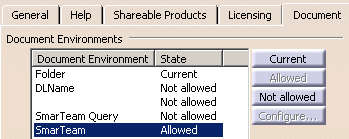
In CATIA, specify your document environment:
- Select Tools -> Options -> General -> Documents tab
- Set SmarTeam to Allowed.
|
 |
-
Still in CATIA, select Connect from the
SmarTeam menu to establish your CATIA - SmarTeam connection.
-
To save a CATIA document in SmarTeam:
- Select Save from the SmarTeam menu.
The Projects Manager dialog box displays.
- Search for the SmarTeam project you want to save your
document under.
- Select the project
- Select the Link to Projects checkbox, then click Save.
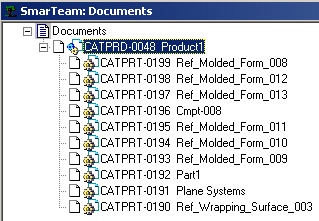
Your document is saved in SmarTeam. |
 |
-
To open a SmarTeam document and send it to CATIA:
- Select Find Document from the SmarTeam
menu in CATIA.
The Search Editor dialog box displays.
- Select CATIA Products, then click Run.
The CATIA Products dialog box displays.
- Right-click the project and select File Operation ->
Open in the contextual menu.
The document associated with the SmarTeam project opens in
CATIA. |
|
| |
For more information on SmarTeam capabilities, see the appropriate
guide.
|
|
 |