
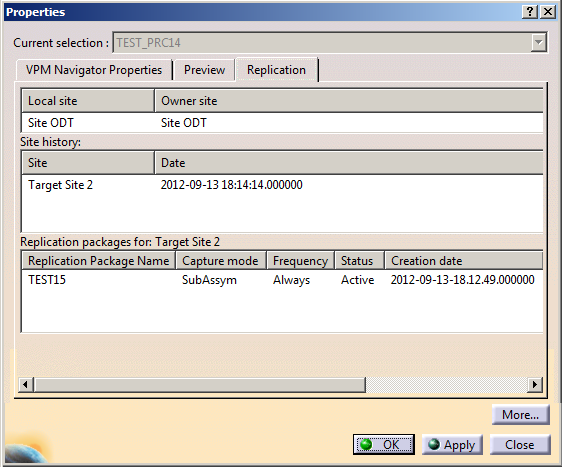
The first table available under the Replication tab displays the local site and the owner site name.
Local site: Displays the name and the description about the site on which you are currently working
Owner site: Provides information about the site to which the object belongs
The Site history lists the external sites (exported to or imported from):
Site: Displays the name and the description of the site to which the object has been replicated
Date: Displays the date and time stamp at which the object has been replicated to the Remote Site
The Replication packages for the target Site lists all the Replication packages created for the current selected target site.
Replication Package Name: Displays the name of the replication packages created to export data to the selected target site
Capture mode: Displays the type of the capture mode used when the replication packages were created
Frequency: Displays the frequency type used such as Transfer, Always or Once when creating the replication packages
Status: Displays the status of the replication packages such as New, Activated, Inactivated.
Creation date: Displays the date and the time stamp at which the replication packages have been created

| Conditions | Replication tab |
|
If a Replication Package is created but not used for extraction |
No information is displayed |
| If a Replication Package is created and used for an extraction but neither applied nor received any acknowledgment | No information is displayed even if we do an extract with TSO |
| If a Replication Package is created and used for an extraction and applied but not received any acknowledgment | If the extraction is done with TSO, information is displayed in Remote Site. |
| If a Replication Package is created and used for an extraction and applied and also received an acknowledgement | A line appears in the table of Local Site but no information is displayed in Remote Site except if the extraction is done with TSO |
