


-
To retrieve the help information:
CATPDMReconcileEV5Batch -help -
To run the reconciliation:
CATPDMReconcileEV5Batch -file filename [-structure] [-simul (Execute|Rule|NoRule]] [-checkDoc numberOfDocs]
[-reload docname] [-keepExternal docname] [-publication docname] [-outputFileList] [-inxml fileName [-completeWithDefaultMapping] [-epexml fileName] [-queryName queryname] [-xml filename]
[-newVersion object] [-newRevision object] [-forceNewVersion][-forceKeepExternal]
[-pvs ExpandCaptureName][-configHandler cfgHandlerName]
[-zoneClearance clearanceInMm] [-zoneMode filteringMode] [-zoneFilter zoneName]
[-attributeFilter attAlias attOperator attValue]
[-action actionAlias]
[-GR globalSetName [globalSetInput] [/filter [filterInput] [/otherFilters]]]
[-importInAssembly PRC_Name]
[-allByDeltaMode] [-overwriteByDelta PartVersionName] [-newVersionByDelta PartVersionName]
[-lockMgt ReleaseAtSave] [-lockMgt NotToAcquire] [-lockMgt Acquire]
[-noDraftingUpdate] [-unlockViews]
[-noPartUpdate]
[-server xxx] [-role xxx] [-user xxx] [-pwd xxx] [-spwd xxx]
Arguments
Connection Information
-server xxx : Provide a connection string
describing how to establish a connection to VPDM repository.
-role
xxx : Role used for ENOVIA V5 VPM connection.
-user
xxx : User for ENOVIA V5 VPM connection.
-pwd
xxx : User password for database connection.
-spwd xxx : Secure password for database
connection.
General Information
-help Help
-file filename : Name of the CATIA file to be loaded
and reconciled. Several file statements are possible.
-checkDoc
Provide number of documents in the Reconcile session for validation.
-xml
filename : Stream Reconciliation session in an XML file.
-inxml Enables to specify an input EpeXML file to restart the batch
from a previous reconcilation session; this option should be used with -completeWithDefaultMapping
if the XML file does not specify the mapping for all objects.
-epexml Enables to generate an EpeXML file that will be used with
option -inxml.
-simul Execute|Rule : Enable not to execute
Save or Apply in VPDM.
Execute means that reconciliation is applied, but the save is not
done.
Rule means that the mapping and rules are set but neither the
reconciliation is applied nor the save is done.
NoRule means that only reconciliation session creation is done.
-queryName queryname : Name of the criterion to be
searched (Default is Query by object Id).
Save Options
-lockMgt ReleaseAtSave: Acquires missing
locks on Document Revision, Part Version and Item Instance if not
allocated to another user and released them after Save.
Note: The
-lockMgt ReleaseAtSave argument is
applicable only for those entities that are not yet locked during
reconciliation.
-lockMgt NotToAcquire: Forbids lock
acquisition on Document Revision, Part Version and Item Instance. It
could drive to case where save after reconciliation will fail due to
missing locks.
-lockMgt Acquire: Acquires missing locks on
Document Revision, Part Version and Item Instance if not allocated to
another user. (Default is Acquire lock management mode).
-noDraftingUpdate : Prevents the automatic update of
CATDrawings associated to modified parts and modified assemblies (note
that when using this option on modified assemblies, it is strongly
recommended that it only be used on publication exposed CATProducts).
This option can be used when no local updates have been made to the
drawings.
-unlockViews:
Enables unlocking of the drafting views to update on drawings. It is
highly recommended to use this option otherwise locked drafting views
dimension could become isolated and also ghost links are generated.
-noPartUpdate: Enables saving of the Product or Part in
the database before updating it.
-action
actionAlias: specifies the identifier of the action
to be used when saving the modifications in ENOVIA V5 VPM.
-configHandler CfgHandlerName: used to
specify the ID of a configuration handler (already defined in ENOVIA V5
VPM) to be used to filter the structure from ENOVIA V5 VPM.
CfgHandlerName
is the identifier of the configuration handler. This option may be
specified at most one time in one command.
-pvs FilterCaptureName: used to specify the
ID of of the expand Capture (PVS) to filter assembly structure. This
option is mutually exclusive with other product structure filtering
options.
-zoneClearance
clearanceInMm: sets the clearance (in millimeters)
to be used in a volume filter on the ENOVIA V5 VPM product structure.
This option may be specified at most one time in one command.
-zoneMode filteringMode: sets the volume
filter mode to be used in a zone filter on the ENOVIA V5 VPM product
structure. Values can be FullyIn, FullyOut,
PartlyIn and PartlyOut. PartlyIn is the default value.
This option may be specified at most one time in one command.
-zoneFilter
zoneName: zoneName is
the identifier of a single zone (already defined in ENOVIA V5 VPM)
to be used in a zone filter on the ENOVIA V5 VPM product structure. This
option may be specified more than once in one command.
-attributeFilter
attName, attOperator,
attValue : used to specify the criteria to be used in an attribute
filter applied to the ENOVIA V5 VPM product structure.
attName is the identifier of an attribute of an instance or part
reference. attOperator is the operator to be used in the
filter predicate. attValue is the attribute value to be used.
This option may be specified more than once in one command. attOperator
can have the following values: LIKE, EQ (=), NOTLIKE, NOTEQ (!=), GT (
>), GTEQ (>=), LT (<), LTEQ (<=).
Rule Management
-reload docname : Enable to set rule to Reload
instead of Overwrite for an object with a specified name. Several reload
statements are possible.
-reload PartName : Enable to set
Reload from VPDM rule instead of Overwrite rule for an
object with a specified name.
Several reload statements are possible.
-keepExternal docname : Enable to set rule to Keep as
External reference for an unloaded document. Several keepExternal
statements are possible.
-structure : Enable to switch from a full document Publication
Exposed to a mode where CATProducts are save in Structure Exposed.
-publication docname : Enable to set an included
CATProduct document to be Publication Exposed when the main CATProduct
document is in Structure Exposed mode. (only possible when -structure
parameter is used).
-newVersion object : object can either be
the name of a document or a part version. When a document is specified
(for example PartA.CATPart) the New Version rule will be set on the
publication exposed CATPart. When a part version is specified, the New
Version rule will be set on all eligible mapped objects under the
specified part version. Several new version statements can be issued in
one command.
-newRevision
docName : sets the new revision rule on the specified
document. Several new revision statements can be issued in one command.
-forceNewVersion: results in all documents (for example,
CATDrawings) being saved as new revisions and all publication exposed
CATProducts and CATParts being saved as new versions.
-forceKeepExternal: force usage of Keep as External rule for
broken link (document not found) where query return no document.
-allByDeltaMode: Enables to set rule to Overwrite by Delta for
all mapped Part or Product in structure exposed instead of Overwrite.
The -allByDeltaMode can also be applied to both
Overwrite as well as New Version rule.
-overwriteByDelta PartVersionNumber: Enables
to set rule to Overwrite by Delta instead of Overwrite for a part or a
product in structure exposed. Several -overwriteByDelta statements are
possible.
-newVersionByDelta PartVersionNumber:
Enables to set rule to New Version By Delta for a part or product. in
structure exposed.
Several -newVersionByDelta statements are possible.
-GR globalSet [globalSetInput] [/filter [filterInput]
[/otherFilters]]: used to run a global set with a filter.
globalSet is the name of the global set,
globalSetInput is any input parameters that are used with the
global set, /filter allows you to apply a filter (SearchNode
or custom) to select objects for the global set, filterInput
is any input parameters that are used with the filter and /otherFilters
- The mapping may not be complete when using global sets, so the -completeWithDefaultMapping option should be used to complete the mapping. To reinforce this, when using global sets if -completeWithDefaultMapping is not used the following command line options will be ignored: -queryName QueryName, -structure, -publication docName, -reload docName, -keepExternal docName, -forceKeepExternal, -newVersion object, -newRevision docName, -forceNewVersion.
- If the global rule encounters an error, the batch will
continue if the error is not a fatal error. For all default
global rules, the errors are not fatal and if encountered a
messeage will be given and the global rule will continue on to
the next object.
| Global Set | Parameter | Meaning | Values |
| New | forceNew | force even on mapped objects | YES (or TRUE) NO (or FALSE) NO is the default. |
| Query | queryName | query name | Name of query (as displayed in the reconciliater panel) |
| skipWhenMapped | skip or not already mapped objects | YES (or TRUE) NO (or FALSE) NO is the default. |
|
| implicitRule | the rule of all objects that are mapped is set to Overwrite and all objects that are not mapped is set to New. | YES (or TRUE) NO (or FALSE) YES is the default. |
|
| StructureExposed | No parameters | ||
| PublicationExposed | No parameters | ||
| Overwrite | forceOverwrite | force overwrite even on mapped objects | YES (or TRUE) NO (or FALSE) NO is the default. |
| NewVersion | forceNewVersion | all objects, even those with rules already defined on them, will be set to New Version, if possible. | YES (or TRUE) NO (or FALSE) NO is the default. |
| onlyOnDocuments | version only part version of the CATPart documents | YES (or TRUE) NO (or FALSE) NO is the default. |
|
| Reload | forceReload | force reload even on mapped objects | YES (or TRUE) NO (or FALSE) NO is the default. |
| NewRevision | forceNewRevision | force new revision even on mapped objects | YES (or TRUE) NO (or FALSE) NO is the default. |
| KeepExternal | forceKeepExternal | force keep external even on mapped objects | YES (or TRUE) NO (or FALSE) NO is the default. |
| MagicRecon | forcePersistency [boolean] | force the persistency even if already applied on object. (false means we will keep existing mapping, if any.) If forcePersistency is TRUE then ForceMapping will be consider as a TRUE as change in persistency will lead to unmapping the object. | YES (or TRUE) NO (or FALSE) YES is the default. |
| forceMapping [boolean] | force the automatic mapping even if already applied on object. (false means we will keep existing mapping, if any.) | YES (or TRUE) NO (or FALSE YES is the default. |
|
| forceRule [boolean] | force the automatic application of rule if already applied on object (false means we will keep selected rule, if any.) | YES (or TRUE) NO (or FALSE) YES is the default. |
| SearchNode Filter Inputs | Availability | Signification | Values |
| Type | The Scm object type | ANY, PART, ANYDOC, DOC, PROXYDOC | |
| DOCTYPE | Only available if TYPE is ANYDOC, DOC or PROXYDOC | The extension of document | Any string (reg exp) |
| SUBTREE | Name of the Scm object considered as root of the tree | Any string | |
| NAME | Name of Scm object | Any string (reg exp) | |
| FILENAME | Only available if TYPE is ANYDOC, DOC or PROXYDOC | Name of document file | Any string (reg exp) |
| STATE | Status (Mapped/Not mapped) | ANY, MAPPED, NOTMAPPED | |
| MODE | Exposition mode | ANY, PUBEXP, STRUCTEXP | |
| %ATTRNAME% | Attr Name and Value. Based on
RegExp. %ATTRNAME% token to be replaced by real display name (NLS) of the attribute (for instance “Part Version”) |
Any string (reg exp) |
-outputFileList : Enables to define the file path of the output file containing the files that will be reconciled.
Filter algorithm locates all the objects of the Reconcile Session that corresponds to the criteria given in the list below:
- Type Criterion: Corresponds to the type of the object to locate. The value is ANY, if the criterion is not set. Similarly, for Part Version the value is PART, for documents ANYDOC, for document loaded in memory DOC and for document pointed through broken links the value is PROXYDOC.
- DOCTYPE Criterion: For filtering of document extension, the values set are ANYDOC, DOC or PROXYDOC. If the value is ANY, all the document extensions are accepted.
- MODECriterion: Corresponds to the exposition of the object to locate. The value is either STRUCTEXP or PUBEXP and ANY, if the criterion is not set.
- State Criterion: Corresponds to the status of the object to locate. The value is ANY, if the criterion is not set. Similarly, for objects only mapped to a PDM object, the value is MAPPED and for only unmapped objects the value is NOTMAPPED.
- Name Criterion: Corresponds to the name of the object as it appears in CATIA view.
- AttributeCondition: Corresponds to the condition on attributes of the ScmObject. Attribute refers to CV5 attributes and for mapped objects PLM attributes.
-importInAssembly
: Enable to define the name of the product to be used to import
sub-assembly.
This command enables you to reroute the assembly drawing on Product Root
Class. Following reconciliation, the drawing is linked to the assembly
in context of the PRC apart from being linked to assembly reference.
Therefore, if any modification is performed on the assembly instance or
if the assembly instance is deleted with regards to PRC, there will be
an impact on the drawings associated with it.
The diagram below illustrates the impact on imported drawings:
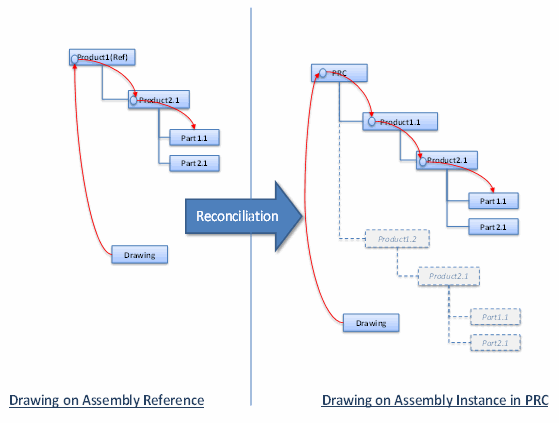
The basic scenario is as follows:
- First the batch user runs a reconciliation in simulation mode (simulation mode is specified using the
option -simul on the batch command line) and using the command line parameter -epexml so that the batch will generate an XML file (called EpeXML file) of the reconciliation session state. This XML file will be used as a pre-valuated template in the ensuing steps.- The user will eventually have to complete the generated EpeXML file to resolve those ambiguities that were not resolved by the simulation (e.g. if the query returned several results, the mapping must be completed by hand). The user can also modify the EpeXML file to explicitly indicate the rule and mapping to be applied to a given object.
- Then using the completed EpeXML file, the user reruns the reconciliation batch with the command line parameter -inxml.
- The batch can be rerun multiple times using the same EpeXML file with -inxml command line parameter.
Examples
When running batches, you must always:
- use the command catstart
- the catstart environment (option -env) to be used is the same as the environment used with VPM Navigator.
For more details, see the Infrastructure Guide, Basic Tasks, Starting a Session on Windows.
set CNEXTOUTPUT=E:\tmp\trace.txt

           catstart -run "CATPDMReconcileEV5Batch -file \"E:\DataREC\RECV5_TEST1rootprc.CATProduct\"
           -structure -queryName \"Query by object Id\" -user odtitp -pwd xxxxx
           -role VPMADMIN.ADMIN.DEFAULT -server \"servername:portnumber\""
-
Reconciliation of an assembly
Here is an example of the command line to use to reconcile an assembly RECV5_TEST1rootprc.CATProduct:
set CNEXTOUTPUT=E:\tmp\trace.txt
CATPDMReconcileEV5Batch -file E:\DataREC\RECV5_TEST1rootprc.CATProduct -structure queryName "Query by object Id" -user odtitp -spwd xxxxx -role VPMADMIN.ADMIN.DEFAULT -server "xxxxxxxxx:nnnn" -
Reconciliation with reload of CATParts
Here is an example of the command line to use to reconcile an assembly RECV5_TEST1rootprc.CATProduct containing two CATParts RECV5_TESTPART1.CATPart and RECV5_TESTPART2.CATPart:
CATPDMReconcileEV5Batch -file E:\DataREC\RECV5_TEST1rootprc.CATProduct -queryName "Query by object Id" -reload RECV5_TESTPART1.CATPart -reload RECV5_TESTPART2.CATPart -
Reconciliation with sub-products as publication exposed
Here is an example of the command line to use to reconcile an assembly RECV5_TEST1rootprc.CATProduct containing two sub-product RECV5_TEST1prd1.CATProduct and RECV5_TEST1prd2.CATProduct:
CATPDMReconcileEV5Batch -file E:\DataREC\RECV5_TEST1rootprc.CATProduct -queryName "Query by object Id" -publication RECV5_TEST1prd1.CATProduct -publication RECV5_TEST1prd1.CATProduct -
Reconciliation with CATParts as KeepExternal
Here is an example of the command line to use to reconcile an assembly RECV5_TEST1rootprc.CATProduct containing two CATParts RECV5_TESTPART1.CATPart and RECV5_TESTPART2.CATPart that are missing (broken link):
CATPDMReconcileEV5Batch -file E:\DataREC\RECV5_TEST1rootprc.CATProduct -queryName "Query by object Id" -keepExternal RECV5_TESTPART1.CATPart -keepExternal RECV5_TESTPART2.CATPart -
Reconciliation with CATParts when the Part Number is different from the file name
Here is an example of the command line to use to reconcile an assembly RECV5_TEST1rootprc.CATProduct containing two CATParts RECV5_TESTPART1.CATPart and RECV5_TESTPART2.CATPart when the part number is not equal to the file name. The queries Query by Object Id and Easy Query will failed in this case, the correct query to use is Query Document by Part Id.
CATPDMReconcileEV5Batch -file E:\DataREC\RECV5_TEST1rootprc.CATProduct
           -queryName "Query Document by Part Id"
Generating an EpeXML file with a reconciliator batch simulation
To generate an EpeXML based on a workpackage composed of e:\DataREC\RECV5_drawing.CATDrawing and e:\DataREC\RECV5rootprc.CATProduct, the command line is:
CATPDMReconcileEV5Batch -file "e:\DataREC\RECV5_drawing.CATDrawing"


       -file "e:\DataREC\RECV5rootprc.CATProduct"

       -structure -queryName "Query by object Id" -simul Rule

       -epexml "e:\tmp\XMLSessionEpe.xml"
Rerunning a session using an EpeXML file
The previously generated and modified EpeXML file can be used to rerun the session:
CATPDMReconcileEV5Batch -file "e:\DataREC\RECV5_drawing.CATDrawing"


       -file "e:\DataREC\RECV5rootprc.CATProduct"

-inxml "e:\tmp\XMLSessionEpe.xml"-
Reconciliation of an assembly with two leaf CATParts, one to be saved to ENOVA V5 VPM as new version and the other as new revision (Note that saving as new version will version the part and revision the corresponding geometry document)
Here is an example of the command line to use to reconcile an assembly RECV5_TEST1rootprc.CATProduct containing two CATParts RECV5_TESTPART1.CATPart and RECV5_TESTPART2.CATPart. :
CATPDMReconcileEV5Batch -file E:\DataREC\RECV5_TEST1rootprc.CATProduct
           -queryName "Query by object Id" -newVersion RECV5_TESTPART1.CATPart

-newRevision RECV5_TESTPART2.CATPart
Reconciliation of an assembly with two leaf CATParts and a CATDrawing document
This example uses the -forceNewVersion to create new versions of the leaf parts (which also created new revisions of their corresponding CATPart documents) and a new revision of the CATDrawing.
CATPDMReconcileEV5Batch -file E:\DataREC\RECV5_TEST1rootprc.CATProduct
           -queryName "Query by object Id" -forceNewVersion
Reconciliation when configured data with a filter set was sent to supplier.
This example will filter the ENOVIA V5 VPM structure with the configuration filter contained in the configuration handler, cfgHdlr1. The modifications by the supplier will be recorded using the action, SupplierChgAction.
When you are saving configured parts, the Create configured part references portal setting in VPM Product Editor Products may need to be set to true if you need any new parts to be created as configured.
CATPDMReconcileEV5Batch -file E:\DataREC\RECV5_TEST1rootprc.CATProduct
		-structure queryName "Query by object Id"

		-configHandler cfgHdlr1 -action SupplierChgAction -user odtitp -pwd
		xxxxx -role VPMADMIN.ADMIN.DEFAULT -server "xxxxxxxxx:nnnn"
Reconciliation when expand capture (PVS) data with filter set is sent to supplier. The example is given below:
CATPDMReconcileEV5Batch -file C:\Documents and Settings\xhq\Desktop\Supplier1\PVSProd1.CATProduct -structure -pvs PVSProd1_PVS -queryName Easy Query -user xhq -pwd xhq -role VPMADMIN.ADMIN.DEFAULT -server aix51plp:9566-
Reconciliation when data with a volume filter set was sent to supplier. Zone clearance of 1mm is set, zone mode is fully in, and 2 zones are set.
This example will filter the ENOVIA V5 VPM structure with the volume filter used to filter the supplier data.
CATPDMReconcileEV5Batch -file E:\DataREC\RECV5_TEST1rootprc.CATProduct
		-structure queryName "Query by object Id"

		-zoneClearance 1 -zoneMode FullyIn -zoneFilter zoneX
		-zoneFilter zoneY -user odtitp
		-spwd xxxxx -role
		VPMADMIN.ADMIN.DEFAULT -server "xxxxxxxxx:nnnn"
Reconciliation when data with an attribute filter set was sent to supplier.
This example will filter the ENOVIA V5 VPM structure with the attribute filter used to filter the supplier data.
CATPDMReconcileEV5Batch -file E:\DataREC\RECV5_TEST1rootprc.CATProduct
		-structure queryName "Query by object Id"

		-attributeFilter Status EQ Approved -user odtitp -pwd
		xxxxx -role VPMADMIN.ADMIN.DEFAULT -server "xxxxxxxxx:nnnn"
This example imports a CATProduct under a newly created PRC:
CATPDMReconcileEV5Batch -file E:\DataREC\RECV5_TEST1rootprc.CATProduct
		-GR StructureExposed -GR Query -GR New
Reconciliation using a global set.
This example will overwrite a CATProduct already existing in the database and sets the reload rule on a specific doc (RECV5_TEST1_PART3.CATPart):
CATPDMReconcileEV5Batch -file E:\DataREC\RECV5_TEST1rootprc.CATProduct
		-GR StructureExposed -GR Query "queryName=Easy Query" -GR
		Overwrite -GR Reload "forceReload=TRUE" / SearchNode "scmType=DOC" "FileName=RECV5_TEST1_PART3.CATPart"
Reconciliation using Magic Reconciliation global set by using:
CATPDMReconcileEV5Batch -file c:\temp\RECV5_TEST1rootprc.CATProduct -Structure -GR MagicRecon "queryName=Query by object Id" "forcePersistency=FALSE"-
Reconciliation preventing the automatic update of drawings.
In this example, a CATPart and its drawing are saved to ENOVIA V5 VPM. The CATPart is modified by the supplier and the OEM launches the batch file on the drawing to update only the CATPart:CATPDMReconcileEV5Batch -file "C:\tmpRedrw.CATDrawing" -noDraftingUpdate Reconciliation inhibits the update of Product or Part by using:
CATPDMReconcileEV5Batch –file PRC.CATProduct –noPartUpdate –server ServerName –user MyId –role VPMADMIN-pwd MyPwd-
Reconciliation of acquiring missing locks on Document Revision, Part Version and Item Instance if not allocated to another user can be done by using:
CATPDMReconcileEV5Batch -file C:\Documents and Settings\xhq\My Documents\R20_HLTEST\ImprveReconusblty\R20_Prod.CATProduct -structure -lockMgt Acquire -queryName Easy Query -user odtitp -pwd xxxx -role VPMADMIN.ADMIN.DEFAULT -
Reconciliation will fail if the locks are missing on Document Revision, Part Version and Item Instance by using:
CATPDMReconcileEV5Batch -file C:\Documents and Settings\xhq\My Documents\R20_HLTEST\ImprveReconusblty\R20_Prod.CATProduct -structure -lockMgt NotToAcquire -queryName Easy Query -user odtitp -pwd xxxx -role VPMADMIN.ADMIN.DEFAULT -
Reconciliation of acquiring missing locks on Document Revision, Part Version and Item Instance if not allocated to another user and released them after Save can be done by using:
CATPDMReconcileEV5Batch -file C:\Documents and Settings\xhq\My Documents\R20_HLTEST\ImprveReconusblty\R20_Prod.CATProduct -structure -lockMgt ReleaseAtSave -queryName Easy Query -user odtitp -pwd xxxx -role VPMADMIN.ADMIN.DEFAULT -
Reconciliation of importing a sub-assembly with assembly drawing by using:
CATPDMReconcileEV5Batch -file C:\Documents and
		Settings\xhq\My Documents\R21_HLTEST\ImprveReconusblty\Rec_DrwMig1_Ass01.CATProduct
		-file C:\Documents and Settings\xhq\My Documents\R21_HLTEST\ImprveReconusblty\Rec_DrwMig1_Ass01Drw.CATDrawing
		-structure -importInAssembly Rec_DrwMig1_PRC -user odtitp -pwd xxxx
		-role VPMADMIN.ADMIN.DEFAULT
Limitations
-
Only one assembly structure (one PRC):
The -file option can be used to reconcile several CATProducts, but the reconciliation will succeed
only if all the listed CATProducts compose the same assembly structure because only one assembly
root per reconciliation is accepted.
-
Getting traces:
The batch is based on CATIA V5 ApplicationFrame infrastructure, therefore a CATIA V5 window may appear when running the batch.
The batch therefore needs a running window manager.
The batch runs as a background task and its traces are not displayed in the window from which it was started. Traces can be retrieved using CNEXTOUTPUT environment variable. -
-spwd option:
-
This information cannot be hidden if running processes are listed using ps -ef | grep pwd command.
-
–11;spwd and –pwd options are incompatible options.
-
Diagnostics
Possible exit status values are:
- 0: Successful completion.
- 4: Failure due to one or more of the standalone documents (-adddoc documents).
- 8: Failure due to any of the following:
- Query failed
- Load of PDM data failed
- Save of loaded data failed
- Locks could not be obtained
- 202: Connection failed.
