 |
This task gives you an overview of
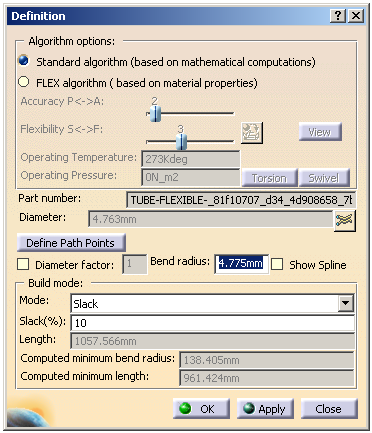
the Definition dialog box for flexibles. You can make modifications to a
flexible routable using the functions contained in this box. |
 |
You should be familiar with the
concepts explained in Routing Flexibles to be
able to take full advantage of these functions. |
 |
1. |
Right-click a flexible, and select FlexTube-xxx object
> Definition. The Definition dialog box appears.
 |
|
|
2. |
You can modify the flexible by editing the respective
attribute.
For more information, refer to Routing Flexibles. |
|
3. |
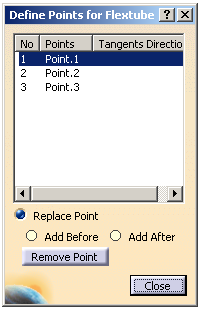
Click Define Path Points to modify the path
points. The Define Points for Flexibles dialog box appears.
 |
|
4. |
Select a point and select the appropriate option
from the following available options:
- Replace Point: Let's you replace the selected point.
- Add Before: Let's you add a point before the selected
point.
- Add After: Let's you add a point after the selected
point.
Note: By default, the Replace Point option is
selected. The tangent direction is displayed whenever applicable. |
| |
5. |
Select a point in the 3D graphic area.
The flexible route
is modified.
Note: You can click Remove Point to remove the
selected point from the flexible route. |
| |
6. |
Click Close. The Definition dialog
box appears. |
|
7. |
Click OK. The flexible is modified. |
|
 |