 |
-
Click
Draft Analysis
 in the Analysis toolbar.

-
Select an axis system (stamping direction).
The Z-Axis represents the cutting tool axis.
-
Select the surface or 3D curve to analyze with respect to the
Draft Angle.
-
Check the completion status of key indicators for
undercut and vertical areas.
-
Go to the Draft Analysis tab.
 -
If necessary, modify the Draft
Angle or the
Facets Tolerancy values.
- Press No Draft Areas or Backdraft Areas
to see the list of found areas.
|
Back in the Definition tab, select
more analysis options:
- Compute Areas:
Computes connected areas
instead of displaying a number of faces.
- Fly Analysis:
Displays precise analysis
values while hovering over the shape.
- Color mode:
- Smooth: Displays analysis results as a
global color gradient applied to the selected shape.
Allowed values and draft settings are not used.
- Face/Edge: Displays analysis results as
colors, applied face by face on the shapes.
- Detailed: Displays analysis results as
colors, applied precisely on the shapes.
- View Mode to display the analysis:
- Mesh
- Vectors used to compute the draft angle.
- Planes used to compute the draft angle.
- Dots
- Acute/Obtuse Dots.
|
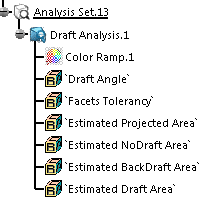
A Draft Analysis feature is created. It contains the parameters of the analysis.
|


