

You can check the result in StampPartition_EndP1.CATPart.

-
Click Stamp Partition
 in the Process Part Separation toolbar.
-
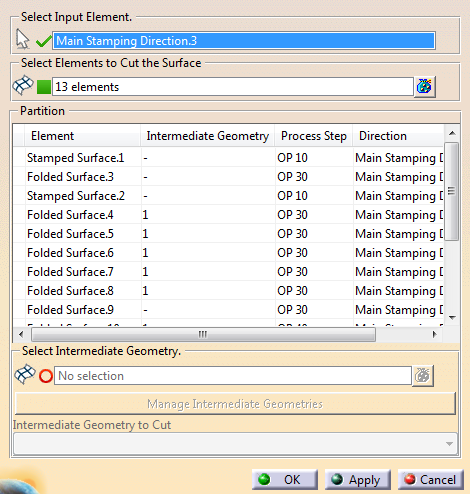
Select the input element (Main Stamping Direction.3 in our example)
- A surface: A Stamped Surface geometrical result is created for each domain.
- A stamping direction: A
Folded Surface
geometrical result is computed for each area (faces)
associated to a tool direction.
For the other areas, a Stamped Surface geometrical result is created for each domain.
A Stamping Partition feature is created under Partition Set.
-
Select elements to cut the surface.
- 3D curves: They cut the surface directly.
- Sketches: An internal extrude of the sketch is computed, in the plane direction. Its intersection with the surface is used to cut the surface.
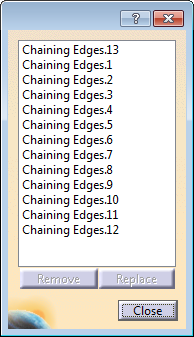
Alternatively, select two points on the surface boundary and chain edges from the contextual toolbar.
The surface is cut. For each domain of the input element, the largest area is typed as Stamped Surface, the other areas as Folded Surfaces. -
Check the result under Partition.
-
Select one element.
It is highlighted in the work area. - Optional: Change its type from the contextual toolbar.
-
Select one element.
-
Associate unfolded surfaces to folded surfaces.
You can select any surface as the unfolded result of a folded surface. This way, you can use results from other softwares.
- Select a folded surface.
- Select the unfolded surface to associate.
-
Alternatively, if the input is a stamping direction, click Create Unfold
 on the contextual toolbar.
The unfolded surface is computed and automatically associated to the selected folded surface. -
Choose intermediate geometries to associate to the selected element.
The table of results is updated. -
Click Manage Intermediate Geometries.
- Reorder intermediate geometries.
- Select intermediate geometries to cut.
A Partition Set is
created.
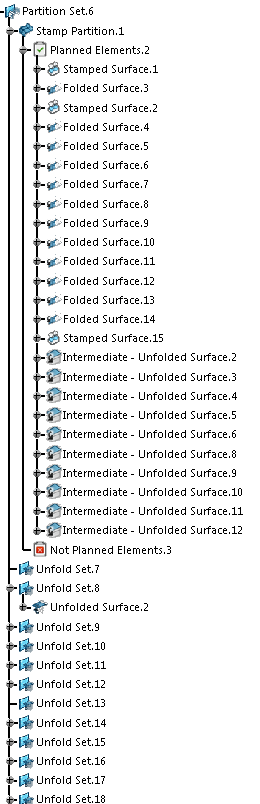
Result areas are stored under geometrical sets:
- Planned Elements (Associated to a process action)
- Not Planned Elements (Not associated to any process action)
- Ignored Elements (Not used by the process).
- Stamped Surface
- Folded Surface
- Unfolded Surface
- Intermediate - name.
