
SDE normally uses the balloon feature for drafting interactivity. Therefore. when a SmarTeam Save is performed, many links are generated between the actual Part and the Drawing that is saved in SmarTeam. However, according to the SDE LifeCycle Rule Setup, when the Part is checked out, the drawing is also Checked Out, which may not be necessary. The functionality described below explains how to avoid saving this link in SmarTeam.
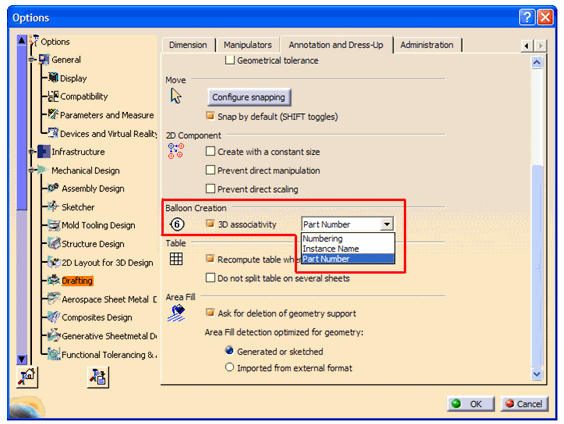
When 3D associativity is set to Instance Name or Part Number, an external link of type Attribute is generated between the Part and
Drawing as shown in the example below: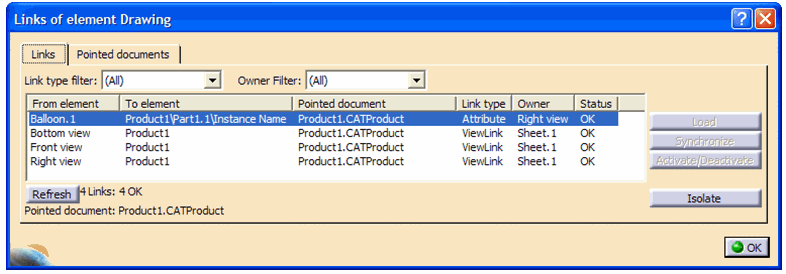
When 3D associativity is set to Numbering no additional link is created between the Part and the Drawing
as shown in the example below: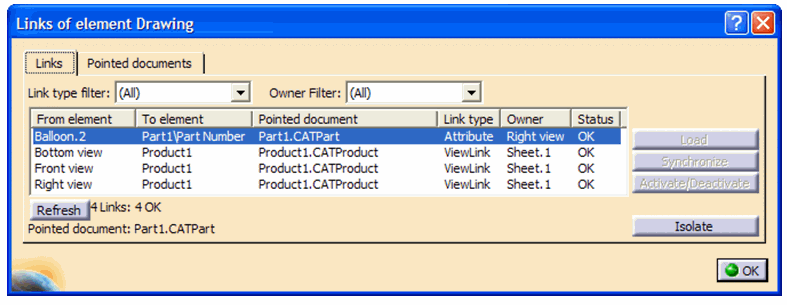
Name of Key: CATIA.CreateDrawingAttributeLinks
Description: Control the saving of an Attribute link on a drawing document to be saved in SmarTeam.
Possible Values: True/False
True = Save Attribute Links on a Drawing document to SmarTeam
(default)
False = Do not save Attribute Links on Drawing document to SmarTeam
