 |
This task explains creation of a stiffener along a plane. To
create a stiffener using a curve as a support, see
Creating a
Stiffener Using a Curve as a Support. |

|
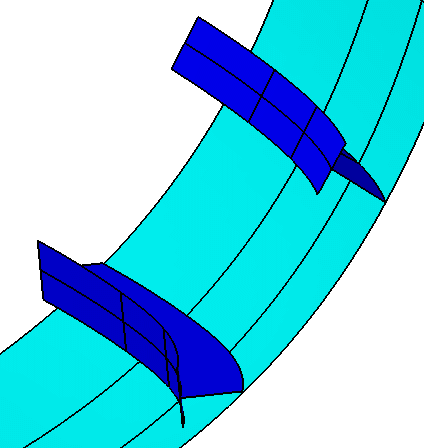
When a stiffener is created using the Along Plane option, it
retains the angle of the support that was selected. Stiffeners created
using the Normal to Plate option have an angle that is normal to
the plate they are on. Shell stiffeners are often created using the
Along Plane option.
The image below shows two stiffeners placed on a
shell that was created using a horizontal deck plane. The one above is
normal to the plate. The lower one has been placed using the Along
Plane option.
|
 |
1. |
With your
document open, click the Stiffener button
 .
The
Stiffener dialog box displays. .
The
Stiffener dialog box displays. |
| |
2. |
Make your
selections as described in Creating a Deck
Longitudinal Stiffener or Creating a Deck
Transverse Stiffener.
For a detailed explanation of
the Stiffener dialog box fields, see
Using the
Stiffener Dialog Box. |
| |
|
The
Angle
options become available when you select a support. Select the Along
Plane option to view what the stiffener looks like when this option
is selected. |
