|
This procedure describes how to open an empty process document. An empty process document is created by default when DPM Process and Resource Definition is started; this procedure describes how to create an additional process document without re-starting DPM Process and Resource Definition. Once an empty PPR view is available, you can populate it with product and resource data, and create processes using the activities defined in the process library. |
|
 |
Process libraries must be defined using the Tools>Options menu. See Setting DPM Options. |
|
 |
1. |
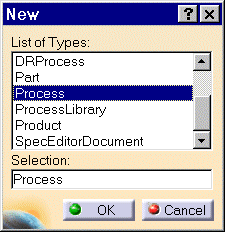
Select File> New. A popup window provides the list of all item types that may be created.
|
|
2. |
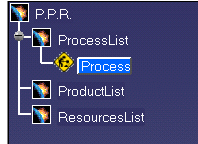
Select the Process item and click the OK button. A new process document is created using the activity libraries previously defined when you set the DPM options. A blank Process/Product/Resource (PPR) tree appears in the 3D inventory space viewer. Once you insert products or resources into this process, you will see 3D graphical representations of the products or resource in the same window as the PPR tree.
All PPR documents have a .CATProcess extension. |
|