|
The DPM Process and Resource Definition installation includes three example scripts which provide a set of rules for automating the process of setting precedence constraints on activities, checking a sequence of activities, and creating a sequence of activities in a CATProcess document. These scripts can be found in the <install_dir>\intel_a\code\command directory of your V5 installation, and are named as follows:
The sections which follow describe the general functionality provided by each. |
 |
|
 |
SetPrecedenceConstraintsHTML.CATScript |
|
SetPrecedenceConstraintsHTML.CATScript sets the precedence constraints of each activity such that they are guaranteed to be in the required sequence when they are linked. This macro requires that the children of the selected activity have not yet been linked. The script currently traverses the children of the selected activity and searches for activities of type locate, drill, deburr and screw that each have a single item assigned to them. In this scenario, the following precedence rules are applied:
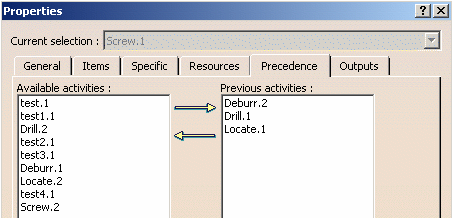
If at least two such activities of the above types are found to have the same assigned item, the required precedent activity is added as an attribute to the successive activity. For example, if a Screw activity and Deburr activity have the same assigned item, the Deburr activity will be added to the Previous activities attribute of the Screw activity. When the macro is finished, the properties for the Screw activity might look like this:
In this example, the activities Deburr.2, Drill.1 and Locate.1 have automatically been added to the Previous activities list for Screw.1 by the SetPrecedenceConstraintsHTML macro. The results of the SetPrecedenceConstraintsHTML macro are written to a generated HTML file which can be referred to after the macro has finished processing. When the macro is executed, the user is queried to indicate a name and location to store this HTML file. Although this script (as provided) is based on a Locate> Drill> Deburr> Screw scenario, it may be customized for any type of activities that have specific precedence requirements. |
|
CheckSequenceAssignedItemsHTML.CATScript |
|
|
CheckSequenceAssignedItemsHTML.CATScript works on a process that has activities that are already linked. This script checks a process to ensure that its activities are linked correctly. Like the script described above, CheckSequenceAssignedItemsHTML.CATScript is also based on the Locate> Drill> Deburr> Screw scenario, but can be customized to work with any other activities. This script performs the following functions:
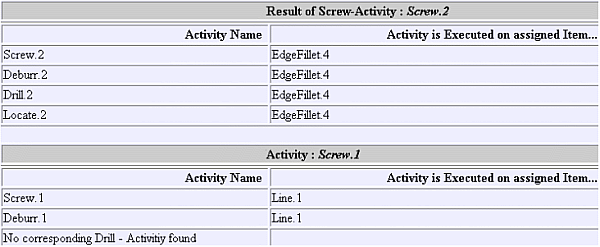
The image below shows an example of a generated HTML file:
The activity is shown in the left column and the item that the activity is performed on is in the right column. In this example, it can be seen that the Locate> Drill> Deburr> Screw sequence is performed on the item EdgeFillet.4 without error. However, the Drill activity did not exist for the Line.1 item, therefore the script was stopped at this step. |
|
CreateSequenceCheckAttributeHTML.CATScript |
|
| CreateSequenceCheckAttributeHTML.CATScript automatically creates the sequence between the
child activities of a selected activity or process. This macro requires that the children of the selected
activity have not yet been linked.
Like the previous scripts described, CreateSequenceCheckAttributeHTML.CATScript is also based on the Locate> Drill> Deburr> Screw scenario, but can be customized to work with any other activities. This script also introduces the notion of precedence rules based on activity attributes (rather than just activity types). In this script, if the Screw activity has an attribute named "DrillDiameter" and its value is greater than 10, then another activity of type PreDrill is also required. Therefore, in this scenario the following precedence rules are applied:
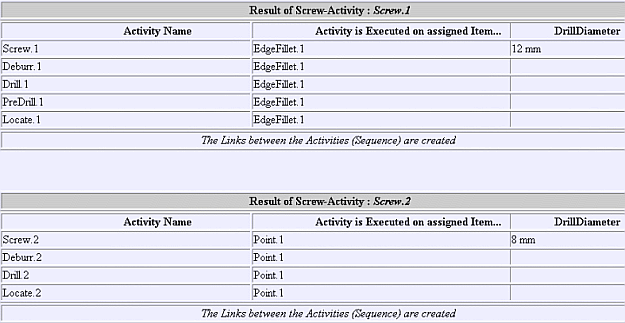
This procedure also produces an HTML file which displays the results of the operation, as shown in the following example:
Referring to the above image, the section titled Result of Screw Activity: Screw.1 indicates that the item has a DrillDiameter attribute of 12, therefore the PreDrill activity is required prior to the Drill activity. In the section titled Result of ScrewActivity.2, the DrillDiameter attribute has a value of only 8 and the PreDrill activity is not required. |