

NOTE: Using the CATDUAV5 tool can result in some reference components being deleted from a catalog or document. See Storing Objects in a Catalog for more information.

 . The Build Component
dialog box displays.
. The Build Component
dialog box displays.
|
|
This task shows you how to create a component and specify a function type for it. | |
|
|
To learn how to build a graphic
see Building a Graphic. NOTE: Using the CATDUAV5 tool can result in some reference components being deleted from a catalog or document. See Storing Objects in a Catalog for more information. |
|
|
|
1. | With your graphic displayed, click
on the Build Component button
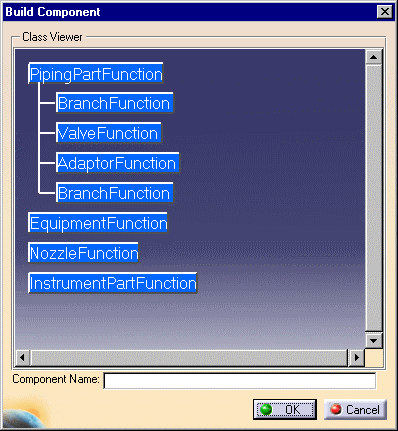
. The Build Component
dialog box displays.
|
| 2. | Double-click on the main functions to expand them. In the image above PipingPartFunction has been expanded. | |
| 3. | Click to select one of the function
types and then click on the graphic. The graphic will highlight.
|
|
| 4. | Enter a name for the component in the Component Name field. | |
| 5. | Click OK. The component is created. | |
