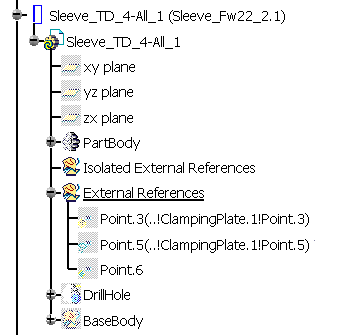
The information below refers to simple components (their reference is a
CATPart, not a CATProduct).
However the principles are the same for assembly components.
You should be familiar with the Tooling Concepts.
The Mold Tooling Replace Reference command deals with:
- A Tooling
Component already inserted in the Die, which you select in
session.
It is the To Be Replaced Component, in short TBRC. - A reference which will take the place of the
reference of the TBRC.
You select this reference as a file, in a catalog ....
It is the Replacing Component, in short RepComp.
Rules you must comply with
Mandatory: you must save the TBRC on files before applying the Tooling Replace command.
Recommended:
- Do not select the reference of the TBRC as the RepComp.
- Do not call the Tooling Replace command and then click OK without selecting anything (a new reference will be created).
- If the RepComp is instantiated in an Assembly and not yet saved, it is the value on File which will be used for the replace, not the instantiated value.
How does Replace work ?
It is important to understand that the TBRC and the RepComp do not play the same role:
- TBRC refers to the reference of a selected instance and all its sisters. It already contributes to the current assembly.
- RepComp is a document about which nothing is yet known:
- It may be instantiated or not, in this assembly or in another one.
- It will be cloned in the process before becoming the new reference.
- The words TBRC and RepComp are just convenient shortcuts.
Before Replace: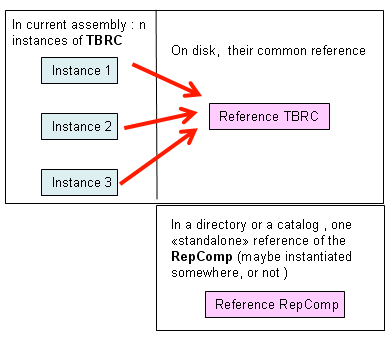 |
After Replace: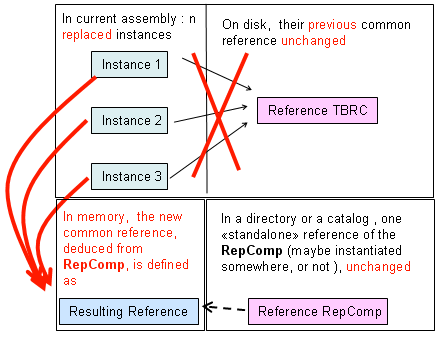 |
During Replace: |
If Reference RepComp receives Impacts IN, this information will be:
- Removed in some cases,
- Cloned in some cases and
- Isolated in some other cases
in the Resulting Reference. This is described below.
Impacts OUT and Replace
Impacts OUT have a meaning for the TBRC (If Impacts were used to create additional geometry, is this additional geometry kept ?) and none for the RepComp.
Publications, Logical and Basic Replace
When information is copied with link from one CATPart to another, in the context of an assembly, there are two possibilities:
- The copied
information is published in the context of the assembly:
- The link can be resynchronized when needed: namely the source of the
copy might be temporarily “not known” by the result,
then retrieved later automatically by a synchronization user request. - If the published object is replaced by another equivalent publication, the result of the copy can be synchronized on this new object automatically
- The link can be resynchronized when needed: namely the source of the
copy might be temporarily “not known” by the result,
- It is not published.
The Tooling Replace Reference command can have two behaviors with respect to Tooling Drills:
- Logical Replace:
- The Tooling Impacts OUT of a TBRC instance are kept after removal of this instance.
- The clone of RepComp is instantiated (same 3D position, same position in spec tree as that of the removed instance).
- The existing Tooling Impacts of the TBRC instance are automatically synchronized on the publications of the RepComp instance.
- The from/to/between list if any is associated to the new instance as is (without computations).
- This requires to have the same publications for TBRC and RepComp. If this is not the case, there may be less Impacts or non synchronized Impacts.
- Basic Replace:
- The Tooling Impacts OUT of a TBRC instance are “captured” before removal of this instance (via the from/to/between list or via link analysis).
- They are deleted.
- The clone of RepComp is instantiated (same 3D position, same position in spec tree as that of the removed instance).
- The Tooling Impacts of the new instance are automatically recreated.
- Switch between the two behaviors: Logical Replace is used:
- If the TBRC has at least ONE publication (any element) at its root level
- AND if the RepComp has at least ONE publication (any element) at its root level.
- Otherwise Basic Replace is used.
Note that Logical Replace:
- Is faster,
- Provides more associativity,
- Is compatible with a logical definition of the tooling component behavior.
while the Basic Replace:
- Provides upward compatibility,
- Is intended for companies who do not have access to the publication mechanism (P2),
- does not request administrator or user to anticipate iso- publications on the components in order to obtain consistent behavior for the Tooling Impacts.
About RepComp
- The RepComp component (document) is not modified.
- If it receives Impacts IN, they are unchanged.
- If it is instantiated somewhere, the Impacts OUT of it various instances are unchanged.
- If its Impacts IN or OUT go through upward or downward Tooling Part Interfaces or Tooling Split Part Interfaces in the context of a given assembly, these part interfaces are unchanged.
About TBRC
If a TBRC is replaced:
- All its sister instances are replaced and for each one:
- The Tooling Drills are maintained for the result,
- The DTPI are updated,
- The from/to/between list is propagated to the new instance, if applicable.
- If its reference receives Impacts IN in the context of the current assembly, they are not propagated to the resulting reference.
- The UTPI and TSPI are cleaned of the now useless data.
Impacts OUT for the TBRC instances
|
INPUT |
RESULT |
||||||||
|
TBRC |
In Plate 1: fillet on the edge of the drill hole |
RepComp |
TSPI | UTP | FTB list on resulting instances | Drills of Plate 1 | All DTPI | In Plate1 fillet is | Other Impacts OUT tooling or non tooling |
| Standard Tooling Drills Logical Replace |
Fillet on the edge of the drill hole |
|
N/A | N/A | Yes |
|
updated | kept | Same behavior as Tooling Drills |
| Standard Tooling Drills Basic Replace |
Fillet on the edge of the drill hole | N/A | N/A | Yes |
|
updated | not kept | Deleted | |
| Detailed Tooling Drills Logical Replace |
Fillet on the edge of the drill hole |
|
N/A | N/A | No |
|
updated | kept | Same behavior as Tooling Drills |
| Detailed Tooling Drills Basic Replace |
Fillet on the edge of the drill hole | N/A | N/A | No |
|
updated | not kept | Deleted | |
Impacts IN for the TBRC reference
| INPUT | RESULT | ||||
| TBRC Single instance |
Surface reduction | Any RepComp without Impact IN |
TSPI | UTPI | Resulting Ref |
| Has been "Tooling Split" by Surf1 | with | cleaned | cleaned | No split by Surf1 | |
| Has been "Tooling Split" by Surf1 | without | N/A | cleaned | No split by Surf1 | |
| Has been split by an external Surf2 in Part Design |
N/A | N/A | No split by Surf2 | ||
| Has been "Tooling Drilled" | N/A | cleaned | Not Tooling Drilled | ||
| Has been "Tooling Morphed" | N/A | cleaned | Not Tooling Morphed | ||
RepComp contains Impacts IN, what about the resulting reference?
| INPUT | RESULT | |||
| TBRC has no Impact IN | RepComp Impact IN | TSPI | UTPI | Resulting Reference |
| is multi-instance | has Impacts IN | N/A | N/A | Replace not allowed |
| is mono-instance | has solid Impacts IN | N/A | N/A | Solid Impacts removed from resulting reference |
| is mono-instance | contains isolated external references in dedicated body |
N/A | created if needed enriched as needed |
Connection dialog appears for these isolated external references |
| is mono-instance | contains external references | N/A | created if needed enriched as needed |
These external references are automatically isolated.
Then as above |
| is mono-instance | contains isolated external references in any body |
N/A | ? | ? |
| is mono-instance | contains external parameters | N/A | N/A | External parameters, isolated or not, not managed during cloning no reconnection dialog box |
Example: Management of the Impact IN for the Replacing Component
Replacing Component:
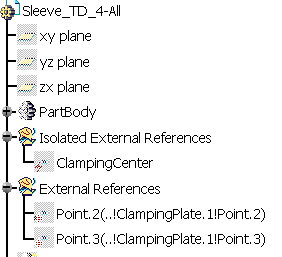
Mold:
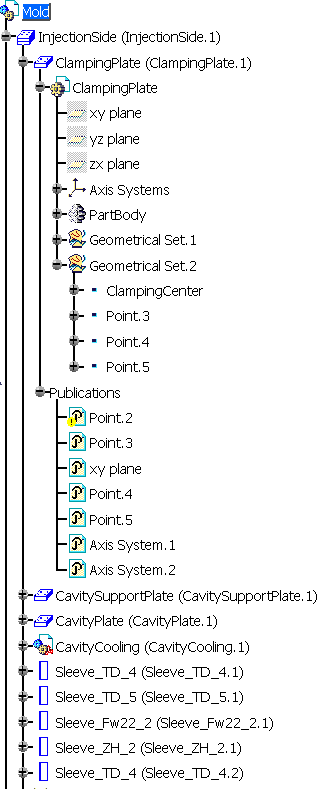
You can see that the replacing component contains:
- An Isolated External Reference (Clamping Center). After the replacement, it will correspond to the Clanping Center of the ClampingPlate,
- Two External References the definitions of those correspond to the publication paths of Point.2 and Point.3 of the ClampingPlate.
You can also note that the Publication Point.2 of the ClamplingPlate is broken (this is indicated by the yellow warning symbol).
We replace Sleeve_TD_4-All_1 in Mold by the replacing component using the
contextual menu item Replace Reference.
As we click OK to validate the replacement, the following dialog
box is displayed:
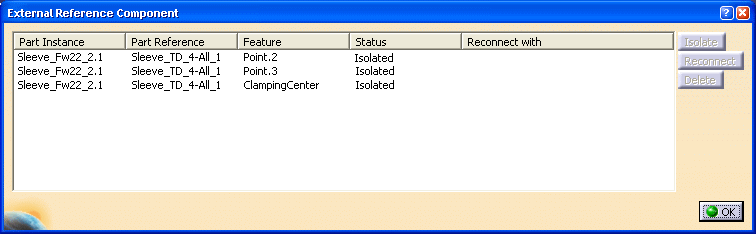
- The status of ClampingCenter is Isolated because it is an Isolated External Reference.
- Point. 2 and Point.3 have been automatically isolated.
When we select a line in the list, the buttons Isolate,
Delete and Reconnect become available. To isolate or delete
a component, simply click the corresponding button. To Reconnect a
component, click Reconnect and select a component in the specification tree.
Its name appears in the Reconnect with column. We have
reconnected the components as shown below:

After validation, the structure of the replacing component in the mold
specification tree looks like this: