 |
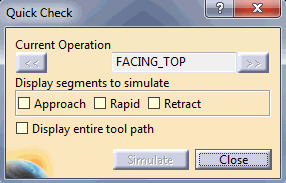
The Quick Check Simulation command is available
on the contextual menu of Machining Operation and Copy transformation
instruction operation. This command simulates the non-material removal
segments of a tool path like Approach, Retract and Feed. You can simulate any one of these
segments or a combination of them. |
 |
Warning: Quick Check Simulation command is
disabled in ISO Code simulation mode.
Note: A segment is of a set of continuous points pertaining to a non-machining move. For example, if you have four rapid moves followed by machining moves and then retract motion, the first segment will contain all the four tool path points pertaining to the rapid move. The second segment will contain all the retract points. If the segment includes the first point of an operation, the simulation of this segment will include the motion from the last point of the previous operation to this point. |
 |
-
Select the Manufacturing Program, the first
suitable manufacturing operation is added as Current the Operation. You
can move to the next or previous operations using forward or back buttons
around the current operation. The Simulate button simulates (with collision
detection) all displayed non machining segments for the current
operation. Collision detection is disabled when machine moves from one
segment to another.
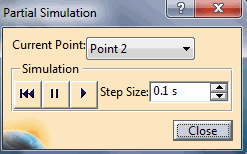
You can also select a specific non-material
removal segment and ask for either machine positioning or simulation
(with collision detection) of that segment. Use right-clicking on
such a segment, you then can use the Partial Simulation contextual menu options
to position or simulate the machine.
-
Using the forward or back buttons around the current
operation, move to the next or previous operations.
-
Use the Simulate button to simulate (with
collision detection) all displayed non machining segments for the
current operation. Collision detection is disabled when machine
moves from one segment to another.
-
Select a specific non-material
removal segment and ask for either machine positioning or simulation
(with collision detection) of that segment. Right-clicking on
the segment, you can use the Partial Simulation contextual
menu options to position or simulate the machine.
Note:
The Quick Check Simulation command is only available in the case of milling
machine simulation for Machining Operations and Copy transformation
instruction operation. It is not available for Auxiliary operations
such as Transition path, Tool change, Head change etc. The command
is not supported for MillTurn machine simulation.
|
