 allows the B-axis orientation to be set and eliminates the
need for a tool change activity.
allows the B-axis orientation to be set and eliminates the
need for a tool change activity.B-axis and C-axis management capabilities are available only on a Turning operation belonging to a program assigned to a turret set as a 'Mill Turret'. A suitable machine must be referenced by the Part Operation: for example, a 'Mill Turret' can be specified on a multi-slide lathe machine.
A Tool Axis symbol on the Turning operation's Strategy tab page
allows the B-axis orientation to be set and eliminates the
need for a tool change activity.
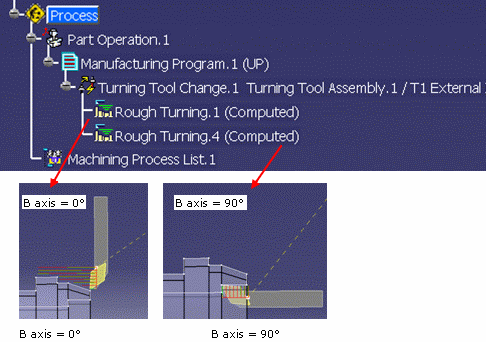
Tool axis is defined on turning operations linked to a mill turret (managing
a B-axis). Information that B-axis is managed on turret will be defined on the machine
Turret type will be defined as ‘mill turret’ on the NC machine.
No tool axis need to be defined on operations defined on a rotary turret.
Tool axis will be defined according to the Spindle axis system.
Note for multi spindle machine:
A Spindle axis system is defined on each Spindle.
Tool axis is defined on the main spindle axis.
Today, for all machining operations affected to the counter spindle, the tool path
computation is always done according to the main spindle axis system.
If capability to compute coordinates in the counter spindle is provided, the tool
axis of operation affected to the counter spindle will be defined in the counter
spindle axis system.
Tool axis is defined by geometry selection or manually (component values or angle
value)
Angle orientation is defined from the Radial axis to the Axial axis of the Spindle
axis system.
For operation defined on a mill turret (on which B axis is defined), the tool
is displayed according to the orientation defined by the tool axis.
The tool axis specified by you will be displayed on the Tool Path Replay
dialog box
and is generated in the APT output.
For operation defined on another turret (not a mill turret), the tool axis is vector normal to the turning plane.
A BAXIS NC command is output at the beginning of an operation defined on a mill turret.
$$ OPERATION NAME : Rough Turning.1

	$$ Start generation of : Rough Turning.1

	$$

	FEDRAT/ 0.3000,IPR

	SPINDL/ 70.0000,RPM,CCLW

	BAXIS/1.000000, 0.000000, 0.000000

	GOTO / 58.63072, 0.00000, 136.34210

	GOTO / 58.63072, 0.00000, 134.34210

	FEDRAT/ 0.4000,IPR

	GOTO / 58.63072, 0.00000, 81.85882

	FEDRAT/ 0.8000,IPR

	GOTO / 58.84286, 0.00000, 82.07095
This syntax contains valuation of I,J,K coordinates of the operation tool axis (defining the B-axis orientation). Coordinates are defined in the machining axis (spindle axis).
Example: BAXIS/1,0,0
Turret axis orientation components (I,J,K) are generated in the output file (according to the 'Tool motion statement' option defined in NC Output option dialog box).
Note: TLAXIS syntax (that is output for a machine axis change) is not modified: coordinates of TLAXIS statement are the components of the vector normal to the turning plane.
For the following statements, the output depends on the 'Tool motion statement' option:
Tool motion statement = (X,Y,Z):
X, Y, Z
BAXIS/I,J,K
TLAXIS/Inormal, Jnormal, Knormal (components of the normal to the turning plane)
Tool motion statement = (X,Y,Z,I,J,K):
X, Y, Z, I, J, K
Tool motion statement = (X,Y,Z):
X, Y, Z
TLAXIS/Inormal, Jnormal, Knormal (components of the normal to the turning plane)
Tool motion statement = (X,Y,Z,I,J,K):
X,Y, Z,Inormal, Jnormal, Knormal
Inormal, Jnormal, Knormal are the components of the axis vector normal to the
turning plane
I, J, K are the components of the tool axis orientation vector that define the B
axis position.
Note: TLAXIS will not be output in the APT file for a Turning operation, unless an explicit Machine Axis Change is added by the user. An exception to this is when there is a change from Milling Operation to a Turning Operation. In this case, TLAXIS/ Inormal, Jnormal, Knormal will be output before the Turning Operation.
B axis move is simulated according to the tool axis defined on the turning operation.
Import of APT source file on which I,J,K coordinates are defined: tool axis is defined with the I,J,K coordinates.
Note: At Replay and Simulation, if tool axis is not correct (not in the turning plane) Radial axis is used for tool assembly orientation.
BAXIS syntax can be correctly interpreted by APT import functionality only when
the syntax is defined with a known order of parameters (the required parameters
of the syntax must respect the default syntax).
Tool path can be correctly replayed only when:
Major word and parameters must be set as follows:
BAXIS,/%MFG_MILL_TURRET_I_AXIS, %MFG_MILL_TURRET_J_AXIS, MFG_MILL_TURRET_K_AXIS
User changes the turret assigned to a Machining Program from one turret type to another type (for example, from Rotary to Mill Turret or vice versa). The Machining Operation will be marked as ‘not up to date’ in this scenario.
If you Cut, Copy and Paste a machining operation related to one Turret type to another Turret type (for example, from Rotary Turret to Mill Turret or inversely), the operation will have status Not up to date.
The C-axis inversion check box on the Turning operation's Strategy
tab page
provides a C-axis rotation (0/180 degrees) without requiring a tool change activity.
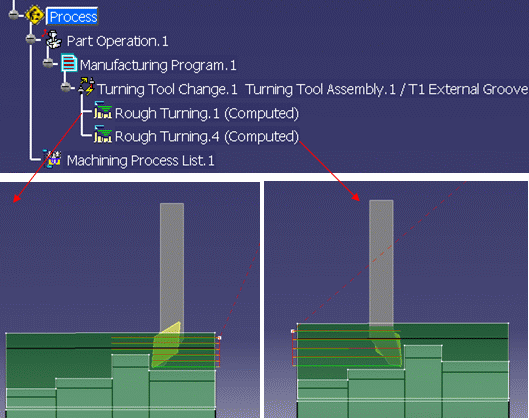
This allows machining of different areas (front and back areas of a part, or part on main spindle and part on a counter-spindle) using the same tool assembly. Only the tool orientation (inversion) differs when machining the different areas or parts.