 Define Spindle Way of Rotation during
Replay and SimulationDefine Spindle Way of Rotation during
Replay and Simulation
Define Spindle Way of Rotation during
Replay and SimulationDefine Spindle Way of Rotation during
Replay and Simulation
 |
This task shows how to get information on spindle associated with a Machining Operation by placing pointer on the Machining Operation node in PPR tree or on a bar (associated to the Machining Operation) in Gantt chart. | |
 |
1. | Go to Tools > Options > Machining > Resources > Color and select the display color of the Spindle Rotation Arrow and of the Spindle Rotation Arrow Head from the lists. |
| 2. | Insert a Rough Turning Machining Operation and compute the tool path. | |
| 3. |
Place the pointer over the Rough Turning
Machining Operation in the PPR Tree. The Information about spindle number, spindle name, and its direction of rotation is displayed as a tooltip. 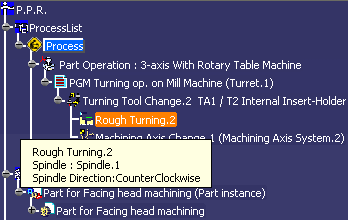 |
|
| 3. |
Open Machining Gantt Chart
 and place pointer on the bar associated to the
Rough Turning Machining Operation.
and place pointer on the bar associated to the
Rough Turning Machining Operation.The information about spindle number, spindle name and its direction of rotation is displayed as a tooltip. 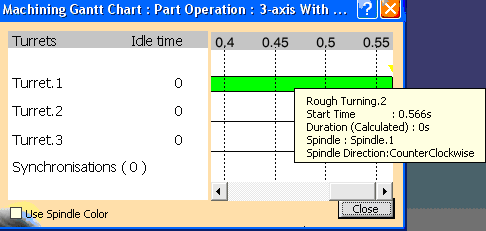 |
|
| 4. |
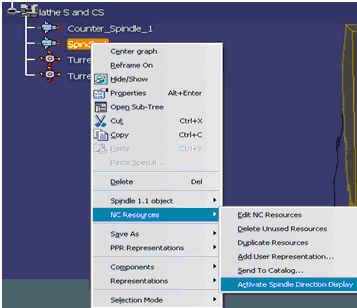
Right-click the Spindle in PPR and
select NC Resources > Activate Spindle
Direction Display. |
|
|
||
| 3. |
Use the mouse to manipulate the arrow diameter and
position.
|
|
| 4. |
Select Rough Turning Machining Operation and
Drilling
Machining Operation having fixed tool and click
Tool Path Replay
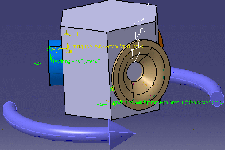
 . .Spindle rotation is shown for Lathe Machining Operations and Axial Machining Operations with fixed tool. The below image shows spindle way of rotation during Tool Path Replay. 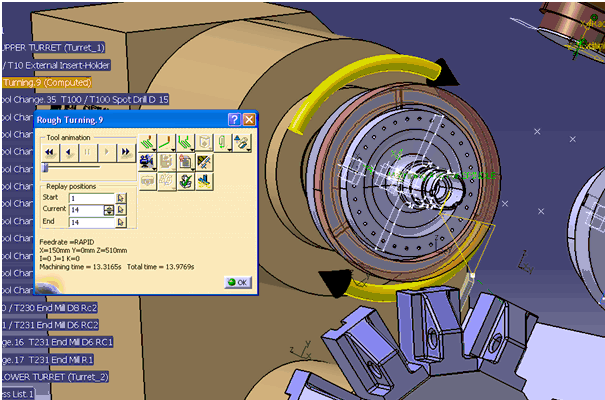 If a spindle is involved simultaneously in more than one activity with different ways of rotations, the spindle arrow is displayed in red color with two arrow heads indicating both clockwise and counter-clock wise directions as shown in the image below (Time Based Replay). 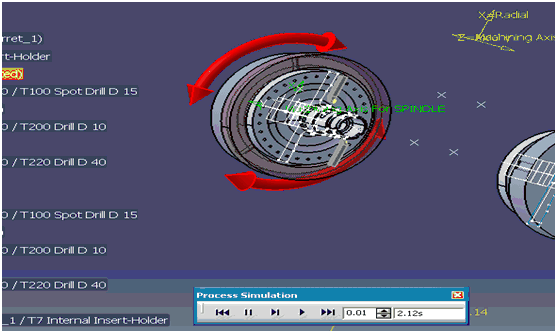 Spindle direction display is not supported during Time Based Video simulation. |
|
|
|
||
 By default,