either compute if not already done
or force computation even when tool path exists.
The various menus and menu commands that are common to NC Manufacturing products are described below.
Tasks corresponding to general menu commands are described in the Version 5 Infrastructure User's Guide.
Please note that most of the commands in the Edit menu are common facilities offered by the Version 5 Infrastructure. The NC Manufacturing edit commands available depend on the type of object being edited: Manufacturing Program or other entity.
Note that you can access the same menu contextually by right-clicking the object in the PPR tree.
|
|
Command... | Description... |
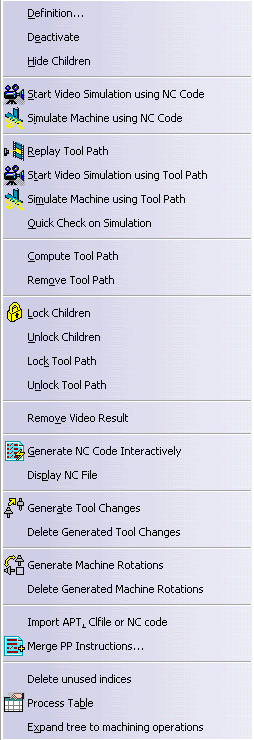
| Definition | Opens the Manufacturing Program dialog box for consultation, edition, replay or simulation. | |
| Deactivate/Activate | Deactivates the program for replay or NC output. It can be made active again with Activate. | |
| Hide/Show Children | Hides the child nodes of the program. They can be visualized again with Show. | |
| Start Video Simulation using NC Code | Allows direct access to Video material removal simulation using NC code. | |
| Simulate Machine using NC Code | If the NC Machine Tool Simulation product is installed, you can simulate the machine using NC code. See NC Machine Tool Simulation User's Guide for more information. | |
| Replay Tool Path | See Replay the Tool Path. | |
| Start Video Simulation using Tool Path | Allows direct access to Video material removal simulation using tool path data. | |
| Simulate Machine using Tool Path | If the NC Machine Tool Simulation product is installed, you can simulate the machine using tool path data. See NC Machine Tool Simulation User's Guide for more information. | |
| Compute Tool Path | Allows you to choose a tool path computation
mode for the program: either compute if not already done or force computation even when tool path exists. |
|
| Remove Tool Path | Removes computed tool paths from the program. | |
| Lock/Unlock Children | Locks all the machining operations of a program. Locked operations can be unlocked with Unlock Children. | |
| Lock/Unlock Tool Path | Locks all the tool paths of a program. Locked tool paths can be unlocked with Unlock Tool Path. | |
| Remove Video Result | Removes all saved material simulation Videos from the program. | |
| Generate NC Code Interactively | See Generate NC Code for the Program. | |
| Display NC File | If an NC file is associated to the program, allows the display of that file. See Display NC File. | |
| Generate Tool Changes | See Tool Change. | |
| Delete Generated Tool Changes | See Tool Change. | |
| Generate Machine Rotations | See Machine Rotation. | |
| Delete Generated Machine Rotations | See Machine Rotation. | |
| Import APT, Clfile or NC Code File | See Import an APT file. | |
| Merge PP Instructions | See Merging Several PP Instructions | |
| Delete Unused Indices | Deletes indices not used by a Copy operator. | |
| Process Table | See Process Table. | |
| Expand tree to machining operations | Expands the PPR tree down to MO level. |
Note that you can access the same menu contextually by right-clicking the object in the PPR tree.
|
|
Command... | Description... |
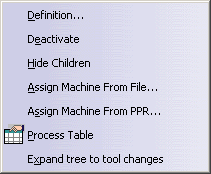
| Definition | Opens the Part Operation dialog box for consultation or edition. | |
| Activate/Deactivate | Deactivates the Part Operation. It can be made active again. | |
| Show/Hide Children | Hides the child nodes of the part operation. They can be shown again. | |
| Assign Machine from File | Allows assigning a generic machine (CATProduct) to the Part Operation. | |
| Assign Machine from PPR | Allows assigning a machine from the Resource List to the Part Operation. | |
| Process Table | See Process Table. | |
| Expand tree to tool changes | Expands the PPR tree down to tool change level. |
Note that you can access the same menu contextually by right-clicking the object in the PPR tree.
 |
Command... | Description... |
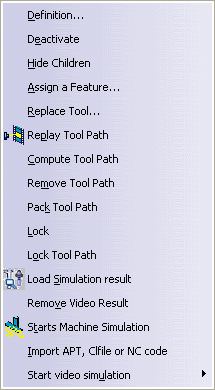
| Definition | Accesses the operation's definition dialog box. | |
| Deactivate/Activate | Deactivates the operation for replay or NC output. It can be made active again. | |
| Hide/Show Children | Hides the child nodes of the operation. They can be shown again. | |
| Replace Tool | Allows you to replace a tool or tool assembly on one or more selected operations. Note: If all selected operations have already an associated tool assembly, then the Tool Assembly tab is activated by default. If all selected operations (or some of them) have no associated tool assembly or tool, then the Tool tab is activated by default. |
|
| Replay Tool Path | See Replay the Tool Path. | |
| Compute Tool Path | Allows you to choose a tool path computation mode for the operation: either compute if not already done or force computation even when tool path exists. |
|
| Remove Tool Path | Removes computed tool paths from the operation. | |
| Pack/Unpack Tool Path | Allows compressing an operation's tool path information in an external
tpl-suffixed file. Unpacking is also possible.
Several operations can be selected for packing. In this case, one tpl file is created for each operation. In the PPR tree, a symbol on the operation indicates that it is packed. |
|
| Lock/Unlock | Locks the computed machining operation. It can be unlocked using Unlock. | |
| Lock/Unlock Tool Path | Locks the tool path of a computed machining operation. It can be unlocked using Unlock Tool Path. | |
| Load Simulation Result | Opens the Video Result CATProduct in a Video window for analysis of the machined stock, collision results, and so on. Only available if a Video Result CATProduct is associated to the opreation. | |
| Remove Video Result | Removes a saved material simulation Video from the operation. | |
| Starts Machine Simulation | If the NC Machine Tool Simulation product is installed, you can switch from the Machining workbench to the NC Machine Tool Simulation workbench by clicking this command. | |
| Import APT, Clfile or NC Code File | See Import an APT file. | |
| Start Video Simulation | Run full Video from last Video result. |
Note that you can access the same menu contextually by right-clicking the object in the Manufacturing View.
 |
Command... | Description... |
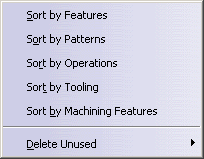
| Sort by Features | Sorts the view by features. | |
| Sort by Patterns | Sorts the view by patterns. | |
| Sort by Operations | Sorts the view by operations. | |
| Sort by Tooling | Sorts the view by tooling criteria. | |
| Sort by Machining Features | Sorts the view by machining features. | |
| Delete Unused | Deletes unused machining features. You can delete either all unused machining features or all unused machining features of a given type. |
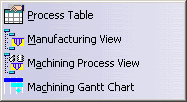 |
Command... | Description... |
| Process Table | See Process Table. | |
| Manufacturing View | See Manufacturing View. | |
| Machining Process View | See Machining Process View. | |
| Machining Gantt Chart | The Machining Gantt Chart can be used to review machining operations on multi-turret machines. Please refer to the Multi-Slide Lathe Machining User's Guide for more information. |
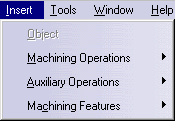 |
Command... | Description... |
| Machining Operations | Creates Machining Operations in the program. This is described in the User's Guides of the various NC products. | |
| Auxiliary Operations | See Insert > Auxiliary Operations, below. | |
| Machining Features | See Insert > Machining Features, below. |
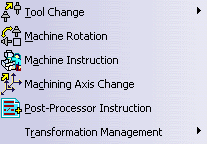 |
Command... | Description... |
| Tool Change | Creates a Tool Change. | |
| Machine Rotation | Creates a Machine Rotation. | |
| Machine Instruction | Available if NC Machine Tool Simulation is installed. See NC Machine Tool Simulation User's Guide for more information. |
|
| Machining Axis Change | Creates a Machining Axis Change. | |
| Post-Processor Instruction | Creates a PP Instruction. | |
| COPY Operator | Creates a COPY Operator. | |
| TRACUT Operator | Creates a TRACUT Operator. | |
| Copy Transformation Instruction | Creates a Copy Transformation Instruction. | |
| Copy Program | See Identical Parts Machining | |
| Merge Program | See Identical Parts Machining |
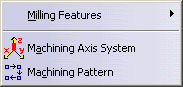 |
Command... | Description... |
| Milling Features | Creates Milling type Machining Features in the program. This is described in the User's Guides of the relevant NC products. | |
| Machining Pattern | See Machining Pattern. | |
| Machining Axis System | Creates a Machining Axis System feature, which is referenced in the Machining Axis Change auxiliary operation. |
Please note that most of the commands available in the Tools menu are common facilities offered by the Version 5 Infrastructure. Specific Machining commands are described in the present document.
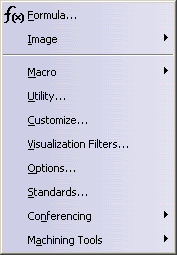 |
Command... | Description... |
| Formula | Allows editing parameters and formula. | |
| Image | Allows capturing images. | |
| Macro | Allows recording, running and editing macros. | |
| Utility | Allows access to batch utilities. | |
| Customize | Allows customizing the workbench. | |
| Visualization Filters | Allows management of visualization filters. | |
| Options | See Customizing Settings for Machining. | |
| Standards | Allows access to standards (general, drafting, and so on). | |
| Conferencing | Allows access to the Conferencing capability. | |
| Machining Tools > Isolate Process Data | Allows creating a Process Template. |