
This task shows you how to instantiate a 2D component previously created on a detail sheet.

Instantiating a 2D component means re-using it (from a layout detail sheet or from a component catalog) in a layout, once or several times. When you instantiate a 2D component, you create what is known as a "2D component instance", or an "instance".

Open the 2DComponent.CATPart document. Select Start > Mechanical Design > 2D Layout for 3D Design to open the layout in the 2D window, alongside the 3D window. Make sure Sheet.1 is active.

-
From the geometry area or from the specification tree, double-click the view in which you want to instantiate the 2D component (the right view, for example). This view is now active.
-
Click Instantiate 2D Component
 in the Layout toolbar.
Double-clicking the Instantiate 2D Component icon lets you position several 2D components on
the sheet while keeping the scale and angle properties for all components. -
From the specification tree, click the 2D component under the detail sheet Sheet.2 (Detail) item.
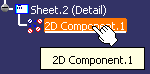
A preview of the 2D component is displayed in the view. -
Position the component using smartpick then click.
The Tools Palette toolbar is displayed and proposes the following commands: Link With Detail: Instantiates a 2D component.
The component instance is linked with its reference in a detail sheet.
Link With Detail: Instantiates a 2D component.
The component instance is linked with its reference in a detail sheet.
 By default, this icon is activated.
 Explode: Instantiates and explodes a 2D
component. The component instance is not linked to its reference, so behaves as independent geometry and annotations.
Explode: Instantiates and explodes a 2D
component. The component instance is not linked to its reference, so behaves as independent geometry and annotations. Fixed Together:
Instantiates and explodes a 2D component, and apply a fixed together constraint to the geometry elements.
Fixed Together:
Instantiates and explodes a 2D component, and apply a fixed together constraint to the geometry elements.The fix together constraint is not applied to annotations, dimensions or dress-up elements.
 Change Component Origin: Defines another
point in the view.
Change Component Origin: Defines another
point in the view. Change Component Angle: Defines the angle in the view.
 Flip component horizontally: Rotates
horizontally the 2D component instance.
Flip component horizontally: Rotates
horizontally the 2D component instance. Flip component vertically: Rotates vertically
the 2D component instance.
Flip component vertically: Rotates vertically
the 2D component instance.Angle: Defines a value for the angle.
Scale: Defines a value for the scale.
-
In the Tools Palette toolbar, choose your instance type. For the purpose of this scenario, check that the Link With Detail
icon is activated.
-
Click the view: the 2D component instance is created.
If needed, select the component and use the displayed manipulators to modify the component.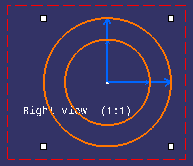
- You can edit the 2D component reference by right-clicking the 2D component instance, and choosing Edit Reference Component.
- The 2D component
instance is added in the Component Instances node under
the respective view node in the specification tree. Any new 2D
components instantiated are added under this node. To view this
node, select the Display features under views check
box (using
Tools > Options > Mechanical Design > Drafting > General
tab, Tree area).
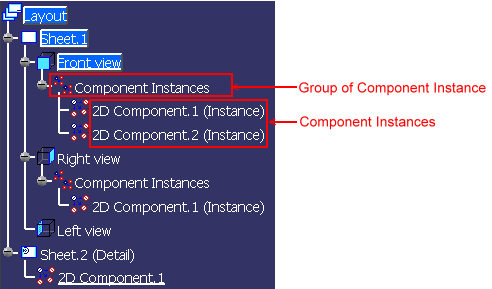
- The Component Instances node is created by default. To view it or not in the specification tree is your choice. Thus you can select the Display features under views option even after the 2D component instantiation.
- The Component Instances node is added to the specification tree when the first instance of 2D component is added. The node is removed from the specification tree when the last instance of 2D component is removed.
- The main family node Component Instances is not selectable as it is used to just group 2D component instances. When trying to select a family node, the selected object will be the parent view of the node.
- The contextual menu for the object in the specification tree is the same as when the object is selected in the view geometry.
- Objects created directly in the sheet are not displayed in the specification tree.
- The active sheet and view nodes are highlighted with blue background.

