|
This task shows you how to edit an insert
holder that is already used in your document. Note that if you edit a resource that is used by one or more machining operations, then these operations will be impacted by the modification. |
|
 |
1. | Double-click the desired
insert holder in the Resource List. You can also right-click it and select the Edit NC Resource contextual command. |
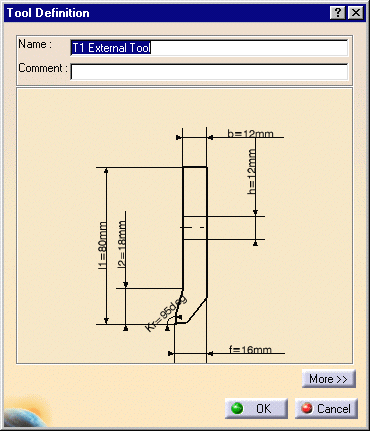
| The Tool Definition dialog box is displayed allowing you
to edit the insert holder's geometric, technological, and compensation
parameters. |
||
 |
Please refer to Tools/Insert Holders for Turning Operations for a description of the available parameters for this resource. | |
| 2. | If needed, enter a new name and comment for the insert holder. | |
| 3. | Click More to expand the dialog box to access the Geometry, Technology, and Compensation tabs. | |
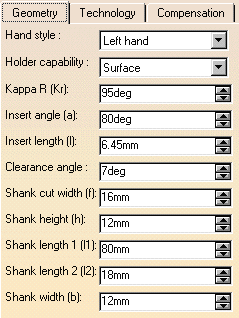
| 4. | You can specify the insert holder geometry in two ways:
The icon representation of the insert holder is updated with these values. |
|
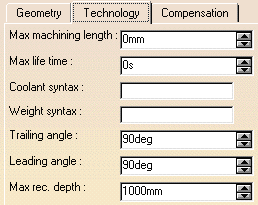
| 5. | Click the Technology tab and enter the desired
values for the insert holder's technological parameters. |
|
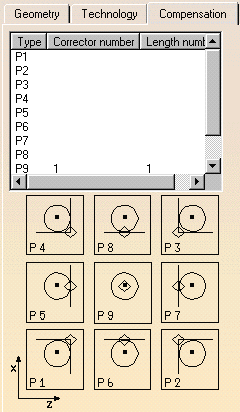
| 6. | If cutter compensation is required, click the
Compensation tab.
You can either edit an existing compensation site or add another site, if other sites are proposed. |
|
| 7. | Right-click the desired line to either edit or add
cutter compensation data. The Compensation Definition dialog box appears. |
|
| 8. | Enter the desired values for the cutter compensation
sites.
See Specify Tool Compensation for more information. |
|
| 9. | Click OK to accept the modifications made to the insert holder. | |
|
|
A CATPart or CATProduct
representation can be assigned to the insert holder by means of the
Add User Representation contextual command in the Resource
List. A mask symbol on the bottom right of the Insert Holder icon in
the PPR tree indicates that a user representation has been added to the
resource. For example: For more information about user representations, please refer to User Representation of Lathe Tools. |
|
|
|
||