


-
Select the PowerCopy from the specification tree for example.
-
Choose Insert > Knowledge Templates > Save In Catalog....
The Catalog Save dialog box is displayed: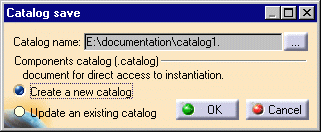
When creating a catalog for the first time, click the ... button to display the Save As dialog box, and navigate to the location where you wish to create a catalog.
Then simply key in the catalog name and click Save.
If you wish to add a PowerCopy to an existing catalog, simply activate the Update an existing catalog option in the Catalog Save dialog box.
By default, the Catalog Save dialog box recalls the catalog accessed last.
-
Click OK.
The PowerCopy has been stored in the catalog.
