
Annotation Manipulators
The following figure depicts an annotation with various manipulators:
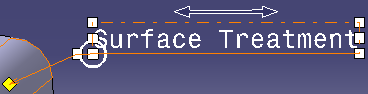
Note: The display of manipulators for annotations can be customized based on whether the annotation is selected or its text is edited. For more information, refer to Annotation Manipulators Display.
Annotation Manipulators Display
The following table lists the default values for display of manipulators:
|
Manipulator |
Representation |
Selection |
Text Edition |
| Stretch text |
 |
Displayed | Displayed |
| Resize text |
|
Displayed | Displayed |
|
Slide text |
 |
Displayed | Not displayed |
| Resize leader attachment |
|
Displayed | Not displayed |
| Move leader attachment |
 |
Displayed | Not displayed |
| Move leader |
 |
Displayed | Not displayed |
