|
This task shows you
how to change the view/annotation plane associated with the capture, and
choose another viewpoint.
|
 |
Open the
Annotations_Part_05.CATPart document. |
 |
-
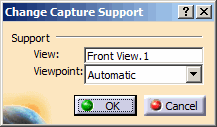
Right-click a capture and select Change Capture
Support command from the contextual menu.
The Change Capture Support dialog box appears.
-
Select another view/annotation plane by selecting the
View box and select a view/annotation plane from the
specification tree or from the geometry.
-
Select an existing camera from the Viewpoint
list.
Cameras are created/managed using the View > Views command.
-
Click OK in the Change Capture Support
dialog box.
|
|
|
 |
|
|
 Changing Capture Support