
This task shows you how to reorder and sort Functional Tolerancing & Annotation features in the Specification Tree.

- View/Annotation planes
- Datums
- Datum targets
- Tolerancing captures
- Dimensions
- Framed (Basic) Dimensions
- Coordinate dimensions
- Texts
- Flag notes
- Note object attributes
- Geometrical tolerances
- Weld features
- Surface texture features
- Datum reference frames
- Construction geometries
- Threads
- Restricted areas
 |
Semantic Datum, Non-Semantic Datum and Non-Semantic Target feature displayed under Datums node are treated as similar objects and can be reordered between each other if they belong to same Annotation Set. |

Open an existing CATPart document containing Functional Tolerancing & Annotation features.

-
Right-click a datum in the specification tree and select Simple Datum.X object > Reorderfrom the contextual menu.
The Arrow Insert After pointer appears on features where you can
reorder your selection.
pointer appears on features where you can
reorder your selection.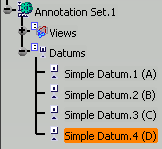
- Press Ctrl to
display the
Arrow Insert Before
 cursor.
 - When it is not possible to reorder your
selection, the no selection
 cursor is displayed.
 - Multi-selection of same features is possible, for this select Selected objects > Reorder from the contextual menu
- Press Ctrl to
display the
Arrow Insert Before
-
Select the datum after which you want reorder the selected datum.
The datum is reordered in the specification tree.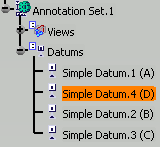
-
Right-click a parent node in the specification tree, for example Datum features and datum targets and select xxx object > Sort.
All the similar objects under the selected node are sorted alphabetically and grouped together.- You can also multiselect the objects in the specification tree, right-click, and select Selected objects > Sort.
- The selected objects must be under the same parent object.
- If you multiselect objects available under different parent nodes, they are sorted between each other under each parent node.
- If you multiselect different types of objects, then the similar types of objects are identified, sorted, and grouped together forming multiple groups.
