
This command will prove useful for versioning and configuration purposes as well as when re-using existing harnesses.


Open a document stored in ENOVIA.

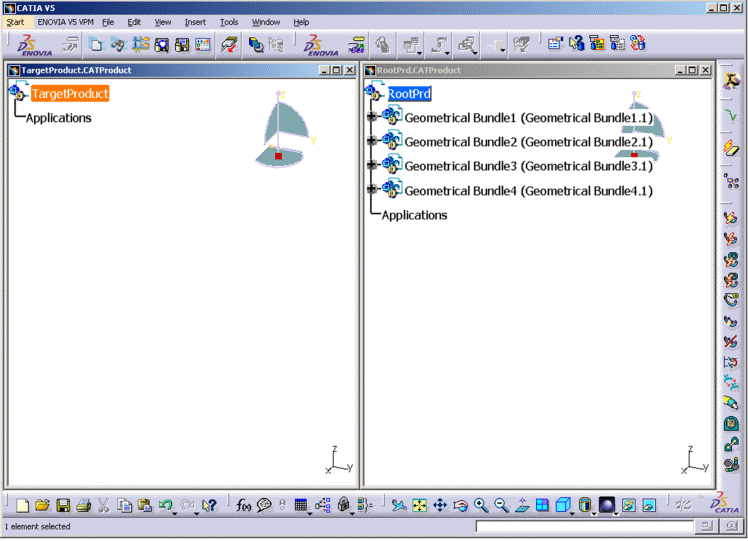
 .
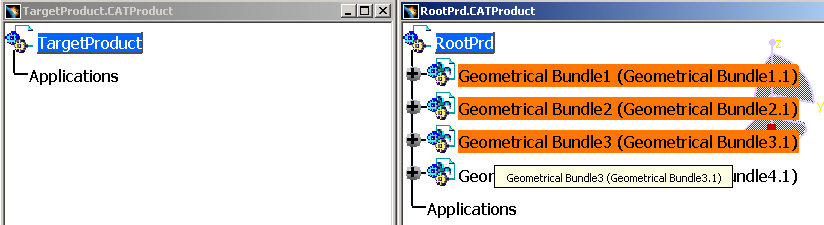
.

- A geometrical bundle previously stored as a workpackage.
- An electrical bundle, only if the common parent of the electrical bundle and its associated geometrical bundle was stored as a workpackage.
Valid Selections:
- One Electrical Bundle
- One or more geometrical Bundle(s)
- Selection of Multiple geometrical Bundles
- Press Ctrl Key
- Select all but one geometrical bundles to be duplicated
- Release Ctrl key (to indicate the last selection)
- Select remaining/ last geometrical bundles
If your selection does not meet the appropriate requirement, then an error message is displayed.
-
In the dialog box that appears, enter the suffix to add to new reference harness components.
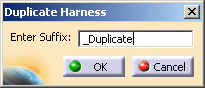
-
Enter alphanumeric suffix to be added to duplicated data.
-
Click OK.
The harness will be duplicated in target product and the editor with source product will be closed.
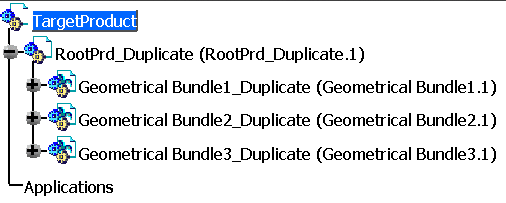
- The suffix is added to geometrical bundles, electrical bundles, multi-branchable documents and protective coverings, but not to devices and supports.
- Duplication of harness in NOT allowed inside a product in same editor. An error message will be shown if source and target products are in same editor.
- If you duplicated a geometrical bundle, a new geometrical bundle having the same content is generated.
- If you duplicated an electrical bundle, a new document containing an electrical bundle and the associated geometrical bundle is generated.
Notes:
- All instances of devices, supports, and wires from catalogs are re-instantiated in the new document.
- All instances of multi-branchable documents, adaptive supports, and protective coverings generate new references that are instantiated in the new document. All relations (constraints, contextual design and electrical connections) are kept.
- New geometrical bundle and electrical bundle references are generated.
