

- If you want to privilege performance and ease-of-manipulation, use Light Protective Covering.
- If you want to add protective coverings to several branches, or across different multi-branchable documents, use Protective Covering.

- There are four types of light protection coverings:
- Fixed Diameter
- Adaptive Diameter
- Corrugated tube
- Tape
- There are two types of regular protection coverings:
- Corrugated tube
- Tape
Protective Covering Properties:
Protective covering properties can be browsed in the Electrical
tab of the Properties dialog box.
Note: The properties available in the tab differ following the type of
protective covering you select.
There are three properties that you can define:
|
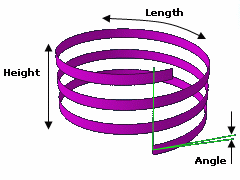
Total Tape Length
The
total tape length is the tape length necessary to cover the
segments. This value depends on the taping angle, the
covered length and the number of layers. The total length is
defined by the following formula:

where:
Angle is the taping angle value.
Height is the bundle segment length covered by the tape.
NbLayers is the number of layers.
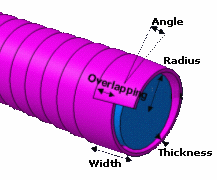
The overlap is the width of tape shared by two consecutive rolls
around the segment. Overlap is computed as follows:
Overlap = Width - 2 P *
(Radius + Thickness/2) * sin (Angle)
where:
Width is the tape
width.
Radius is the bundle segment radius.
Thickness is the tape thickness.
Angle is the taping angle value.
|
|
Notes: |
|
Diameter
When routing wires through segments covered with a protective covering, the segment and protective covering diameters are updated if needed.
Annotation
The Annotation box allows you to enter any additional information about protective coverings.
About Supports, Bend Radius, and Integration With Other Electrical
Products:
- Supports can be added to bundle segments covered with a protective covering. If the support is adaptative, its parameters will be linked to the protective covering outer diameter.
- The protective covering bend radius is not taken into account when
computing the bundle segment using the standard algorithm. It is only
used with the FLEX algorithm.
However, this parameter lets you create knowledge rules. - This functionality is integrated with the wire routing (EWR): when routing wires into bundle segments covered with a protective covering, the bundle segment diameter updates as well as the protective covering's.
- This functionality is also integrated with the drawing extraction (EHF): the protective coverings are displayed in the drawing sheet.
