
The profile offset constraint maintains all the elements of the profile in parallel.

|
 and
and  options are selected in the
-
Select the created profile.
-
Click Offset
 in the Operation toolbar (Transformation
sub-toolbar).
in the Operation toolbar (Transformation
sub-toolbar).
In the Sketch Tools, select Both Side Offset to create offset on both sides. 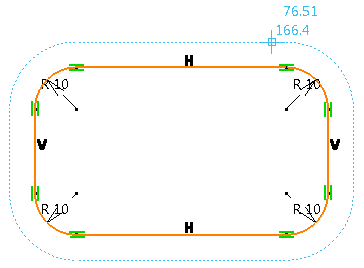
Offset profile is previewed in dotted lines -
Enter the required value of offset in the Sketch Tools. You can also move the cursor in the work area to achieve the required offset.
The offset of the profile is created and the distance between the base profile and the offset profile is displayed. This ensures the parallelism of the two profiles.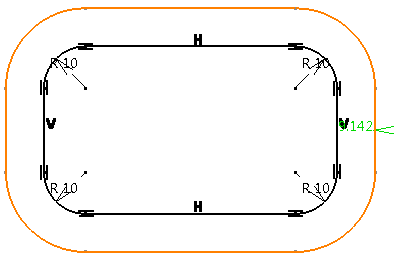
The profile offset constraint is displayed You can create an offset to the profile only if the following conditions are met: - The topology of both profiles is identical.
- Both profiles have same number, type, and arrangement of geometries.
- Both profiles contain simple geometries like arcs, circles, and lines that are not self intersecting and are mono-domain.
-
Select the profile and move one of the geometries profiles.
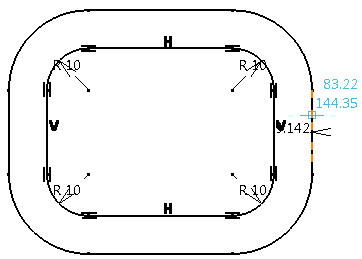
A parallelism at a given distance is maintained between the two profiles during the move.
-
Double-click the offset value in the 3D area to open the Parameter Definition dialog box or double-click the Profile Offset node in the tree to open the Profile Offset Definition dialog box and change the offset value.
The global offset value is changed. The offset value between all the elements is changed uniformly.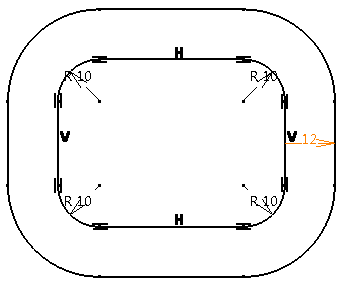
Change in global offset value -
Change the local offset value:
- Double-click the Profile Offset node in the tree to open the Profile Offset Definition dialog box and click More.
- Select the pair of geometrical elements in the list for which you want to locally change the offset.
- Select the Local check box below the list and enter the required offset value.
The local offset value is changed without disturbing other geometrical elements. You can also have positive and negative local offset. 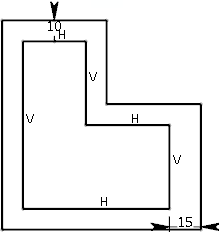
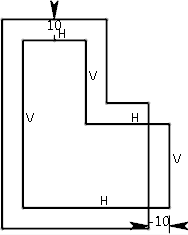
Positive offset Negative offset -
Break, trim, chamfer, corner, or remove one or more elements in the base or offset profile.
Only the modified element is modified or removed. The rest of the profile remains consistent. The profile offset constraint is active. If you remove all the elements of either base or offset profile, the profile offset constraint is broken and is removed. -
Select all the geometries of both profiles and perform copy paste operation.
The profile offset constraint is copied and pasted.
