- From the free edge
- From a planar section.

-
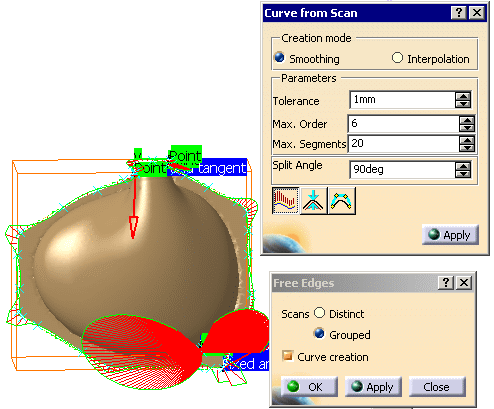
Click Free Edges
 in the Scan Creation toolbar and select Flip Edge.1.
In the Free Edges dialog box, select the Curve creation check box.
This opens a new dialog box: Curve from Scans.
In this dialog box change the Split Angle value to 30 and click Curvature Analysis .
.
-
Click OK in the Free Edges dialog box to create the curves and exit the action.
The curves are created in the specification tree.

- If you modify an option or a parameter, click Apply in the corresponding dialog box to take the modification into account.
- If you select the Curve creation check box, you will create only curves (no scans).
- If you clear the Curve creation check box, you will create only scans (no curves).

-
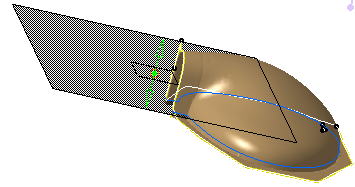
Click Planar Section
 in the Scan Creation toolbar and select Flip Edge.1.
-
Use the arrow to move the sectioning plane at the level of the seam between the rounded area and the flat area.
-
In the Planar Sections dialog box, click Flip to curve creation
 .
.
This opens the Curve from Scans dialog box. In this box click Curvature Analysis.
-
Click Apply in the Planar Sections dialog box and OK to validate the creation of the curves and exit the action.
The curves are created in the specification tree.