
Broken views are used to shorten elongated objects.


-
Click Broken View
 in the Views toolbar (Break view sub-toolbar).
 -
Click a first point corresponding to the first extremity of the first profile in the view.
A green dotted profile appears which allows you to position the profile either vertically or horizontally.
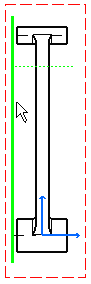
-
Click a second point corresponding to the profile second extremity. In this example, click a point so that the profile appears horizontally.
OR
Move the cursor over the green horizontal profile that appears as you create a first point and, click to locate the second point on this first profile.
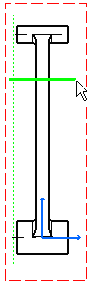
-
Translate the profile (green horizontal profile in this case).
Red zones appear. These red zones correspond to the zones out of which the view cannot be broken.
Note that the orientation of the second profile is the same as the orientation of the first profile.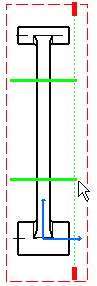
-
Click a point to define the position of the second green profile that appears.
-
Click on the sheet.
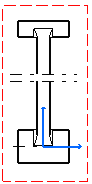
More on Broken Views
Miscellaneous
- You can create new breaks in a broken view, but in the same direction and providing the two breaks do not overlap.
- You can remove existing breaks by right-clicking the callout and selecting Callout (Broken View).1 object > Unbreak.
- It is impossible to create breakout views, quick detail views, and clipping views from a broken view.
- It is possible to create detail views
in a broken view.
For more information about creating details views from broken views, refer to Creating a Detail View / Detail View Profile.
Propagating a broken specification
To propagate the broken specification during the creation of a projection or auxiliary view, go to Tools > Options > Mechanical Design > Drafting > Layout tab, and activate the Propagation of broken and breakout specifications option.
 |
Broken views are not propagated to detail views. |
Propagating a specification means generating a view (B) from another view (A) on which you previously performed an operation, and obtaining a view (B) which includes this operation.
For example,
|
You can only perform a propagation from a broken view if the projection direction is perpendicular to the direction of the broken view.
About line types
You can assign a line type to the view to be generated. To do this, go to Tools > Options > Mechanical Design > Drafting > View tab, click the Configure button next to View linetype and select the desired option from the dialog box.
