
Using Simplified Representations
An example of importing a simplified representation named SIMPREP1 is shown below.
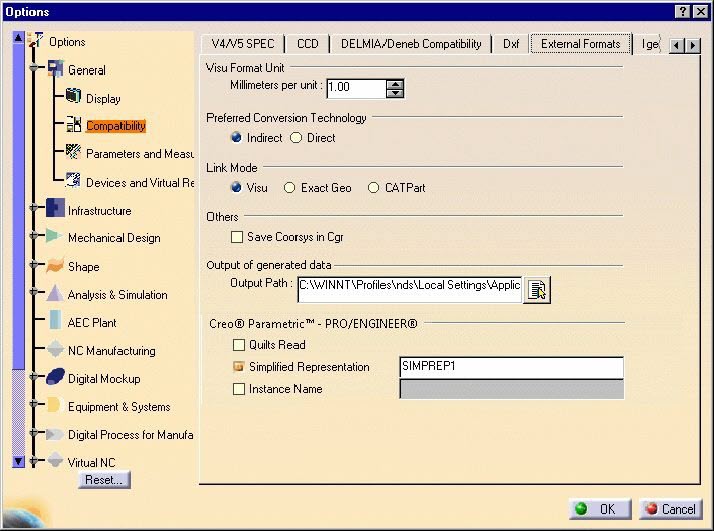 |
In such an import, only the indicated simplified assembly would be converted during the assembly import. If no name is supplied for a simplified representation or a non-existent simplified representation name is indicated, then the simplified representation mode of import will be ignored and the complete assembly import will be performed.

Limitations
- Currently only assembly/sub-assembly level simplified representations are addressed. Part level simplified assemblies, when present, are not taken into account and the master representation will be converted in such cases.
- Not available in CATPart mode.
- The product structure tree will look different compared to the original assembly tree in Creo® Parametric™ or PRO/ENGINEER®.
- Simplified Representations other than Include or Exclude are not supported.
- The name of the Simplified Representation must be entered in Upper case in the settings panel, as shown above.
Using Instance Name
In order to import a specific instance (named INST1 for example) the name retrieved from Creo® Parametric™ or PRO/ENGINEER® should be put in the Instance Name field in Tools -> Options prior to the batch or interactive conversion.