
- Please note that all MULTICAx Plug-ins are on a dedicated media. You need this media to install them.
- Never modify data generated in V5: information could be lost and the MULTICAD Update could result in incorrect results.
- Part Number must be unique, all parts with the same name are considered as identical.
- On Windows, make sure the files to translate are not encrypted: push
the Advanced button in the Properties dialog box of the file
and uncheck the Encrypt contents to secure data option.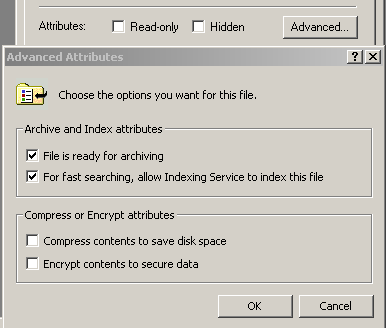
The MULTICAx Pro/Engineer PD Plug-in allow users to import Creo® Parametric™ or PRO/ENGINEER® native parts and assembly models into V5. Part geometry is converted into the CATIA Graphical Representation (CGR) or V5 Part (CATPart) format, while assembly files are imported into a V5 product structure document (CATProduct).
You may perform this import either:
- Interactively (for all V5 platforms)
- From a command line (all V5 platforms except 3d com)
General information
- Converted surfaces may be in the form of:
- Creo® Parametric™ or PRO/ENGINEER® solid surfaces
- Surfaces imported from formats such as IGES or the quilt set of surfaces
(which are imported based on a user-indicated option in case of cgr conversion).
- Native Creo® Parametric™ or PRO/ENGINEER® parts and assemblies can be interactively imported.
- V5 data (CATProduct, CGR, and CATPart files) generated through the command line can be interactively imported as well.
- The assembly import converts the Creo® Parametric™ or PRO/ENGINEER® assembly hierarchy into product structure, along with the proper positions.
- Simplified Representations and Part Instances, when present, may be optionally imported.
- No attributes of the assembly other than hierarchy, positions, and colors of the geometry are addressed in assembly import.
- Creo® Parametric™ or PRO/ENGINEER® part files must have a .prt.* extension (with or without the version number). With the version number, the extension must be .prt.n, n being a numerical value.
- Creo® Parametric™ or PRO/ENGINEER® assembly files must have a .asm.* extension (with or without the version number). With the version number, the extension must be .asm.n, n being a numerical value.
- A product structure document (either new or previously created) must be visible to import data interactively.
When importing part geometry, MULTICAx PD Plug-in converts all solid bodies belonging to visible layers in the Creo® Parametric™ or PRO/ENGINEER® part into the CGR-faceted form, with user-specified tessellation parameters. In addition, parts can optionally be imported in the CATPart data format, with full support for exact geometry. Coordinate systems can also be retrieved in the generated CGR and CATPart files. Any part user attributes defined in the original part are stored in the CATProduct or CATPart document.
Batch Conversion
The batch conversion directly generates CATProduct documents for imported assemblies, and CGR or CATPart files for parts.
Protocols and attributes
The following protocols or attributes apply to batch conversions:
- Length units for both parts and assemblies are converted to millimeters.
- Assembly-level colors and other features are not supported.
- Pure wire frame data and coorsys are not supported during the conversion.
- Text and annotations are not supported.
- Parts and sub-assemblies residing in invisible layers will not be converted.
- Cable elements are not supported.
Direct mode
- MULTICAx ProE currently supports PRO/ENGINEER® files up to versions Wildfire 5 and Creo® Parametric™ 1.0-4.0.
- Windows 64 bits OS is supported.
This program has the following limitations:
- No support for drawing import.
- Support of Part instances and simplified representation requires .xpr and .xas files to be present.
- Support of Part instances requires .xpr and .xas files to be in the same directory as the Creo® Parametric™ or PRO/ENGINEER® file.
- Instance name must be in uppercase in the Tools/Option/General/Compatibility tab (as it is in Creo® Parametric™ or PRO/ENGINEER®).
Licensing requirements
| CAD Format | Part | Assembly | Drafting support | Foreign CAD license required |
File Extension | V5 License |
|
PRO/ENGINEER®
R16, 2001, Wildfire 1-5, Creo® Parametric™ 1.0-5.0 |
OK | OK | KO | No | .asm, .prt | PDL |
| VDA-FS | OK | N/A | N/A | No | .vda | (**) |
PDL, DAL, DEL, DSL, UDL.