

- Please note that all MULTICAx Plug-ins are on a dedicated media. You need this media to install them.
- Never modify data generated in V5: information could be lost and the MULTICAD Update could result in incorrect results.
- Part Number must be unique, all parts with the same name are considered as identical.
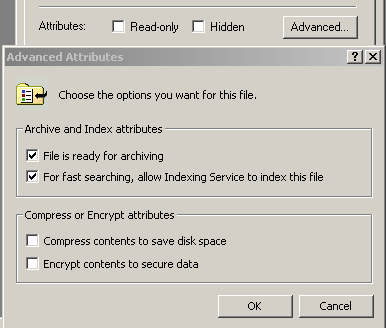
- On Windows, make sure the files to translate are not encrypted: push
the Advanced button in the Properties dialog box of the file
and uncheck the Encrypt contents to secure data option.
- The MULTICAx IGES Plug-in allows you to import IGES native data (part
models).
This import converts IGES part geometry into the CATIA Graphical Representation (CGR) or CATPart formats, which renders it readable by V5. - You can perform this import interactively or from the command line.
- Windows 64 bits OS is supported.
- Aix 64 bits OS is supported.
Protocols and attributes
For conversions, the following protocols or attributes apply:
- The IGES part files must have the .igs extension
- see the IGES import section in the Data Exchange Interfaces User's Guide documentation for more information.
Licensing requirements
*.igs extension is not natively supported in V5, therefore, the licenses DGL (ENOVIA PORTAL, CATIA) or MGP (DELMIA) are required to access this extension.