
Product Simplification and Merging retrieves the list of product instances that are children of the selected product,
and that are entirely or partially visible from the outside.
The retrieved products are tessellated and placed into one single representation, which is visualized as the final result.
This representation contains no intellectual properties but keeps the color and graphic properties of the input products.

- To avoid the transfer of integrity errors in data, and to improve the
filtering performances,
we recommend that you use CATDUA V5 and make sure the data are up-to-date before performing any simplification and merge. - If a memory error or a memory warning occurs, or if the input document is corrupted, the output part will be empty or partial.
- If the geometry to filter is not up-to-date, the result will not be coherent.

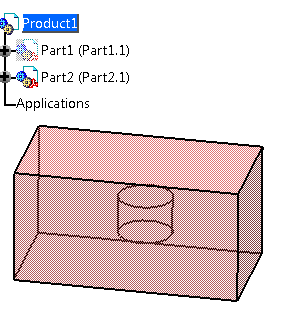
It contains a pad with a hidden cylinder inside the pad.
The pad properties have been overloaded with color and transparency.

-
Click Product Simplification and Merging
 .
.
-
Select a node in the product structure.
Only the selected node and the elements it contains are processed.
The position of the geometries, the visibility and the colors transferred are those of the reference of the selected node. -
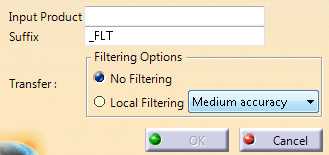
If required, edit the proposed suffix.
-
Select a filtering option.
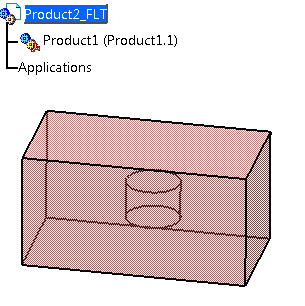
- No Filtering transfers a CGR
representation of all visible and invisible geometries into
the resulting product.
Only this CGR representation is kept.
- Local Filtering transfers a CGR
representation of only the visible geometries into the
resulting product.
Only this CGR representation is kept.
A representation that is not visible from 14 view points is considered as hidden, and thus removed from the result.
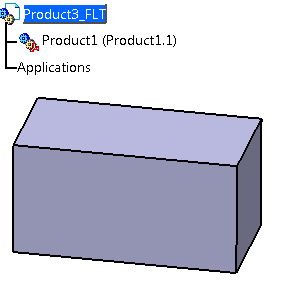
If you make the pad transparent, you see that it is empty.
For Local Filtering, you can set the accuracy level (Low, Medium, High and Very High, Medium being the default one).
Depending on the complexity of the assembly, and the accuracy level, some small elements may be left out during simplification.
This does not affect the result, since Product Simplification and Merging aims at providing a global shape, not at retrieving all details.
- No Filtering transfers a CGR
representation of all visible and invisible geometries into
the resulting product.
Validate.
The original CATProduct is untouched.
One separated CATProduct is created. It contains a sub-product, to which the CGR representation is associated.
The CGR data are saved under...\AppData\Local\DassaultSystemes\CATTemp\.
Do not delete these data, or save the CGR to another directory and rebuild the link to the product manually.
