
| Shown geometry Graphic attributes Axis system Naming |
always kept |
| Product properties | optional |
| Colors and attributes on subelements | optional |
| 2D Layout for 3D Design data | optional |
| Publications | optional |
| Selection sets | optional |
| Annotations | optional |
| Keep only Wireframe features ... | optional |
| Layers and filter definitions | optional |
| Specifications of sketches | optional |
Any data other than the ones described above are removed in the newly
created CATPart.
Note that the In Work Object in the result part is always the PartBody.
In this task, you will find:
- A simple example,
- The description of the standard behavior.

- To avoid the transfer of integrity errors in data, and to improve the
filtering performances,
we recommend that you use CATDUA V5 and make sure the data are up-to-date before performing any Product Data Filtering. - If a memory error or a memory warning occurs, or if the input document is corrupted, the output part will be empty or partial.
- If the geometry to filter is not up-to-date, the result will not be coherent.

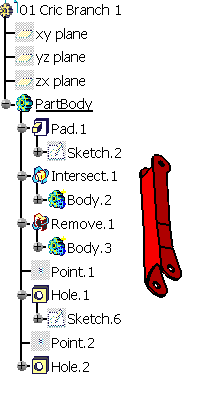

-
Click Part to Part
 .
The dialog box is displayed.
.
The dialog box is displayed. 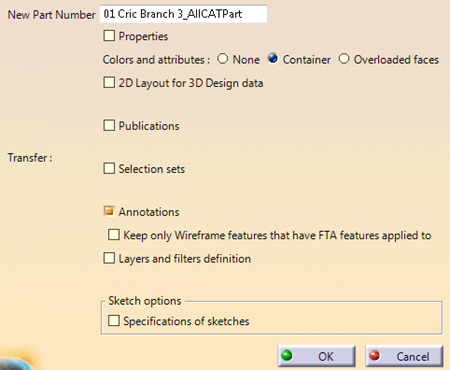
-
Click OK. A progress bar is displayed while 01 CRIC_BRANCH_1_AllCATPart is created.
It looks like this: 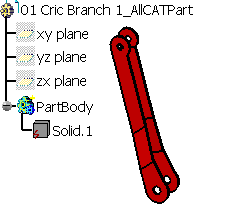

Standard behavior
- A CATPart is created. Its default name is "PartNumber_of_Original_CATPart"_AllCATPart and can be edited.
- Starting with R21, an empty default PartBody is no longer created.
- When a visible geometry is found in a body of the original CATPart, a body with the same name is created in the resulting CATPart.
- The geometries found in the original CATPart are transferred as solids, surfaces or wireframes (as datums) and placed in the corresponding bodies in the resulting CATPart.
- Masks found in the original CATPart are transferred.
- 3D working support based on the main planes found in the original CATPart are transferred. Other types of working support are not transferred.
- The solids are created with the graphic properties (color, line type, line thickness, transparency) of their original body, the surfaces and wireframes are created with the graphic properties of their original feature.
- The layer attribute on each element of the original CATPart is always kept.
- Current filter and layer of the original CATPart are not kept in the resulting CATPart.
- The current filter of the original CATPart is not taken into account: Part to Part considers the filter All visible is active.
- An option in the 3D Shape Infrastructure Settings enables hybrid design inside part bodies and bodies. Product Data Filtering does not take the status of this option into account: The structure is always copied with the same types, without transformation nor re-ordering.
Options
You can select several options to transfer some elements that are not
transferred in the standard behavior.
For more information, see the Part to Part Options chapter.
